
Ai Overview
Feeling confused between AI Copilot and Microsoft Copilot? In the AI Copilot vs Microsoft Copilot comparison, the surface-level differences in features and pricing matter, but the deeper difference is about ownership, control, and specificity. In 2026, Microsoft Copilot for Microsoft 365 is priced at approximately $30 per user per month on top of an existing Microsoft 365 subscription. For an organization with 100 users, that is $3,000 per month or $36,000 annually.
Key Takeaways
- ›In the AI Copilot vs Microsoft Copilot debate, the key distinction is that Microsoft Copilot is a fixed commercial product while a custom AI Copilot is purpose-built for your specific business workflows.
- ›Microsoft Copilot works exclusively within the Microsoft 365 ecosystem, while a custom AI Copilot integrates with any business tool, platform, or data source your team uses daily.
- ›Custom AI Copilot solutions trained on your proprietary business data consistently outperform generic AI Copilot vs Microsoft Copilot options in domain-specific accuracy and retrieval quality.
- ›Organizations in regulated industries in the UAE and India should evaluate data residency and compliance implications carefully before choosing between AI Copilot vs Microsoft Copilot platforms.
- ›Microsoft Copilot suits organizations already deeply committed to Microsoft 365 who need productivity assistance within that ecosystem without requiring custom architecture or specialized domain knowledge.
- ›Custom AI Copilot solutions offer far greater control over model choice, data handling, security architecture, and integration depth than any commercial off-the-shelf platform can provide.
- ›In the AI Copilot vs Microsoft Copilot cost comparison, Microsoft Copilot has a simpler pricing model while custom AI Copilot has higher upfront investment but typically superior long-term ROI.
- ›For enterprises with complex workflows, proprietary knowledge, and multi-system environments, custom AI Copilot consistently delivers higher adoption rates and measurable productivity returns than Microsoft Copilot.
- ›The AI Copilot vs Microsoft Copilot choice is not permanently binary; many enterprises start with Microsoft Copilot and migrate to custom AI Copilot as their requirements and AI maturity grow.
- ›Understanding which option fits your organization requires honest assessment of your ecosystem dependency, customization needs, compliance requirements, and long-term AI strategy ambition.
AI Copilot vs Microsoft Copilot: What You Need to Know First?
Feeling confused between AI Copilot and Microsoft Copilot? You’re not alone. The names sound similar, which is why many people assume they’re the same thing. In reality, they’re quite different. Think of AI Copilot as a general term for AI assistants that can be used across various tools and platforms where as Microsoft Copilot, is Microsoft’s own AI assistant built specifically for apps like Word, Excel, Outlook, Teams, and Windows.
Microsoft Copilot is a specific, branded AI product created by Microsoft. It is deeply embedded in the Microsoft 365 product suite and designed to work with the tools Microsoft already sells, including Word, Excel, Teams, Outlook, and SharePoint. Its intelligence comes from large language models combined with your Microsoft 365 data. It is a ready-to-use product that you subscribe to and switch on. A custom AI Copilot vs Microsoft Copilot debate is really a question of scope: are you choosing a platform-bound commercial tool, or a purpose-built intelligent assistant designed for your specific business needs?
A custom AI Copilot, by contrast, refers to an AI assistant system built from the ground up around your organization’s specific workflows, data sources, tools, and compliance requirements. It uses foundation models as a starting point but is configured, integrated, and trained to serve your particular business context. It is not a product you subscribe to; it is a system you build and own. The core concept of an artificial intelligence Copilot refers to any AI-powered assistant that works alongside people to help them complete tasks more effectively. Microsoft Copilot is one specific commercial product that uses this concept within the Microsoft ecosystem.
What exactly is an AI Copilot?
AI Copilot is a broad term used for AI assistants that help people complete tasks, automate work, and improve productivity across different software, platforms, and industries. These AI copilots can be developed by various companies and built into a wide range of business tools. Microsoft Copilot, on the other hand, is Microsoft’s own AI assistant designed specifically for products like Word, Excel, Outlook, Teams, and Windows.
What makes a custom AI Copilot distinctive is its specificity. It is built with your business’s data at its core. A law firm’s AI Copilot knows your case law library, your document templates, and your billing codes. A hospital’s AI Copilot knows your clinical protocols, your formulary, and your patient documentation standards. A logistics company’s AI Copilot knows your carrier contracts, your rate tables, and your routing rules. This specificity is what generates the accuracy and usefulness that generic tools cannot match.
Custom AI Copilot systems integrate with any tool your organization uses, not just one vendor’s ecosystem. They connect to CRMs, ERPs, industry platforms, legacy systems, and proprietary databases. They operate within whatever security and compliance architecture your industry requires. And they improve over time as they accumulate interaction data specific to your business context.
What is Microsoft Copilot?
Microsoft Copilot is an AI assistant integrated into the Microsoft 365 suite of products. It uses large language models, primarily from Microsoft’s partnership with OpenAI, combined with the data stored in your Microsoft 365 environment, such as your emails, documents, Teams conversations, and SharePoint files, to provide AI assistance within those applications.
Microsoft Copilot can help you draft emails in Outlook, summarize Teams meetings, create PowerPoint presentations from prompts, analyze data in Excel, and search across your Microsoft 365 content in natural language. For organizations deeply invested in the Microsoft ecosystem, it is a straightforward way to add AI capability to tools they already use daily.
The key constraint of Microsoft Copilot is its boundary. It operates within the Microsoft world. It cannot natively connect to your Salesforce CRM, your proprietary industry platform, your non-Microsoft document management system, or your custom internal databases. Its knowledge base is your Microsoft 365 data, not the full breadth of your organization’s knowledge assets. This boundary suits some organizations well and is a significant limitation for others.
AI Copilot vs Microsoft Copilot Quick Comparison
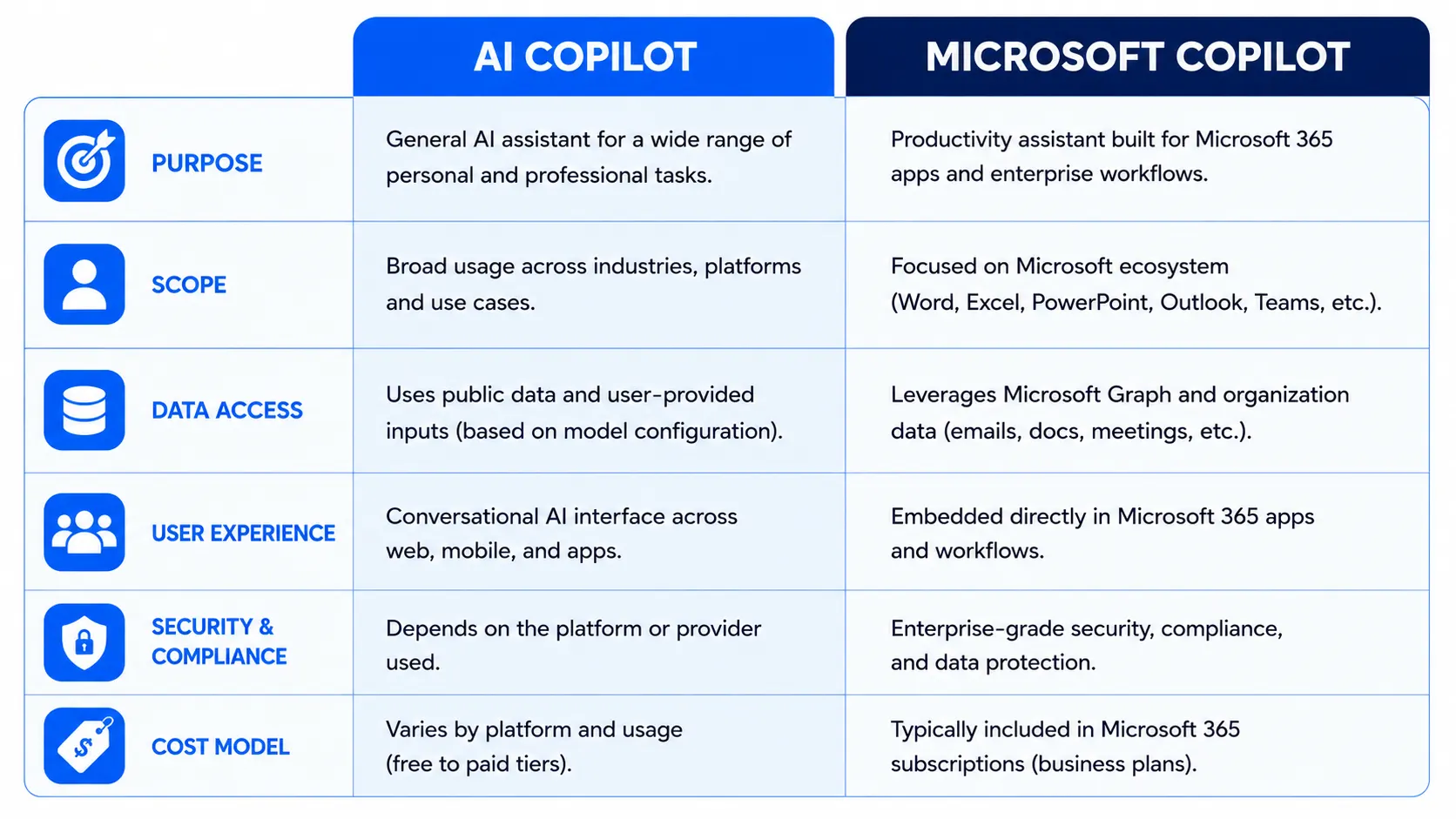
What Really Sets These Copilots Apart?
In the AI Copilot vs Microsoft Copilot comparison, the surface-level differences in features and pricing matter, but the deeper difference is about ownership, control, and specificity.
Microsoft Copilot is designed for breadth. It works reasonably well across a wide range of standard Microsoft productivity tasks. But “reasonably well across standard tasks” is not the same as “exceptional at your specific business workflows.” A financial analyst in Dubai who needs the AI to understand specific regulatory frameworks, proprietary investment models, and internal research databases will find Microsoft Copilot helpful for generic tasks but limited where specialized accuracy matters most.
A custom AI Copilot is designed for depth. It is built to be exceptional at the specific tasks your team actually performs, informed by the specific knowledge your business actually has, and integrated with the specific tools your workflow actually uses. The depth advantage compounds over time as the system learns from real interactions within your business context.
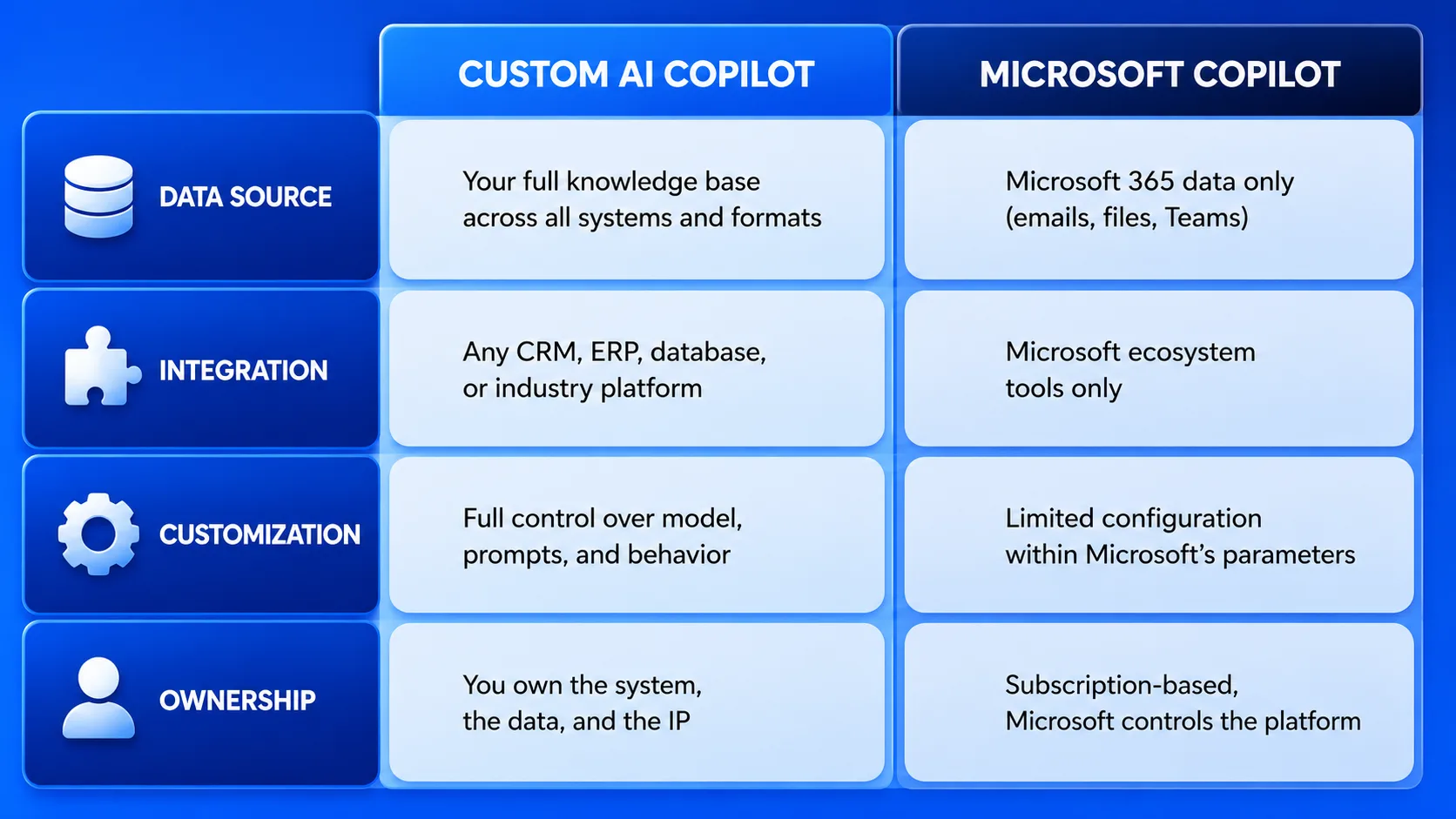
AI Copilot vs Microsoft Copilot Features Compared
Feature-by-Feature Breakdown: AI Copilot vs Microsoft Copilot
| Feature | Custom AI Copilot | Microsoft Copilot |
|---|---|---|
| Knowledge Base | All your business data across all systems | Microsoft 365 content only |
| Natural Language Search | Across all integrated systems and data sources | Within Microsoft 365 only |
| Content Generation | Any format, any application, custom to your brand | Microsoft Office documents and communications |
| Meeting Intelligence | Any platform with integration configured | Microsoft Teams meetings |
| Workflow Automation | Cross-system, custom workflow triggers and actions | Power Automate and Microsoft ecosystem |
| Domain Specialization | Deep domain training on your industry knowledge | General purpose, limited domain depth |
| Multilingual Support | Configurable multilingual with custom language priorities | Standard multilingual within Microsoft models |
Integration and Compatibility Differences
Integration capability is where the AI Copilot vs Microsoft Copilot difference is most consequential for most businesses. The question of what your AI assistant can connect to determines how useful it actually is in practice.
Microsoft Copilot connects natively to the Microsoft ecosystem. If your team uses Teams, Outlook, SharePoint, Word, Excel, and OneDrive, Microsoft Copilot will work smoothly within those tools. If your business runs on Salesforce, uses Jira for project management, stores critical data in an industry-specific platform, or relies on custom internal tools, Microsoft Copilot cannot access any of that without significant additional integration work that is often difficult or impossible within Microsoft’s architecture constraints.
A custom AI Copilot is built integration-first. It is designed to connect with whatever tools your business uses through APIs, database connectors, and custom integration pipelines. For a healthcare organization in India where the AI Copilot needs to access the hospital information system, the billing platform, the formulary database, and internal clinical protocols simultaneously, custom integration is not a luxury; it is the core requirement that makes the system actually useful in clinical workflows.
For businesses in the UAE operating across mixed technology environments, as many do in Dubai’s diverse enterprise landscape, the custom AI Copilot’s ability to bridge multiple vendor platforms in a single coherent intelligence layer is frequently the deciding factor in the AI Copilot vs Microsoft Copilot selection.
Security and Privacy Compared
Security is not a secondary concern when evaluating AI Copilot vs Microsoft Copilot. For any organization handling sensitive customer data, financial records, health information, or proprietary business knowledge, how your AI assistant handles data is a core selection criterion.
Microsoft Copilot operates within Microsoft’s security and compliance framework. For many organizations this is reassuring: Microsoft has established enterprise security certifications, data residency commitments for many regions, and compliance frameworks for regulated industries. The limitation is that you are bound by Microsoft’s security model. You cannot customize how data is handled beyond what Microsoft’s platform allows. If your compliance requirements are more specific than Microsoft’s framework accommodates, Microsoft Copilot may not be adequate.
With a custom AI Copilot, security architecture is designed from the ground up to meet your exact requirements. You choose where data is stored and processed. You design the access control model. You implement the audit logging and monitoring that your compliance framework requires. You decide which data the AI can and cannot access at a granular level. For organizations in regulated industries in India under DPDP, financial institutions in the UAE under DFSA oversight, or healthcare organizations in the US under HIPAA, this level of control over the security architecture is often non-negotiable.
How Much Does Each Copilot Cost?
Cost is one of the most practically important dimensions of the AI Copilot vs Microsoft Copilot decision, but it requires looking at the full picture rather than just the sticker price.
Microsoft Copilot has a straightforward subscription pricing model. In 2026, Microsoft Copilot for Microsoft 365 is priced at approximately $30 per user per month on top of an existing Microsoft 365 subscription. For an organization with 100 users, that is $3,000 per month or $36,000 annually. The pricing is predictable, the deployment timeline is short, and there are no upfront architecture costs. However, you are paying for general-purpose productivity assistance across Microsoft tools, not for specialized intelligence tailored to your specific workflows.
A custom AI Copilot has a higher upfront investment. Depending on scope, integration complexity, and data volume, a custom AI Copilot implementation typically costs between $40,000 and $200,000 for a mid-market organization. Ongoing operating costs including model API fees, hosting, and maintenance typically run 15 to 25 percent of the initial cost annually. The higher upfront investment is recovered through productivity returns that are significantly higher in specialized use cases than Microsoft Copilot can deliver for the same workflows. Most custom AI Copilot deployments achieve full payback within 6 to 12 months.
The total cost of ownership calculation over three years frequently favors custom AI Copilot for organizations with specific domain requirements, even accounting for the higher initial investment. AI Copilot vs Microsoft Copilot is a calculation worth doing carefully for your specific organizational context before defaulting to the lower-ticket Microsoft Copilot option.
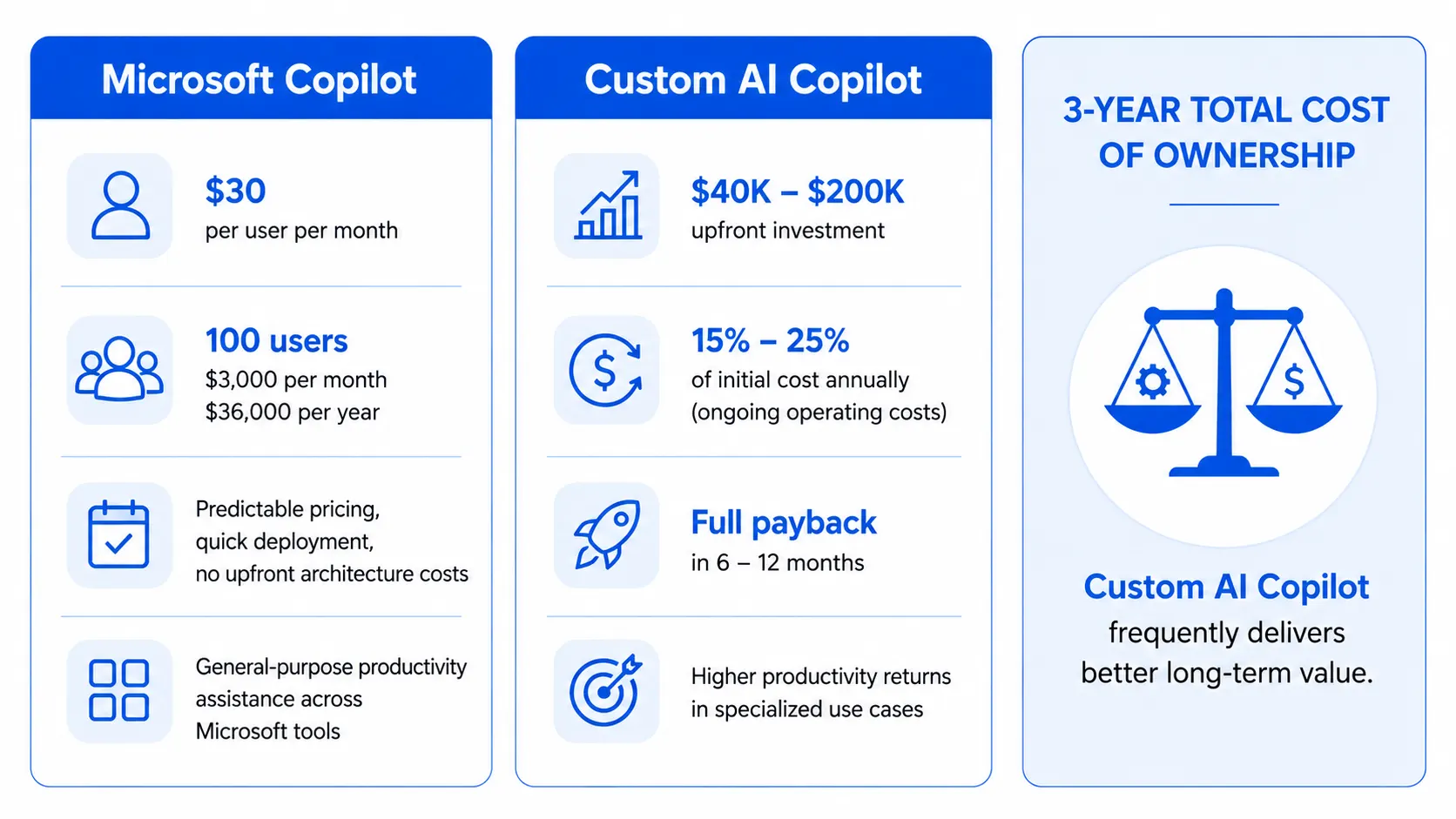
AI Copilot vs Microsoft Copilot Customization Compared
Customization is perhaps the starkest difference between the two options in the AI Copilot vs Microsoft Copilot comparison. It goes to the core of what each system is.
Microsoft Copilot is designed for broad usability, not deep customization. You can configure it to some degree within Microsoft’s framework, such as restricting what data it can access or using Copilot Studio to build simple extensions. But you cannot change the underlying model, modify the retrieval architecture, adjust how the system reasons about your specific domain, or fundamentally alter how it behaves beyond the parameters Microsoft provides. What you get is what Microsoft built.
A custom AI Copilot is entirely customizable because it is built from the ground up for your organization. You choose the foundation model. You design the retrieval and grounding strategy that connects the AI to your knowledge assets. You write the system prompts that define the AI’s behavior, tone, and boundaries. You configure the integration architecture that determines what systems the AI can access. You establish the security and access control model that fits your compliance requirements. Every layer of the system reflects decisions made specifically for your business.
For most organizations, the meaningful customization question is not whether they want it, but whether the specific customization they need is available through Microsoft Copilot or requires a custom build. If Microsoft Copilot’s configurability meets your requirements, the simpler path is justified. If it does not, building custom is the only way to get the AI behavior your business actually needs.
Who Should Use an AI Copilot?
A custom AI Copilot is the right choice when your organization has specific characteristics that a generic product cannot adequately serve.
Multi-Tool Organizations
Your team uses Salesforce, a custom ERP, industry platforms, and internal databases alongside or instead of Microsoft tools. A custom AI Copilot bridges all of these in a single intelligent interface that Microsoft Copilot simply cannot reach.
Regulated Industries
Financial services in Dubai, healthcare in India, legal services in the US: industries where data governance, auditability, and compliance control requirements exceed what Microsoft Copilot’s architecture permits organizations to configure independently.
Knowledge-Intensive Businesses
Organizations where the competitive advantage lives in proprietary knowledge, such as legal firms, research organizations, financial institutions, and specialized professional services. Custom AI Copilot turns that knowledge into a searchable, queryable asset that accelerates every professional interaction.
Who Should Use Microsoft Copilot?
Microsoft Copilot is genuinely the right choice for some organizations. It is not the right choice for every organization, but it is not a poor product; it is a product with a specific fit profile.
Organizations for whom Microsoft Copilot makes clear sense are those that are deeply invested in the Microsoft 365 ecosystem across their entire operation, whose primary AI assistance needs are for standard productivity tasks within Microsoft applications, whose compliance requirements are fully met by Microsoft’s enterprise security framework, and who want to add AI capability quickly without the investment and timeline of a custom build. A 50-person professional services firm that lives in Outlook, Teams, Word, and Excel and needs help drafting client communications, summarizing meeting notes, and searching internal documents will find Microsoft Copilot genuinely useful and appropriately priced.
The critical honest assessment is whether your “primary AI assistance needs” truly match what Microsoft Copilot delivers. Many organizations discover after deployment that the use cases where they most need AI assistance are precisely the ones that Microsoft Copilot cannot fully serve, because those use cases require access to data and systems outside the Microsoft ecosystem.
AI Copilot vs Microsoft Copilot: Which Should You Choose?
The honest answer to the AI Copilot vs Microsoft Copilot question is that it depends on your organization’s specific situation, not on which product has better marketing. Here is the practical decision framework we use with enterprise clients across the US, UAE, and India:
AI Copilot vs Microsoft Copilot: Decision Framework
| Your Situation | Recommended Choice | Reason |
|---|---|---|
| Fully committed to Microsoft 365, standard productivity needs | Microsoft Copilot | Fast deployment, predictable cost, ecosystem alignment |
| Multi-system environment with non-Microsoft core tools | Custom AI Copilot | Microsoft Copilot cannot access your critical systems |
| Regulated industry with specific compliance requirements | Custom AI Copilot | Full security architecture control required |
| Large volume of proprietary domain knowledge to leverage | Custom AI Copilot | Domain-specific retrieval and accuracy required |
| SMB wanting quick AI deployment with limited IT resources | Microsoft Copilot | Lower complexity, simpler IT overhead |
| Enterprise with long-term AI strategy and data advantage goals | Custom AI Copilot | Proprietary data advantage compounds over time |
One practical path that we see work well for larger organizations is a sequential approach: start with Microsoft Copilot to build organizational familiarity with AI assistance and generate internal demand for more capable AI tools, then invest in custom AI Copilot for the high-value, high-specificity use cases where Microsoft Copilot’s limitations become visible. This sequence avoids forcing an all-or-nothing decision before the organization is ready.
The Right Choice Depends on Your Specific Business
The AI Copilot vs Microsoft Copilot comparison ultimately comes down to a simple question: does Microsoft Copilot’s functionality and data access scope match the workflows where you most need AI assistance? If yes, it is a cost-effective, fast-to-deploy option. If the workflows where you most need AI help require knowledge assets, system integrations, or compliance architectures that Microsoft Copilot cannot accommodate, a custom AI Copilot is the investment that delivers genuine competitive advantage.
After eight years of deploying AI systems for enterprises across India, UAE, and the US, our consistent observation is that the organizations most satisfied with their AI Copilot investment are those that chose the model that matched their actual operational reality rather than the option that was easiest to justify to procurement. Take the time to assess your real requirements honestly before making the call.
Let Us Help You Choose and Build the Right AI Copilot
We assess your requirements and build AI Copilot solutions that fit your exact business, compliance, and integration needs across US, UAE, and India.
Frequently Asked Questions
Q1.1. What is the main difference between AI Copilot vs Microsoft Copilot?
AI Copilot vs Microsoft Copilot differs mainly in scope. AI Copilot is a general term for AI assistants across platforms, while Microsoft Copilot is Microsoft’s specific AI assistant for its products and services.
Q2.2. Which is better in AI Copilot vs Microsoft Copilot?
There is no universal winner in AI Copilot vs Microsoft Copilot. The best choice depends on your business needs, software ecosystem, budget, and desired level of integration.
Q3.3. Can AI Copilot work outside the Microsoft ecosystem?
Yes. One key difference in AI Copilot vs Microsoft Copilot is that many AI copilots can work across multiple platforms, whereas Microsoft Copilot is optimized for Microsoft products.
Q4.4. Does Microsoft Copilot require Microsoft 365?
For full functionality, Microsoft Copilot often works best with Microsoft 365. In AI Copilot vs Microsoft Copilot, many other AI copilots offer flexibility without Microsoft-specific dependencies.
Q5.5. Is AI Copilot more flexible than Microsoft Copilot?
In many cases, yes. AI Copilot vs Microsoft Copilot often comes down to flexibility versus integration. General AI copilots may support broader customization and third-party platforms.
Q6.6. Which option is better for small businesses?
In AI Copilot vs Microsoft Copilot, small businesses using diverse software may prefer AI copilots, while businesses already using Microsoft 365 may benefit from Microsoft Copilot.
Q7.7. Can both tools generate content and automate tasks?
Yes. In AI Copilot vs Microsoft Copilot, both can generate content, summarize information, answer questions, and automate routine tasks to improve productivity.
Q8.8. Which option offers better security?
Security depends on the provider. In AI Copilot vs Microsoft Copilot, Microsoft Copilot benefits from Microsoft’s enterprise-grade security, compliance, and governance capabilities.
Q9.9. Can developers use both AI Copilot and Microsoft Copilot?
Yes. AI Copilot vs Microsoft Copilot is relevant for developers because both can assist with coding, documentation, debugging, and workflow automation depending on the platform.
Q10.10. Who should choose an AI Copilot instead of Microsoft Copilot?
In AI Copilot vs Microsoft Copilot, organizations using multiple software platforms or requiring custom AI solutions may find a general AI copilot better suited to their needs.
Explore Services
Related Services
Reviewed by

Aman Vaths
Founder of Nadcab Labs
Aman Vaths is the Founder & CTO of Nadcab Labs, a global digital engineering company delivering enterprise-grade solutions across AI, Web3, Blockchain, Big Data, Cloud, Cybersecurity, and Modern Application Development. With deep technical leadership and product innovation experience, Aman has positioned Nadcab Labs as one of the most advanced engineering companies driving the next era of intelligent, secure, and scalable software systems. Under his leadership, Nadcab Labs has built 2,000+ global projects across sectors including fintech, banking, healthcare, real estate, logistics, gaming, manufacturing, and next-generation DePIN networks. Aman’s strength lies in architecting high-performance systems, end-to-end platform engineering, and designing enterprise solutions that operate at global scale.