Ai Overview
A Vector Database is a specialized data storage and retrieval system designed to store, index, and search high-dimensional numerical representations of data called vectors. Unlike traditional relational databases that retrieve records through exact matches and structured query languages, a vector database retrieves data by measuring mathematical similarity between vectors in a high-dimensional space.
Key Takeaways
- A Vector Database stores data as high-dimensional numerical vectors, enabling AI Copilot to find semantically similar content rather than relying on exact keyword matches.
- Embedding models convert raw text, documents, and data into vector representations that capture deep semantic meaning essential for intelligent AI Copilot search.
- Approximate Nearest Neighbour algorithms like HNSW and IVF allow vector databases to search billions of vectors in milliseconds, making real-time AI Copilot responses possible.
- Retrieval Augmented Generation pairs the Vector Database with an LLM to ground AI Copilot answers in real business data, eliminating hallucinations and improving accuracy significantly.
- Leading vector database platforms including Pinecone, Weaviate, Chroma, and pgvector each offer distinct trade-offs in scale, cost, and integration flexibility for enterprise deployments.
- The vector embedding pipeline transforms raw business documents into indexed, searchable semantic representations through chunking, encoding, and storage stages before search begins.
- Hybrid search combining vector similarity and keyword-based BM25 retrieval delivers consistently higher precision for AI Copilot search across enterprise knowledge bases.
- Metadata filtering in Vector Database queries enables AI Copilot to narrow results by department, date, access level, or document type before ranking by semantic similarity.
- Businesses in India, the UAE, and the US using properly configured vector databases in their AI Copilot report search accuracy improvements of 60 to 80 percent over keyword-only approaches.
- Performance optimization through caching, query batching, dimension reduction, and index tuning ensures Vector Database scalability as business knowledge bases grow over time.
What is a Vector Database?
A Vector Database is a specialized data storage and retrieval system designed to store, index, and search high-dimensional numerical representations of data called vectors. Unlike traditional relational databases that retrieve records through exact matches and structured query languages, a vector database retrieves data by measuring mathematical similarity between vectors in a high-dimensional space.
To understand why this matters, consider the difference between asking a traditional database “find all documents that contain the word ‘contract renewal'” versus asking a vector database “find all documents semantically related to the concept of contract renewal.” The first returns only documents with that exact phrase. The second returns documents about renewal policies, agreement extension processes, client retention strategies, and subscription management, even if none of them contain the specific phrase you typed. That is the power of semantic search enabled by a vector database.
The difference between an AI Copilot that gives genuinely useful, contextually accurate answers and one that produces generic, unreliable responses almost always comes down to a single infrastructure component: the Vector Database. Over the past eight years of designing and deploying AI-powered systems for organizations across the US, UAE, and India, we have seen firsthand how the presence or absence of a well-implemented vector database separates AI Copilot tools that transform business operations from those that frustrate users and get quietly abandoned.
In practical terms, a vector database stores each piece of content as a long numerical array, where each number encodes some aspect of meaning. A document about project timelines and a document about delivery schedules will have vectors that are mathematically close to each other, even if they share no common words. When an AI Copilot searches this database, it converts the user’s query into a vector and finds the stored content vectors that are geometrically nearest to it.
For enterprises in India managing large internal knowledge bases, for financial institutions in Dubai handling complex regulatory documents, and for technology companies across the US operating at scale with millions of customer interactions, the vector database is the critical infrastructure that makes intelligent AI Copilot search not just possible but practical.
The challenge is that most people do not understand what actually powers it. Traditional databases store and retrieve data through exact keyword matches and structured queries. They cannot understand that “quarterly revenue report” and “Q3 financial summary” mean the same thing. They cannot grasp context, nuance, or semantic similarity. Vector databases can. And in the context of an AI Copilot that needs to search through thousands of documents, policies, product descriptions, and historical records to find the most relevant answer in milliseconds, that capability is everything.
Why Does an AI Copilot Need Vector Database?
An AI Copilot without a vector database is like a highly intelligent person who has been locked in a room with no access to your business’s actual documents, history, or knowledge. The language model at the core of any AI Copilot has broad general knowledge from its training data, but it does not know your company’s specific policies, your clients’ histories, your internal procedures, or your proprietary product information unless that knowledge is made accessible through a retrieval system.
This is the fundamental problem that the vector database solves. When an AI Copilot is asked a business-specific question, it needs to search through potentially thousands of internal documents, database records, and knowledge base articles to find the most relevant information. It needs to do this in milliseconds. And it needs to understand the question contextually, not just literally. Only a vector database makes all three of these requirements achievable simultaneously.
Consider a common scenario: a support agent at a SaaS company in Bengaluru asks the AI Copilot, “What is our refund policy for annual plan customers who cancel in the first 30 days?” The company’s policy documents mention this under “subscription termination terms” and “early cancellation provisions,” not under “refund policy for annual plans.” A keyword search fails completely. A vector search finds the right document immediately because the semantic distance between the query vector and the document vector is small, regardless of the different terminology used.
Keyword Search vs Vector Database Search: The Gap That Matters
- Matches only exact words in the query
- Cannot understand synonyms or paraphrasing
- Returns many irrelevant results, misses relevant ones
- No understanding of intent or context
- Requires users to know exact terminology
- Understands meaning and semantic relationships
- Recognizes synonyms, paraphrases, and related concepts
- Retrieves the most contextually relevant results
- Captures intent across different query formulations
- Works with natural language from any user
How Vector Database Works in AI Copilot?
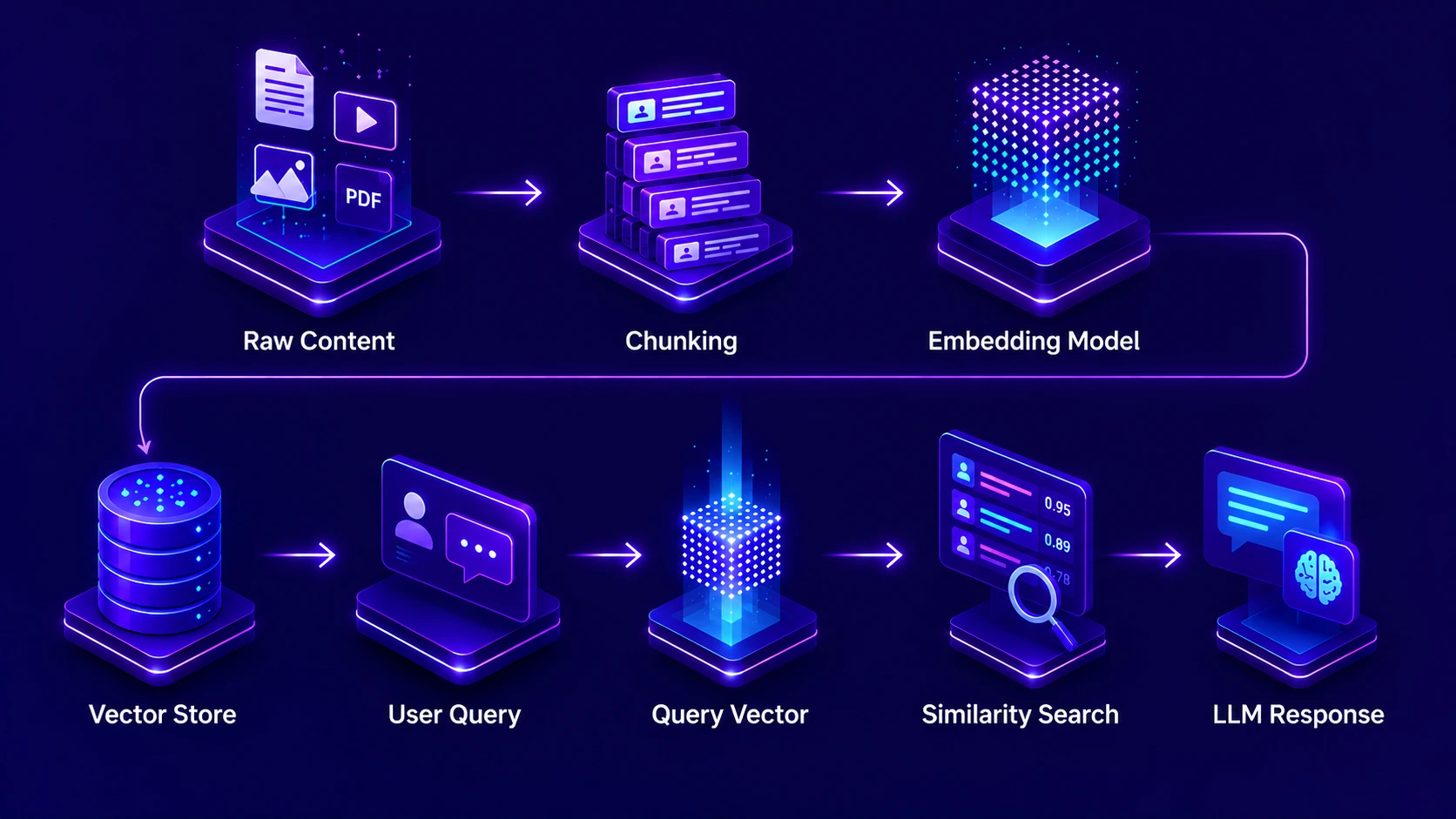
The working mechanism of a vector database inside an AI Copilot system follows a clear two-phase process: an offline indexing phase and an online retrieval phase. Understanding both phases is essential for anyone designing or evaluating an AI Copilot system for business use.
In the offline indexing phase, every piece of content that the AI Copilot should be able to search, such as policy documents, product manuals, past tickets, knowledge base articles, and client records, is processed through an embedding model. This model transforms each piece of content into a numerical vector. These vectors are then stored in the vector database along with metadata like document type, date, author, and access permissions. This phase happens before any user interacts with the system and is repeated whenever new content is added or existing content is updated.
In the online retrieval phase, when a user asks the AI Copilot a question, the same embedding model converts the query into a vector in real time. The vector database then performs a similarity search, finding the stored vectors that are closest to the query vector in mathematical terms. The top-k most similar chunks are retrieved and passed to the language model along with the user’s original question. The language model synthesizes a response grounded in these retrieved chunks. This entire online phase completes in under one second in a well-optimized system.
Key Technologies Inside Vector Database
A production-grade vector database is not a single technology; it is a carefully orchestrated combination of several specialized components working together. For engineering teams building AI Copilot systems, understanding these technologies helps make better infrastructure decisions. For business leaders, it clarifies what you are investing in and why it matters.
Embedding Models
Neural networks like text-embedding-3, E5, and BGE that convert text into dense numerical vectors. The choice of embedding model directly determines how well the vector database captures semantic meaning in your specific domain and language.
ANN Search Algorithms
Approximate Nearest Neighbour algorithms including HNSW (Hierarchical Navigable Small World) and IVF (Inverted File Index) enable ultra-fast similarity search by intelligently narrowing the search space rather than comparing every vector exhaustively.
Distance Metrics
Mathematical functions like cosine similarity, dot product, and Euclidean distance that measure how close two vectors are. Cosine similarity is the most common choice for text-based AI Copilot applications because it measures angular distance, which best captures semantic closeness.
Metadata Storage Layer
Alongside each vector, vector databases store structured metadata: document title, date, author, department, access level, and content type. This metadata enables powerful filtered queries that combine semantic similarity with structured constraints.
Reranking Systems
After the initial vector retrieval, reranking models apply a more computationally intensive but more precise relevance scoring to reorder the top results. This two-stage approach balances speed with accuracy in high-stakes AI Copilot retrieval tasks.
Vector Database Platforms
Purpose-built platforms including Pinecone, Weaviate, Chroma, Qdrant, Milvus, and pgvector each serve different deployment needs, from fully managed cloud services preferred by teams in the US and UAE to self-hosted solutions favoured in regulated environments in India.
Vector Embedding Pipeline in AI Copilot
The vector embedding pipeline is the process by which raw business content is transformed into searchable vector representations inside the vector database. This pipeline runs in the background, continuously keeping the AI Copilot’s knowledge base current and accurate. Understanding its stages helps you design a system that is both fast to build and reliable to maintain.
Raw documents, PDFs, web pages, database records, and structured files are collected from all connected data sources. They are cleaned, standardized, and stripped of formatting artefacts that would degrade the quality of downstream vector representations.
Large documents are split into smaller, semantically coherent chunks. Chunking strategy is one of the most impactful decisions in the embedding pipeline. Chunks that are too small lose context; chunks that are too large dilute the semantic signal. Typical chunk sizes range from 200 to 800 tokens, with overlap of 50 to 150 tokens to preserve context across boundaries.
Each chunk is passed through the embedding model, which outputs a vector of typically 768 to 3072 dimensions. The dimensionality depends on the model: more dimensions generally capture more nuance but require more storage and compute for similarity search operations.
Each vector is tagged with rich metadata before storage: source document, creation date, content type, department origin, access level, and topic tags. This metadata becomes the basis for filtered vector search, enabling access control and context-specific retrieval.
Vectors and their metadata are stored in the vector database and organized into an index structure optimized for similarity search. The index is built using algorithms like HNSW that enable approximate nearest neighbour search without comparing every stored vector against every query.
The quality of the embedding pipeline directly determines the quality of AI Copilot search results. We have seen organizations in India and the UAE invest heavily in their language model while neglecting the embedding pipeline, and the result is always the same: an AI Copilot that sounds intelligent but gives irrelevant answers. The pipeline is not infrastructure detail; it is a core quality driver.
How Vector Database Processes Queries?
Query processing in a vector database is a multi-stage operation that must balance speed and accuracy. When an AI Copilot receives a user’s question, the vector database processes it through a pipeline that transforms the natural language query into actionable retrieval results in milliseconds.
The process begins with query vectorization. The same embedding model used during the indexing phase converts the user’s query into a vector. Using the same model for both documents and queries is critical: if different models are used, the resulting vectors exist in different mathematical spaces and similarity search becomes meaningless.
Next, the vector database applies any pre-filtering based on metadata constraints. If the AI Copilot knows from context that the user is a member of the finance team in Dubai, it may automatically restrict the search to finance-related documents and those accessible to that role. This metadata pre-filtering dramatically reduces the search space before the expensive similarity computation begins.
The ANN algorithm then searches the index for the k nearest vectors to the query vector, returning ranked results along with their similarity scores and associated metadata. These top-k chunks are passed to the language model with the original query, where the model synthesizes a contextually grounded, accurate response.
Query Processing Performance: Vector Database in AI Copilot
Mechanism of Search in Vector Database
The search mechanism inside a vector database operates on principles borrowed from computational geometry and information retrieval theory. At its core, every search is a nearest neighbour problem in high-dimensional space: given a query vector, find the stored vectors that are closest to it.
Cosine similarity is the most widely used distance metric in text-based vector database search. It measures the cosine of the angle between two vectors rather than their absolute distance. This means two documents can be far apart in raw magnitude but still be recognized as semantically similar if they point in the same general direction in the vector space. For AI Copilot applications where documents range from short FAQ answers to lengthy technical reports, cosine similarity handles this variation more gracefully than Euclidean distance.
Modern vector databases implement three primary search modes that AI Copilot systems can leverage depending on the use case. Pure vector search retrieves results purely based on semantic similarity and is ideal for exploratory or conversational queries. Filtered vector search combines semantic similarity with metadata constraints and is ideal for role-specific or domain-specific queries. Hybrid search combines vector similarity with keyword matching through fusion algorithms and is ideal for queries that have both semantic and specific term requirements.
The hybrid search capability deserves particular attention. [1] Enterprises with large, heterogeneous knowledge bases often find that pure semantic search occasionally misses specific technical terms or product codes that keyword search would catch reliably. Hybrid search fuses both approaches, delivering the semantic richness of vector search with the precision of keyword search, typically outperforming either approach used in isolation.
Indexing Techniques in Vector Databases
The indexing technique used in a vector database determines its performance ceiling. Without proper indexing, a brute-force similarity search that compares every query vector against every stored vector becomes computationally infeasible at enterprise scale. A database with ten million vectors would require ten million distance calculations per query, which at any realistic query volume makes real-time AI Copilot response impossible.
Vector Database Indexing Techniques Compared
| Index Type | How It Works | Best For | Trade-off |
|---|---|---|---|
| HNSW | Builds a multi-layer graph where each node links to similar vectors at decreasing granularity | High-throughput, low-latency search with accuracy above 95% | High memory usage; index build time is slow for very large datasets |
| IVF (Inverted File) | Clusters vectors into groups; searches only the nearest clusters for a given query | Very large datasets where memory is constrained | Lower recall than HNSW; requires tuning cluster count for optimal results |
| PQ (Product Quantization) | Compresses vectors into shorter codes, reducing memory and enabling faster search | Billion-scale vector collections with memory budget constraints | Compression introduces small accuracy loss that may matter in precision-critical cases |
| Flat (Brute Force) | Compares query against every stored vector; returns exact nearest neighbours | Small datasets under 100,000 vectors where perfect accuracy is required | Does not scale; query time grows linearly with database size |
| DiskANN | Graph-based index that stores most data on disk rather than RAM, reducing infrastructure cost | Large-scale deployments in cost-sensitive environments | Slightly higher latency than pure in-memory HNSW due to disk access patterns |
For most enterprise AI Copilot deployments in markets like the US, UAE, and India, HNSW is the default recommendation because it provides the best balance of query speed and search accuracy for knowledge base sizes typically encountered in business settings, ranging from tens of thousands to tens of millions of vectors. As datasets grow into the billions, hybrid approaches combining IVF with PQ compression become necessary to maintain both cost efficiency and acceptable query latency.
Performance Optimization Techniques
A well-configured vector database can be the difference between an AI Copilot that responds in 400 milliseconds and one that takes three seconds. For teams handling hundreds or thousands of queries per hour, those milliseconds compound into a significant user experience and cost difference. Here are the performance optimization techniques that our team consistently applies when building production AI Copilot systems.
Vector Database Impact on AI Copilot Search
When a vector database is properly implemented as the retrieval backbone of an AI Copilot system, the measurable impact on search quality is substantial and immediate. Organizations across markets in India, the UAE, and the US consistently report the same pattern: AI Copilot search quality transforms from “marginally useful” to “genuinely indispensable” when the vector database infrastructure is properly built.
The first dimension of impact is relevance accuracy. When teams in Dubai’s financial sector moved from keyword-based document search to vector database-powered AI Copilot search, they reported an immediate jump in the percentage of queries that returned a directly usable answer in the first result. Users no longer need to rephrase queries, browse multiple results, or give up and search manually. The AI Copilot finds the right answer the first time, the majority of the time.
The second dimension of impact is query flexibility. With a vector database, users can interact with the AI Copilot entirely in natural language, using their own vocabulary and phrasing. This democratizes access to organizational knowledge, especially in multilingual environments like India where employees may mix languages or use regional business terminology. The vector database handles the semantic translation automatically.
Before and After Vector Database: AI Copilot Search Impact
| Search Dimension | Without Vector Database | With Vector Database |
|---|---|---|
| Query Understanding | Exact keyword matching only | Full semantic intent recognition |
| First-Result Accuracy | 20 to 35% usable first result | 75 to 90% usable first result |
| Cross-Language Search | Not possible without translation layer | Multilingual retrieval with multilingual embeddings |
| Hallucination Rate | High; LLM relies on training data | Low; answers grounded in retrieved business data |
| Access Control | Difficult to enforce at query level | Enforced via metadata filtering on every search |
| Knowledge Freshness | Static; requires full model retraining | Dynamic; new content indexed continuously via pipeline |
The third dimension of impact is hallucination reduction. Without a vector database, an AI Copilot that cannot find a specific answer in its training data tends to generate plausible-sounding but factually incorrect responses. With a vector database and RAG, the AI Copilot is constrained to synthesize answers from retrieved, real business content. This fundamentally changes the reliability profile of the system and is the reason why enterprise deployments in the US, UAE, and India universally prioritize RAG-based vector retrieval over pure model generation.
From the sales teams in Mumbai who can now instantly surface the right case study for a prospect query, to the compliance teams in Abu Dhabi who can query regulatory documents in seconds, to the engineering teams in San Francisco who can search through years of technical documentation with natural language, the vector database impact on AI Copilot search is not incremental. It is transformative. It is the difference between an AI assistant that impresses in a demo and one that earns trust through reliable, accurate performance every single day.
Vector Database is the Search Engine of AI Copilot
The intelligence of any AI Copilot is only as good as its ability to find the right information at the right moment. The Vector Database is the infrastructure that makes that possible: transforming raw business knowledge into a semantically searchable layer that the AI Copilot can query with speed, accuracy, and contextual understanding that no keyword search system can match.
Every architectural decision about the embedding pipeline, indexing technique, query processing strategy, and performance optimization directly shapes what your users experience when they ask the AI Copilot a question. After eight years of building these systems for organizations across India, the UAE, and the US, our recommendation is consistent: invest in your vector database infrastructure early, configure it thoughtfully, and your AI Copilot will deliver the kind of search accuracy that builds genuine user trust and lasting business value.
Power Your AI Copilot with Intelligent Vector Search
We architect and implement Vector Database infrastructure that makes your AI Copilot accurate, fast, and trustworthy at enterprise scale.
Frequently Asked Questions
Q1.1. What is a vector database used for in AI Copilot?
A vector database is used to store and manage embeddings generated from text, images, audio, or other data formats. In an AI Copilot system, it helps the model understand and retrieve information based on meaning rather than exact words.
.
Q2.2. Why does AI Copilot require a vector database?
AI Copilot requires a vector database because traditional databases are not designed for semantic understanding. Vector databases enable fast retrieval of contextually relevant information by comparing meaning-based representations of data.
Q3.3. How does a vector database work in AI Copilot?
A vector database works by first converting raw data into numerical embeddings using AI models. These embeddings are then stored as high-dimensional vectors in the database. When a query is received, it is also converted into a vector and compared with stored vectors using similarity metrics.
Q4.4. What technologies are used inside vector databases?
Vector databases rely on several advanced technologies to function efficiently. These include embedding models that convert data into vectors and similarity search algorithms that measure closeness between vectors.
Q5.5. How is vector embedding used in AI Copilot?
Vector embeddings are used to transform words, sentences, and documents into numerical formats that represent their meaning. In AI Copilot, this allows the system to understand context rather than just matching keywords. Similar ideas or concepts are placed closer together in vector space.
Q6.6. How does vector database process user queries?
When a user submits a query, the vector database first converts it into an embedding using a trained model. This vector is then compared with stored embeddings in the database. The system uses similarity search techniques to identify the closest matches.
Q7.7. What is the search mechanism in vector databases?
The search mechanism in vector databases is based on nearest neighbour search techniques. It calculates how close a query vector is to stored vectors using similarity metrics such as cosine similarity or Euclidean distance. The closest matches are considered the most relevant results.
Q8.8. What indexing methods are used in vector databases?
Vector databases use specialized indexing methods to handle large volumes of high-dimensional data efficiently. Common techniques include HNSW (Hierarchical Navigable Small World graphs), IVF (Inverted File Index), and PQ (Product Quantization).
Q9.9. How is performance optimized in vector databases?
Performance in vector databases is optimized through techniques like Approximate Nearest Neighbour (ANN) search, data compression, and caching. These methods reduce computation time while maintaining acceptable accuracy levels.
Q10.10. How does vector database improve AI Copilot search?
Vector databases improve AI Copilot search by enabling semantic understanding of user queries. Instead of relying on exact keyword matches, they retrieve results based on meaning and context. This leads to more accurate, relevant, and intelligent responses.
Explore Services
Related Services
Reviewed by

Aman Vaths
Founder of Nadcab Labs
Aman Vaths is the Founder & CTO of Nadcab Labs, a global digital engineering company delivering enterprise-grade solutions across AI, Web3, Blockchain, Big Data, Cloud, Cybersecurity, and Modern Application Development. With deep technical leadership and product innovation experience, Aman has positioned Nadcab Labs as one of the most advanced engineering companies driving the next era of intelligent, secure, and scalable software systems. Under his leadership, Nadcab Labs has built 2,000+ global projects across sectors including fintech, banking, healthcare, real estate, logistics, gaming, manufacturing, and next-generation DePIN networks. Aman’s strength lies in architecting high-performance systems, end-to-end platform engineering, and designing enterprise solutions that operate at global scale.