Ai Overview
AI Copilot Architecture refers to the complete technical system design that defines how an intelligent AI assistant is built, structured, and operated. Then the design moves inward to the reasoning core, where the choice and configuration of the underlying language model shapes everything from response quality to latency to cost.
Key Takeaways
- ✓AI Copilot Architecture is the complete technical blueprint that defines how an intelligent assistant processes input, reasons, and delivers outputs in real time.
- ✓A well-designed AI Copilot system architecture includes distinct layers for input, reasoning, memory, integration, and output to ensure reliability and scalability.
- ✓Large Language Models serve as the reasoning core of AI Copilot Architecture but must be surrounded by retrieval, memory, and orchestration layers for enterprise use.
- ✓RAG (Retrieval Augmented Generation) is a critical component of modern AI Copilot Architecture that grounds responses in real business data rather than generic training knowledge.
- ✓The orchestration layer in AI Copilot Architecture acts as the central nervous system, coordinating modules, managing task sequences, and routing requests to the right components.
- ✓Memory architecture in AI Copilot systems operates at short-term, session, and long-term levels, enabling contextual continuity across extended user interactions and workflows.
- ✓Integration architecture enables AI Copilot to connect with CRMs, ERPs, knowledge bases, APIs, and communication tools to act as a unified operational intelligence layer.
- ✓Agentic AI Copilot Architecture adds autonomous task execution capabilities, enabling multi-step workflow completion with minimal human intervention across complex business processes.
- ✓Security and governance layers in AI Copilot Architecture ensure data privacy, role-based access control, and regulatory compliance in markets like the US, UAE, and India.
- ✓Vector databases are foundational infrastructure in AI Copilot solution architecture, enabling semantic search and context retrieval across massive enterprise knowledge repositories.
- ✓Modular AI Copilot Architecture allows businesses to upgrade individual components such as the LLM or retrieval system without rebuilding the entire platform from scratch.
- ✓Enterprises in Dubai, Bangalore, and New York achieving the highest ROI from AI Copilot are those investing in robust architecture design before worrying about interface or features.
- ✓Feedback and evaluation loops built into AI Copilot Architecture allow continuous performance improvement aligned with evolving business goals and user behavior patterns.
What is AI Copilot Architecture?
AI Copilot Architecture refers to the complete technical system design that defines how an intelligent AI assistant is built, structured, and operated. It encompasses every layer of the system, from how user inputs are received and interpreted, to how reasoning happens, how external knowledge is accessed, how actions are executed, and how outputs are delivered back to the user or the business system.
Think of AI Copilot Architecture as the blueprint of a sophisticated building. The floors, walls, plumbing, electrical systems, and elevators all serve distinct purposes, but they are all interconnected and designed to work as one coherent system. Remove or poorly design any one element, and the entire structure underperforms or fails. The same principle applies to AI Copilot system architecture: every component must be thoughtfully designed, and every layer must connect cleanly with the others.
AI Copilot Architecture is the foundational system design that determines how an AI assistant receives input, processes context, reasons through tasks, connects to external systems, and delivers intelligent, accurate outputs at enterprise scale. As an agency with over 8 years of hands-on experience designing and deploying AI-powered systems for organizations across the US, UAE, and India, we have built, tested, and refined AI Copilot architectures across dozens of industries.
What separates an AI Copilot that truly transforms business operations from one that frustrates users comes down entirely to how well the architecture is designed at its core. Whether you are a CTO evaluating an AI Copilot build for your enterprise, a solutions architect planning a custom implementation, or a business leader trying to understand what powers the intelligent assistant your team will rely on daily, this guide gives you the full technical and strategic picture. Organizations working with experienced AI Copilot agencies consistently achieve faster deployment, better integration quality, and stronger performance from day one because the architecture decisions are made correctly from the start.
Let us break down the complete AI Copilot Architecture from the ground up.
How is AI Copilot Architecture Designed?
Designing an AI Copilot Architecture is not a single decision; it is a series of interconnected design choices that collectively define how your AI Copilot will behave in the real world. From our experience building AI Copilot systems for enterprises in Mumbai, Dubai, and across the US, good architecture design always starts with a clear understanding of three things: the use cases it must serve, the data environments it must operate within, and the performance standards it must meet.
The design process begins at the input layer. How will users interact with the copilot? Text, voice, structured forms, or programmatic API calls? Each modality requires different preprocessing and parsing pipelines. Then the design moves inward to the reasoning core, where the choice and configuration of the underlying language model shapes everything from response quality to latency to cost.
A critically important design decision in modern AI Copilot architecture is how the system accesses business-specific knowledge. Generic AI models are trained on public data and cannot know your company’s policies, products, client history, or internal processes unless that knowledge is deliberately made accessible through Retrieval Augmented Generation, fine-tuning, or structured tool use. This architectural choice is where many AI Copilot implementations fail: they rely on a model’s base knowledge rather than building proper retrieval and grounding infrastructure.
Finally, a well-designed AI Copilot architecture must account for integration, security, and observability from the beginning, not as afterthoughts. Organizations that treat these as “phase two” concerns consistently face costly redesigns and security incidents later.
Core System Structure of AI Copilot
The core system structure of an AI Copilot is best understood as a series of concentric operational zones, each with a specific responsibility, all working together in real time. At the outermost ring is the interface zone where users interact. Moving inward, you encounter the processing zone, the intelligence zone, the memory zone, and at the center, the action zone where outputs and executions happen.
This layered structure is what enables an AI Copilot to handle highly complex, multi-step tasks without losing coherence. Each layer is responsible for a specific class of operations, and the clean boundaries between layers make the system easier to maintain, upgrade, and scale. For enterprise deployments in regulated markets like financial services in the UAE or healthcare in India, this layered structure also makes it far easier to implement targeted security and compliance controls at the right level.
What Are the Key Layers in AI Copilot Architecture?
Every robust AI Copilot Architecture is built around a set of clearly defined, purposeful layers. Each layer handles a specific stage of the AI Copilot working process, and the quality of each layer directly impacts the overall intelligence and reliability of the system. Here is a detailed breakdown of each layer and its function:
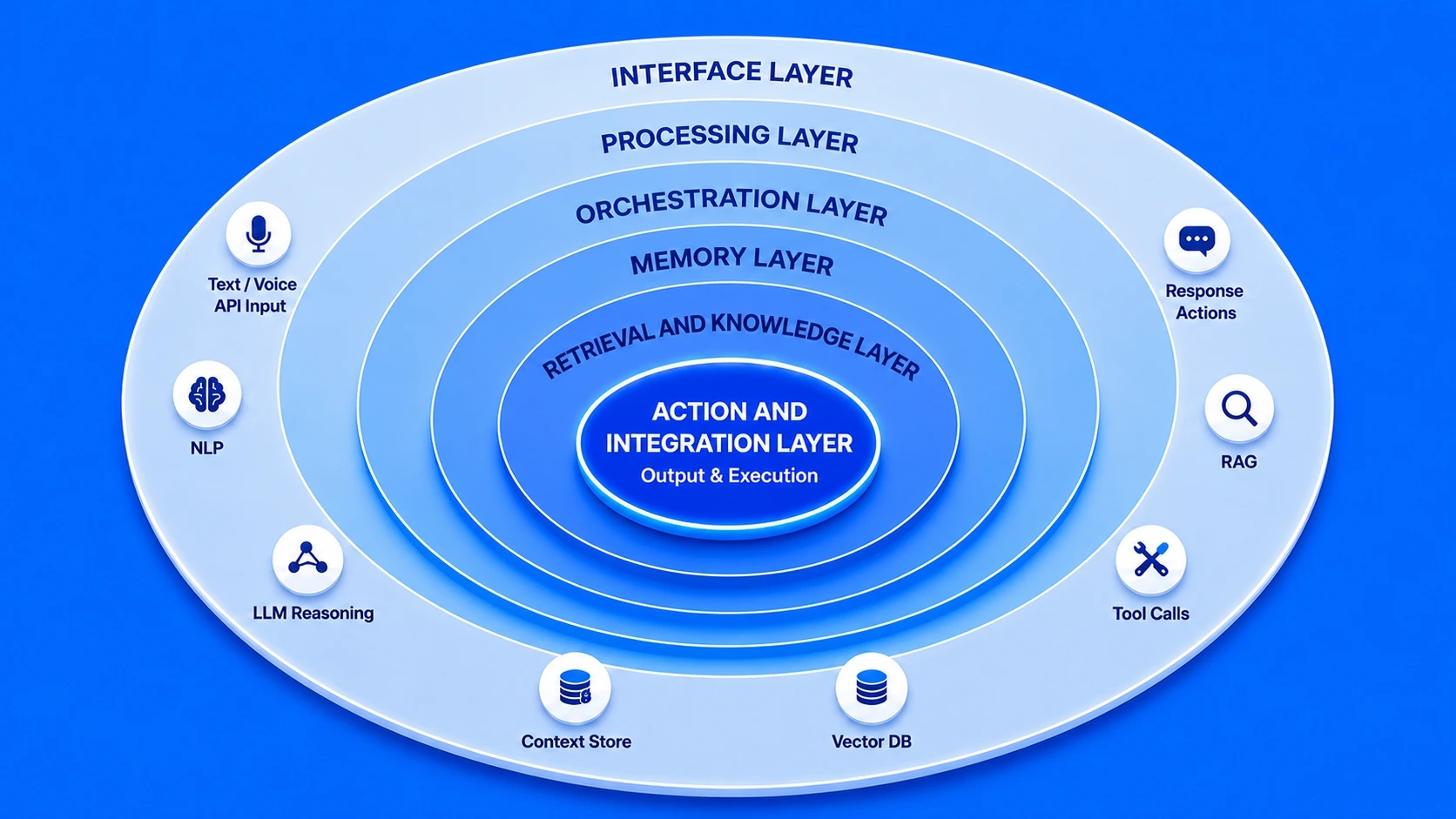
Input and Interface Layer
This is where user intent enters the system. It handles text input, voice processing, file uploads, structured form data, and programmatic API calls. The interface layer must normalize diverse input types into a consistent format that downstream layers can process reliably.
Natural Language Processing Layer
The NLP layer parses and interprets the user’s request, identifying intent, entities, required actions, and context signals. This layer determines what the user actually wants, beyond what they literally typed, accounting for ambiguity, abbreviation, and domain-specific terminology.
Orchestration and Reasoning Layer
The orchestration layer is the command centre of the AI Copilot framework. It decides which modules to activate, in what order, and how to combine their outputs. For complex multi-step tasks, this layer manages the sequence of tool calls, reasoning steps, and response assembly.
Memory and Context Layer
Memory architecture enables the AI Copilot to maintain continuity. Short-term memory holds the current conversation context. Session memory retains state across a work session. Long-term memory stores user preferences, past decisions, and accumulated business knowledge for persistent personalization.
Retrieval and Knowledge Layer
This layer houses the vector databases, document stores, and knowledge bases that make the AI Copilot specific to your business. Through semantic search and RAG pipelines, it retrieves the most contextually relevant information from your internal data to ground AI responses in business reality.
Action and Integration Layer
The action layer is where AI Copilot architecture goes beyond conversation and into real-world execution. It connects to external APIs, triggers workflow automations, updates CRM records, sends communications, and calls business tools. This layer is what transforms an AI assistant into an AI agent capable of independently completing tasks.
Core Components of AI Copilot Architecture
Beyond the layers, AI Copilot Architecture is made up of specific technical components that each serve a distinct function. Understanding these components helps engineering teams make better build versus buy decisions, and helps business leaders understand where architecture investment delivers the highest return.
LLM Core
The Large Language Model is the reasoning brain of the system. It processes context, generates text, follows instructions, and carries out multi-step reasoning tasks based on the assembled prompt from upstream components.
Vector Database
Stores semantic embeddings of business documents, policies, product knowledge, and past interactions. Enables ultra-fast similarity search so the copilot retrieves the most relevant context chunks for any given query in milliseconds.
RAG Pipeline
Retrieval Augmented Generation connects the vector database to the LLM. When a query arrives, the RAG pipeline retrieves the top-k relevant documents and injects them into the model’s context window, grounding responses in real business knowledge.
Tool Registry
A catalogue of all tools and APIs the AI Copilot can call: CRM queries, calendar functions, document generators, data APIs, and more. The orchestrator selects from this registry based on what each task requires.
Security and Auth Module
Manages identity, authentication, role-based access control, and data governance. This component ensures that users in different roles, markets, or geographies only access the data and capabilities they are authorized to use.
Observability Engine
Logs every AI Copilot interaction, traces reasoning chains, measures latency, and tracks accuracy metrics. This component is essential for ongoing quality improvement and for auditing AI behaviour in regulated industries.
Modules in AI Copilot Architecture
While components refer to the infrastructure building blocks, modules in AI Copilot Architecture refer to the functional units that perform specific operational roles. Modules are the “departments” of the AI Copilot system, each specialized in a particular class of tasks and designed to be interchangeable and independently upgradeable as needs evolve.
AI Copilot Architecture Modules and Their Functions
| Module | Primary Function | Key Technology |
|---|---|---|
| Intent Engine | Parses and classifies user intent from raw input | NLP classifiers, intent recognition models |
| Context Manager | Maintains conversation history and session state | In-memory stores, Redis, session caches |
| Retrieval Module | Fetches relevant knowledge chunks from vector stores | Pinecone, Weaviate, Chroma, FAISS |
| Reasoning Module | Executes multi-step reasoning using chain-of-thought | LLM prompt chains, ReAct patterns |
| Action Planner | Breaks complex goals into executable task sequences | Agentic frameworks, task graphs |
| Output Formatter | Structures and renders final response for the user interface | Templating engines, markdown parsers |
The modular nature of AI Copilot Architecture is one of its greatest strategic advantages. When a newer, more capable LLM becomes available, you can upgrade the reasoning module without touching the retrieval or integration layers. When your business expands into a new market like expanding from India to the UAE, you can add a new language processing module without restructuring the entire system. Modularity is what makes AI Copilot architecture a long-term investment rather than a one-time implementation.
Models That Power AI Copilot Architecture
The intelligence of any AI Copilot system ultimately rests on the quality and configuration of the models embedded within its architecture. Understanding which models serve which purposes is essential for architects and decision-makers designing a capable, cost-effective AI Copilot solution architecture.
Foundation LLMs
Large language models such as GPT-4, Claude, Gemini, Llama, and Mistral form the primary reasoning backbone. These models handle complex language understanding, generation, and multi-step reasoning tasks at the core of the AI Copilot framework.
Embedding Models
Specialized models like text-embedding-ada or sentence transformers convert documents and queries into high-dimensional vector representations. These are the foundation of the retrieval layer, enabling semantic search across your business knowledge base.
Fine-Tuned Domain Models
For highly specialized industries, base LLMs can be fine-tuned on proprietary business data. A legal firm in Dubai or a healthcare network in India may use a fine-tuned model that understands their specific terminology, processes, and compliance requirements far better than a general model.
Smaller Specialized Models
For latency-sensitive tasks like intent classification or quick lookups, smaller, faster models handle specific subtasks, with the orchestration layer routing them appropriately. This hybrid approach reduces cost and improves response speed significantly in high-volume deployments.
How Do Modules Interact in AI Copilot Architecture?
One of the most nuanced aspects of AI Copilot technical structure is understanding how modules communicate and coordinate with each other at runtime. This interaction pattern determines the system’s ability to handle complex, multi-step tasks with coherence and accuracy.
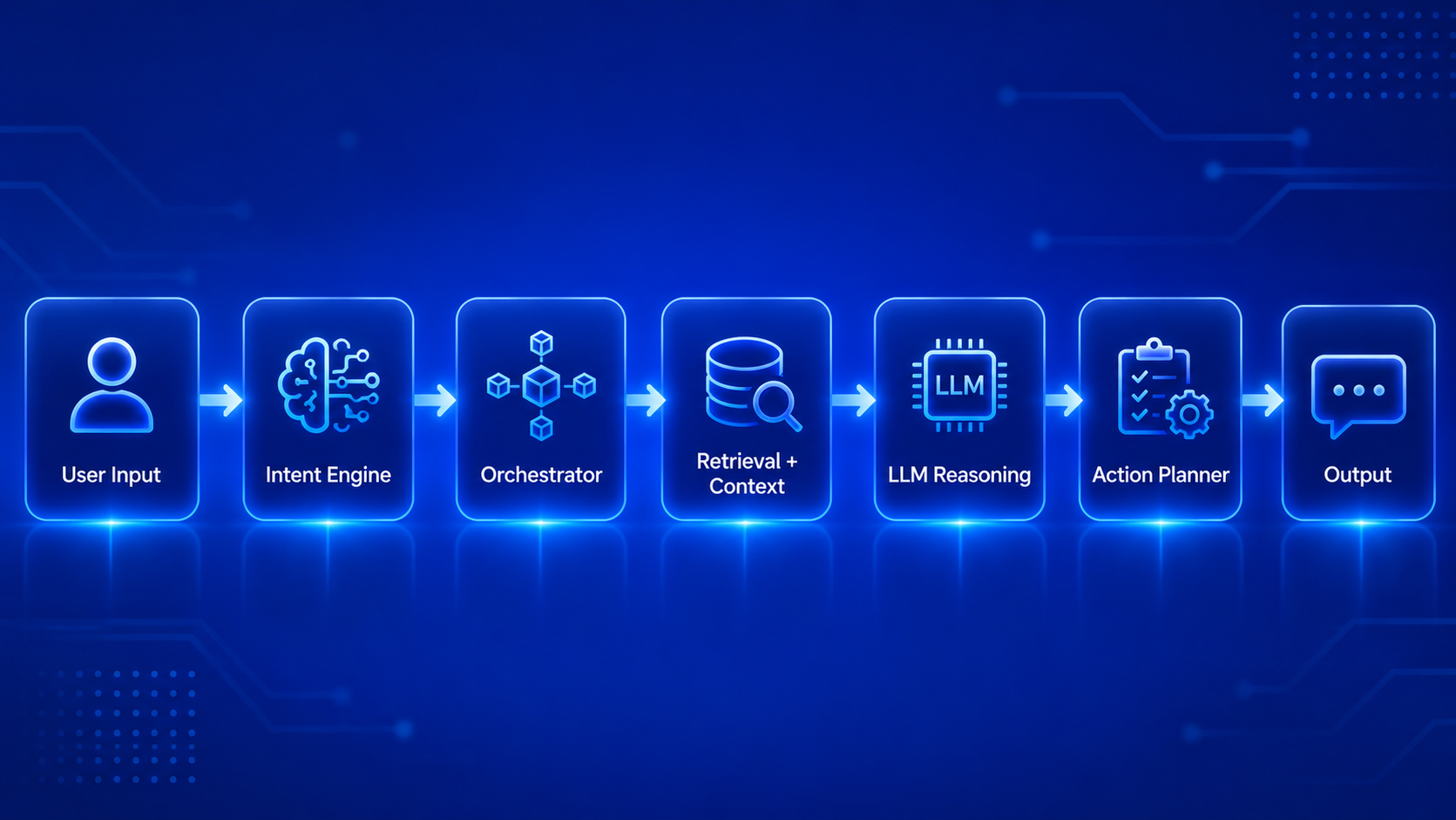
When a user submits a request, it triggers a cascade of coordinated module interactions orchestrated by the central orchestration layer. The intent engine first processes the input and signals the orchestrator about what class of task is being requested. The orchestrator then activates the context manager to retrieve relevant session history and user preferences, and simultaneously triggers the retrieval module to fetch business-specific knowledge from the vector store.
Once the context is assembled, the orchestrator constructs a rich, grounded prompt and passes it to the reasoning module (the LLM). If the task requires external actions, such as creating a record in a CRM or sending an email, the reasoning module generates a tool call specification and passes it to the action planner. The action planner validates the proposed actions against the security module, executes them through the tool registry, and returns results to the reasoning module for final response generation.
This entire interaction cycle happens in a matter of seconds in a well-optimized AI Copilot architecture. The speed and reliability of this inter-module communication is determined by architecture design choices made upfront: asynchronous versus synchronous processing, caching strategies, and how context is passed between modules without loss of information.
End-to-End Processing Flow in AI Copilot
To understand AI Copilot Architecture in the most practical terms, let us walk through a real-world end-to-end processing scenario. A senior account manager at a financial services firm in Dubai asks the AI Copilot: “Summarize the last three months of activity for Client X and suggest the best time to schedule a review call.”
Here is what happens inside the architecture, from input to output:
This entire flow, spanning five distinct stages and multiple integrated systems, completes in under three seconds in a well-optimized AI Copilot architecture. For a team handling hundreds of such queries daily across offices in the US, India, and UAE, that speed and accuracy at scale is where the ROI becomes undeniable.
How Does Data Flow in AI Copilot Architecture?
Data flow is one of the most architecturally critical and least visible aspects of AI Copilot system architecture. How data moves through the system, where it is stored, how it is accessed, and how it is secured at each stage directly determines the quality, speed, and safety of every AI Copilot interaction.
Data enters the AI Copilot architecture through three primary channels. The first is real-time user input, which consists of the queries, commands, and tasks that users submit during active sessions. The second is structured business data pulled from connected systems like databases, CRMs, and ERPs through API integrations. The third is indexed knowledge, consisting of documents, policies, and reference materials that have been pre-processed and stored in the vector database for retrieval.
Inside the architecture, data flows through the orchestration layer in a carefully managed sequence. Raw input is transformed into a structured representation, enriched with retrieved context and session history, assembled into a prompt structure for the LLM, and then processed through the reasoning engine. The output flows back through the formatting layer and out to the user interface or the integration endpoint, depending on whether the response is conversational or action-based.
Data Flow Velocity by Channel: AI Copilot Architecture
A critical data flow consideration in AI Copilot architecture is data isolation and tenancy. In multi-user enterprise environments, the architecture must ensure that one user’s data context does not leak into another user’s session, and that confidential client information is only accessible to authorized roles. This is particularly important for organizations operating across multiple jurisdictions like the US, UAE, and India, where data residency regulations add another layer of architectural requirements.
How Does AI Copilot Architecture Handle Integration?
Integration architecture is what transforms a sophisticated AI assistant into a truly useful business tool. Without robust integration capabilities, even the most intelligent AI Copilot is isolated from the systems where actual work happens. Integration in AI Copilot architecture operates at three levels: data integration, tool integration, and workflow integration.
Data integration connects the AI Copilot to the repositories where your business’s knowledge lives: document management systems, databases, data warehouses, and cloud storage. This is typically achieved through dedicated connectors, ETL pipelines, and real-time sync mechanisms that keep the copilot’s knowledge base current and accurate.
Tool integration connects the AI Copilot to the applications where your team works. This includes CRM platforms, project management tools, communication systems, ticketing platforms, and productivity suites. Through standardized APIs and webhook frameworks, the AI Copilot can read from and write to these tools, enabling it to take real actions, not just generate text. [1]
Workflow integration is the most sophisticated level. Here, the AI Copilot is embedded directly into multi-step business processes. When a new deal is closed in the CRM, the copilot automatically generates an onboarding brief, schedules a kickoff call, and drafts the first client communication. The AI Copilot is not just responding to queries; it is an active participant in how your business operates.
Tools Connected with AI Copilot Architecture
The breadth of tool connectivity in your AI Copilot solution architecture directly determines how much value the system can deliver. Here is a comprehensive overview of the tool categories that leading AI Copilot deployments connect with across US, UAE, and India-based enterprises:
Tool Integration Categories in AI Copilot Architecture
| Tool Category | Examples | What AI Copilot Can Do |
|---|---|---|
| CRM Platforms | Salesforce, HubSpot, Zoho | Read deal history, update records, generate account summaries |
| Communication Tools | Slack, Teams, Gmail, Outlook | Draft messages, summarize threads, schedule communications |
| Project Management | Jira, Asana, Monday.com | Create tasks, update statuses, generate progress reports |
| Data and Analytics | Tableau, Power BI, BigQuery | Query data conversationally, generate visualizations, highlight anomalies |
| Document Platforms | SharePoint, Google Drive, Notion | Search documents, summarize content, create new files |
| ERP Systems | SAP, Oracle, Microsoft Dynamics | Pull financial data, monitor inventory levels, generate operational reports |
What Makes AI Copilot Architecture a Complete System Design?
A truly complete AI Copilot Architecture is more than the sum of its components. What elevates a collection of AI tools and APIs into a genuine system design is the presence of five defining characteristics that we have seen separate high-performing AI Copilot implementations from underperforming ones across every market we serve.
When all five of these characteristics are present in an AI Copilot architecture, the result is a system that does not just work on launch day; it improves over time, scales with the business, and earns the trust of the people who use it every day. That trust is the ultimate indicator of architectural success.
From the smallest SaaS startup in Bengaluru deploying a conversational AI Copilot for customer support, to the largest enterprise in the UAE building a multi-modal AI Copilot for operational intelligence, the architecture decisions made at the outset shape every aspect of performance, security, and long-term value. Invest in getting the architecture right, and the AI Copilot you build will compound in value for years to come.
Architecture is the Foundation of AI Copilot Success
AI Copilot Architecture is not a technical detail that can be figured out later. It is the foundational decision that determines everything else: performance, scalability, security, integration depth, and long-term adaptability. Every business that has attempted to bolt architecture onto an already-built AI Copilot has faced costly rebuilds, security gaps, and user frustration.
With eight-plus years of experience designing intelligent systems for businesses in the US, UAE, and India, our recommendation is consistent: start with architecture. Define your layers clearly. Choose your components intentionally. Design your integration strategy before writing a single line of code. The AI Copilot you build on a strong architectural foundation will serve your business not just for months but for years.
Build Your AI Copilot on the Right Architecture
Our architecture-first approach ensures your AI Copilot is built to scale, integrate, and deliver measurable business results from day one.
Frequently Asked Questions
Q1.1. Why is AI Copilot Architecture important?
A strong AI Copilot Architecture is important because it directly impacts how efficiently the system performs in real-world scenarios. It improves scalability, response accuracy, system reliability, and security. A well-designed architecture also ensures smooth connectivity with enterprise tools, databases, and external services, enabling seamless automation and intelligent decision-making across business environments.
Q2.2. How does AI Copilot process user requests?
AI Copilot processes user requests through a structured multi-step workflow. It begins with input analysis to understand intent, followed by context retrieval from memory or databases. Then the model performs reasoning, interacts with APIs or tools if needed, generates a response, and finally delivers a refined output. This entire process ensures accurate and context-aware results.
Q3.3. What role do integrations play in AI Copilot Architecture?
Integrations play a critical role by connecting AI Copilots with enterprise systems, APIs, databases, and third-party applications. These connections allow real-time data exchange, workflow automation, and cross-platform functionality. Without integrations, the Copilot would be limited to static responses instead of performing meaningful business actions.
Q4.4. How is AI Copilot Architecture designed?
AI Copilot Architecture is designed using a layered and modular approach that includes LLMs, APIs, orchestration systems, and data pipelines. Each layer handles specific responsibilities such as input processing, reasoning, tool usage, and output generation. This structure ensures flexibility, scalability, and efficient handling of complex AI-driven workflows.
Q5.5. What models power AI Copilot systems?
AI Copilot systems are powered by multiple types of AI models working together. These include large language models for understanding and generation, embedding models for semantic search, retrieval models for fetching relevant data, and task-specific models for automation. Together, they enable reasoning, context awareness, and intelligent decision-making.
Q6.6. How do modules work in AI Copilot Architecture?
Modules in AI Copilot Architecture divide the system into smaller functional components, each handling a specific task. These include input processing, memory management, reasoning engines, API execution, and response generation. This modular approach improves system efficiency, makes debugging easier, and allows independent upgrades without affecting the entire system.
Q7.7. How does AI Copilot process user requests?
AI Copilot processes user requests through a structured pipeline that includes input interpretation, context gathering, model inference, tool or API execution, validation of results, and finally structured response delivery. This ensures that every request is handled accurately, efficiently, and with proper contextual understanding.
Q8.8. How does AI Copilot Architecture handle integration?
AI Copilot Architecture handles integration through dedicated integration layers that connect with enterprise software, cloud platforms, APIs, and external tools. These layers enable real-time communication, automated workflows, and data synchronization, allowing the Copilot to function as an active part of business ecosystems.
Q9.9. What makes AI Copilot Architecture a complete system?
AI Copilot Architecture becomes a complete system when it combines multiple components such as layered design, intelligent AI models, modular workflows, integration capabilities, orchestration mechanisms, and strong security frameworks. Together, these elements create a unified system capable of handling complex tasks efficiently.
Q10.10. What is the orchestration layer in AI Copilot?
The orchestration layer acts as the control system of AI Copilot Architecture. It manages communication between different models, APIs, and modules, ensuring that tasks are executed in the correct sequence. It coordinates workflows, handles dependencies, and ensures smooth execution for accurate and reliable outputs.
Explore Services
Related Services
Reviewed by

Wazid Khan
Director & Co-Founder
Wazid Khan is the Director & Co-Founder of Nadcab Labs, a forward-thinking digital engineering company specializing in Blockchain, Web3, AI, and enterprise software solutions. With a strong vision for innovation and scalable technology, Wazid has played a key role in building Nadcab Labs into a trusted global technology partner. His expertise lies in strategic planning, business development, and delivering client-centric solutions that drive real-world impact. Under his leadership, the company has successfully delivered numerous projects across industries such as fintech, healthcare, gaming, and logistics. Wazid is passionate about leveraging emerging technologies to create secure, efficient, and future-ready digital ecosystems for businesses worldwide.