Ai Overview
ERP and CRM are two of the most common enterprise software categories, and they are frequently confused because both manage business data, both improve efficiency, and many platforms offer features from both. ERP manages the internal operations of an entire organization, finance, inventory, procurement, HR, and production. CRM manages the external-facing relationship between a business and its customers, leads, sales pipelines, communication history, and service records.
ERP and CRM are two of the most common enterprise software categories, and they are frequently confused because both manage business data, both improve efficiency, and many platforms offer features from both. The difference comes down to focus. ERP manages the internal operations of an entire organization, finance, inventory, procurement, HR, and production. CRM manages the external-facing relationship between a business and its customers, leads, sales pipelines, communication history, and service records. This blog explains each system clearly, compares them directly, identifies when a business needs one or both, and explains how ERP and CRM integration delivers value that neither system provides alone.
Key Takeaways
- Core Difference: ERP manages internal business operations across all departments. CRM manages external customer relationships, leads, sales, and service interactions.
- Primary Users: ERP is used by finance, operations, procurement, HR, and manufacturing teams. CRM is used by sales, marketing, and customer service teams.
- Data Direction: ERP centralizes operational and financial data. CRM centralizes customer interaction and revenue pipeline data.
- Not Interchangeable: ERP cannot replace a dedicated CRM for sales pipeline management. CRM cannot replace ERP for financial reporting, inventory control, or payroll.
- Both Can Coexist: Most growing businesses eventually need both, ERP for back-office operations and CRM for front-office customer management, integrated through APIs.
- ERP Often Includes Basic CRM: Many ERP systems include a customer management module with contact records, order history, and basic pipeline tracking, but this is rarely as deep as a dedicated CRM.
- CRM Market Size: The global CRM market reached $73.4 billion in 2023 and is projected to grow to $157 billion by 2030, driven by sales automation and AI-assisted pipeline management.
- Integration Delivers the Most Value: When ERP and CRM share data, sales teams see live inventory and credit status, finance sees closed deals without manual input, and customer service has full order and payment history in one view.
- Starting Point Matters: Businesses with operational complexity (manufacturing, distribution) typically implement ERP first. Businesses that are sales-driven (SaaS, services) typically implement CRM first.
What Is ERP Software?
Enterprise Resource Planning (ERP) is a business management software system that integrates all core operational functions of an organization into one platform with a shared database. This includes finance and accounting, inventory and warehousing, procurement and purchasing, manufacturing, HR and payroll, project management, and in many systems, a basic customer management component. Every department works from the same live data, which eliminates duplication and improves reporting accuracy across the business.
ERP’s defining characteristic is that it connects back-office functions. When a purchase order is approved in procurement, the financial module records the commitment automatically. When goods arrive, inventory updates and the supplier liability is created without manual entry. This cross-departmental data flow is what makes ERP fundamentally different from any single-function tool, including CRM.[1]
What Is CRM Software?
CRM (Customer Relationship Management) software is a system designed to manage a company’s interactions with current and potential customers. It stores contact information, tracks every communication touchpoint, manages sales pipelines, automates marketing outreach, and records customer service interactions. The goal of a CRM is to help sales, marketing, and service teams build stronger customer relationships, close more deals, and retain customers longer.
CRM’s defining characteristic is that it manages front-office functions, everything that happens between the business and the customer. A lead enters the CRM when a sales team member adds a new contact or a web form captures a prospect’s details. That lead then moves through defined pipeline stages, qualified, proposal sent, negotiation, closed, with all communication history, calls, emails, and meeting notes stored against the record. When a deal closes, the CRM records the revenue and updates the salesperson’s performance metrics.[2]
Major CRM platforms include Salesforce, HubSpot, Microsoft Dynamics 365 Sales, Zoho CRM, and Pipedrive. Each is built around the sales and customer management workflow, with varying depth in marketing automation, customer service, and analytics capabilities.
ERP vs CRM: The Core Difference Explained
The simplest way to understand the ERP and CRM difference is by direction. ERP looks inward, it manages the internal operations that keep the business functioning. CRM looks outward, it manages the external relationships that bring revenue into the business. Both are necessary for a complete business operation, but they solve different problems for different teams.
Consider a manufacturing company. Its ERP manages raw material procurement, production scheduling, inventory levels, quality control, financial accounting, and payroll. Its CRM manages the sales team’s prospect list, tracks which deals are in negotiation, records every customer call, and generates revenue forecasts from pipeline data. The ERP tells the business whether it can fulfill an order. The CRM tells the business how many orders are coming. Neither answers the other’s question, which is why businesses with both types of complexity need both systems.[3]
ERP vs CRM: Side-by-Side Comparison
| Factor | ERP System | CRM System |
|---|---|---|
| Primary Purpose | Manage internal business operations | Manage customer relationships and sales pipeline |
| Data Focus | Financial, operational, and HR data | Customer, prospect, and deal data |
| Primary Users | Finance, operations, HR, procurement, manufacturing | Sales, marketing, customer service teams |
| Core Modules | Finance, inventory, HR, purchasing, production | Contact management, pipeline, marketing, service |
| Business Orientation | Back-office (internal) | Front-office (external) |
| Revenue Impact | Reduces operational cost and improves efficiency | Increases sales conversion and customer retention |
| Reporting Type | Financial statements, operational metrics, compliance | Pipeline reports, win rates, customer lifetime value |
| Implementation Complexity | High — multiple departments, data migration | Moderate — primarily sales team onboarding |
| Entry Cost | Higher — multi-module licensing or subscription | Lower — per-user subscription model common |
| Can They Work Together? | Yes — ERP and CRM integration via API is standard for growing businesses | Yes — ERP and CRM integration via API is standard for growing businesses |
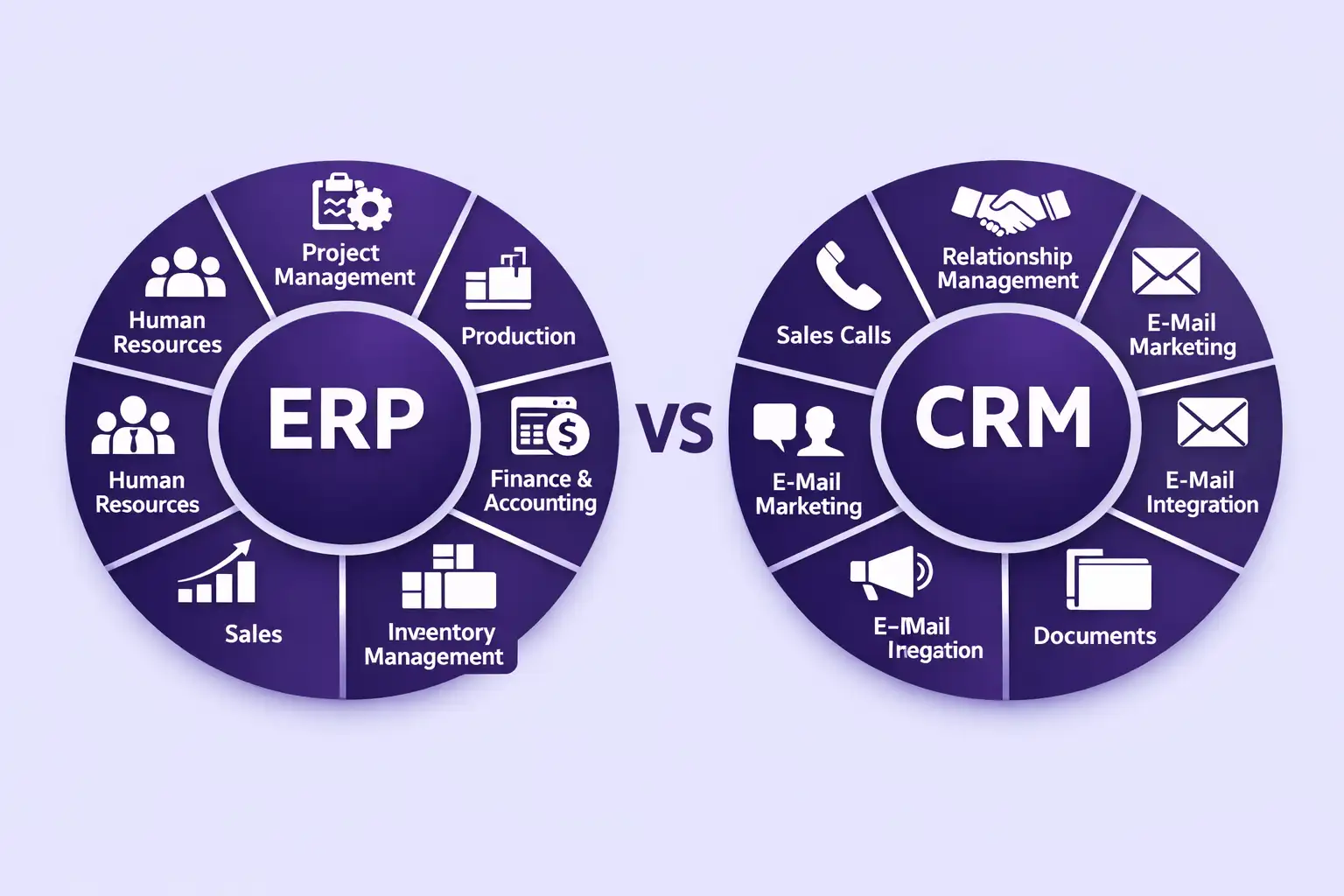
ERP vs CRM Features: What Each System Includes
Key Features of ERP Software
- Financial management: General ledger, accounts payable, accounts receivable, fixed assets, budgeting, and financial reporting.
- Inventory and warehouse management: Real-time stock tracking, reorder automation, multi-warehouse support, and stock valuation.
- Procurement: Purchase order management, supplier management, three-way invoice matching, and spend analytics.
- HR and payroll: Employee records, payroll calculation, time and attendance, and statutory compliance reporting.
- Manufacturing: Bill of materials, production scheduling, work orders, and quality control (in manufacturing-focused ERP).
- Project accounting: Budget tracking, resource allocation, and cost-to-completion reporting by project.
Key Features of CRM Software
- Contact and account management: Centralized database of customer and prospect records with full interaction history.
- Sales pipeline management: Visual deal stages, probability weighting, and forecast generation from open opportunities.
- Marketing automation: Email campaigns, lead nurturing sequences, landing page tracking, and lead scoring.
- Customer service and ticketing: Case management, resolution tracking, and SLA monitoring for support teams.
- Sales analytics: Win rate, average deal size, sales cycle length, and individual salesperson performance reporting.
- Integration with communication tools: Email inbox sync, call logging, and meeting scheduling directly within the CRM interface.
When Should a Business Use ERP, CRM, or Both?
Use ERP If:
Your primary operational challenges involve financial management, inventory control, procurement, or production. ERP is the right choice when manual processes across multiple departments are creating errors, slowing reporting, and making it impossible to get an accurate view of business performance without significant manual effort. Businesses in manufacturing, distribution, retail, and construction typically need ERP before they need a dedicated CRM.[4]
Use CRM If:
Your primary challenge is managing a growing sales pipeline, tracking customer interactions, improving conversion rates, or reducing customer churn. CRM is the right choice when your sales team loses track of leads, follow-ups are inconsistent, deals fall through gaps because no one knows where they stand, or customer service lacks a complete history of each customer’s interactions with the business. SaaS companies, agencies, professional services firms, and subscription businesses typically need CRM before they need ERP.
Use Both If:
Your business has both operational complexity and a structured sales process. Most businesses at the 50 to 200 employee stage reach a point where ERP handles back-office functions and CRM handles the sales and customer management layer, with the two systems connected through API integration. This is the most common enterprise software configuration for mid-market businesses across industries. The guide to top 10 ERP software companies shows which major ERP vendors also offer native CRM modules or preferred CRM integration partnerships, which simplifies the combined deployment.
ERP and CRM Integration: How They Work Together
When ERP and CRM share data through integration, the business gains capabilities that neither system provides independently. This is where the practical value of having both becomes most visible.
Sales Team Sees Live Inventory and Pricing
With ERP and CRM integrated, a salesperson closing a deal can check real-time stock availability and current pricing directly in the CRM without calling operations or waiting for an email response. This eliminates the common situation where a sale is closed on a delivery date that operations cannot meet.
Finance Receives Deal Data Without Manual Input
When a deal closes in the CRM, the integration automatically creates a customer record, an open receivable, and a sales order in the ERP. Finance sees the revenue without the sales team manually notifying them or submitting paperwork. This removes the gap between when a sale closes and when finance can record and act on it.[5]
Customer Service Has Complete Order and Payment History
When a customer contacts support, the service agent sees the full picture in one interface: every deal from CRM history, every invoice and payment status from ERP, and every previous support interaction. This eliminates the situation where a service agent is unaware that a customer has an outstanding invoice dispute or a pending delivery, both common causes of customer frustration.
Unified Customer View Improves Retention Decisions
Combining CRM engagement data (frequency of interaction, deal history, satisfaction scores) with ERP financial data (payment reliability, total revenue, product mix) gives account managers a complete picture of each customer’s value and risk profile. This enables more targeted retention efforts, better credit management, and more informed upsell decisions than either system can support alone. For businesses building these integrated systems from the ground up, working with an ERP software development company that also understands CRM architecture ensures the integration is built correctly from the first deployment.
Trend to Watch (2025–2026)
The boundary between ERP and CRM is narrowing as major vendors expand into each other’s territory. Microsoft Dynamics 365 combines ERP (Business Central) and CRM (Sales, Customer Service) in one unified platform with shared data. Salesforce acquired Slack and expanded into operational workflows. Oracle offers both ERP Cloud and CX Cloud (its CRM product) under the same licensing framework. For growing businesses, this convergence means fewer integration headaches when both needs are served by the same vendor, but it also means evaluating platforms on the strength of both their operational and customer management capabilities, not just one.
ERP vs CRM Examples: Real Platform Comparisons
| Platform | Category | Best Known For | CRM Included? |
|---|---|---|---|
| SAP S/4HANA | ERP | Large enterprise finance and supply chain | Basic (SAP CX sold separately) |
| Oracle ERP Cloud | ERP | Finance, procurement, multi-entity | No (Oracle CX is separate) |
| Microsoft Dynamics 365 | ERP + CRM | Unified business apps on one platform | Yes (Sales module included) |
| NetSuite | ERP + CRM | Cloud-native, fast-growing businesses | Yes (CRM module included) |
| Odoo | ERP + CRM | Open-source, modular SMB platform | Yes (CRM module included) |
| Salesforce | CRM | Enterprise sales pipeline and automation | Core product (no ERP) |
| HubSpot | CRM | Inbound marketing and SMB sales | Core product (no ERP) |
| Zoho One | ERP + CRM | All-in-one suite for SMBs | Yes (Zoho CRM included) |
For businesses evaluating deployment options, the comparison of top cloud ERP systems covers how leading platforms handle the ERP and CRM combination in cloud-based environments, including pricing structures and integration depth for each.
Build a Custom ERP or CRM System for Your Business
Nadcab Labs develops custom ERP and CRM platforms, individually or integrated, covering finance, operations, sales pipeline, customer management, and API connections between existing tools, built to your specific workflows and scale requirements.
Frequently Asked Questions
Q1.What is the main difference between ERP and CRM?
ERP manages internal business operations — finance, inventory, procurement, HR, and production — across all departments from one integrated system. CRM manages the external relationship between the business and its customers — leads, sales pipeline, communication history, and service records. ERP looks inward at how the business runs. CRM looks outward at how the business grows its customer base and revenue.
Q2.Can ERP replace a CRM system?
Most ERP systems include a basic customer management module with contact records, order history, and simple pipeline tracking. This is sufficient for businesses with straightforward sales processes. However, ERP cannot replace a dedicated CRM for businesses that need advanced sales pipeline management, marketing automation, lead scoring, campaign tracking, or detailed customer service ticketing. Dedicated CRM platforms offer significantly deeper sales and customer management functionality than ERP customer modules.
Q3.Which is better for small businesses, ERP or CRM?
It depends on the business type. Sales-driven businesses (SaaS, agencies, professional services) should implement CRM first. Operationally complex businesses (manufacturing, distribution, retail) should implement ERP first. Many small businesses start with CRM because it is cheaper, faster to deploy, and has an immediate impact on revenue. ERP becomes necessary when operational complexity — inventory, finance, procurement — creates problems that CRM cannot solve.
Q4.Do ERP and CRM work together?
Yes, and most growing businesses eventually integrate both. When ERP and CRM share data, sales teams see live inventory and pricing in the CRM, finance sees closed deals automatically in the ERP, and customer service has full order and payment history in one view. This integration is typically done through REST APIs and is supported by most major ERP and CRM vendors either natively or through third-party integration tools like MuleSoft or Zapier.
Q5.What are examples of ERP and CRM software?
Leading ERP platforms include SAP S/4HANA, Oracle ERP Cloud, Microsoft Dynamics 365 Business Central, NetSuite, and Odoo. Leading dedicated CRM platforms include Salesforce, HubSpot, Zoho CRM, Pipedrive, and Microsoft Dynamics 365 Sales. Some platforms like NetSuite, Odoo, Microsoft Dynamics 365, and Zoho One combine both ERP and CRM capabilities within one unified system, reducing the need for separate integration work.
Explore Services
Related Services
Reviewed by

Aman Vaths
Founder of Nadcab Labs
Aman Vaths is the Founder & CTO of Nadcab Labs, a global digital engineering company delivering enterprise-grade solutions across AI, Web3, Blockchain, Big Data, Cloud, Cybersecurity, and Modern Application Development. With deep technical leadership and product innovation experience, Aman has positioned Nadcab Labs as one of the most advanced engineering companies driving the next era of intelligent, secure, and scalable software systems. Under his leadership, Nadcab Labs has built 2,000+ global projects across sectors including fintech, banking, healthcare, real estate, logistics, gaming, manufacturing, and next-generation DePIN networks. Aman’s strength lies in architecting high-performance systems, end-to-end platform engineering, and designing enterprise solutions that operate at global scale.