Ai Overview
Enterprise Resource Planning (ERP) software connects all core business functions into one unified system. It comes in different types based on how it is deployed, who it is designed for, and how it is structured. Initial investment costs are 20 to 40% lower than on-premise systems. Over 53% of companies had adopted cloud-based ERP as of 2025.
Enterprise Resource Planning (ERP) software connects all core business functions into one unified system. But ERP is not a single product or a fixed format. It comes in different types based on how it is deployed, who it is designed for, and how it is structured. Choosing the wrong type means paying for features you do not need, missing capabilities you do, or committing to infrastructure that does not match your business requirements.
This guide covers every type of ERP system clearly and factually: what each one is, how it works, who it suits, and what the real trade-offs are between them.
Key Takeaways
- Two Classification Systems: ERP types are classified by deployment model (how the software is hosted) and by functional scope (what the software covers). Both matter when selecting a platform.
- Five Deployment Types: The main ERP deployment models are on-premise, cloud, hybrid, web-based, and two-tier ERP. Each has different cost, control, and scalability profiles.
- Cloud ERP Is Now Standard: Over 53% of companies have adopted cloud-based ERP as of 2025. Gartner predicts more than 50% of all new ERP deployments are cloud-based.
- Hybrid Dominates Enterprises: Industry experts predict that by 2025, most large enterprises will operate hybrid ERP environments combining on-premise and cloud components.
- Open-Source Is Free to License: Open-source ERP software such as ERPNext and Odoo eliminates software licensing costs, but businesses still pay for hosting, implementation, and support.
- Industry-Specific ERP Reduces Customization: Vertical ERP systems come pre-configured for a specific industry, reducing the time and cost needed to adapt a generic platform to specialized workflows.
- Two-Tier ERP Serves Multi-Entity Groups: Large parent companies run Tier-1 ERP at the corporate level while subsidiaries use lighter Tier-2 systems, with data synchronized between them.
- AI Is Now Standard in Modern ERP: Leading ERP platforms including SAP, Oracle, and Microsoft Dynamics 365 have embedded AI for demand forecasting, anomaly detection, and process automation.
- Wrong Type Choice Is Costly: A small business that overspends on a highly customized on-premise ERP, or a manufacturer that selects a generic system, will face either excessive costs or missing critical features.
How ERP Systems Are Classified
ERP systems are classified in two ways. The first is by deployment model, meaning where and how the software is hosted and maintained. The second is by functional scope, meaning which business areas the software covers and how specifically it targets a particular industry or business size. Both dimensions matter when selecting a platform. A business that picks the right functional scope but the wrong deployment model will still face operational problems.
To understand what ERP software is and why businesses implement it before evaluating which type to choose, the full explanation of Enterprise Resource Planning covers the definition, core modules, and documented business benefits in detail. That context makes the type comparisons in this guide easier to apply to a specific situation.[1]
Types of ERP by Deployment Model
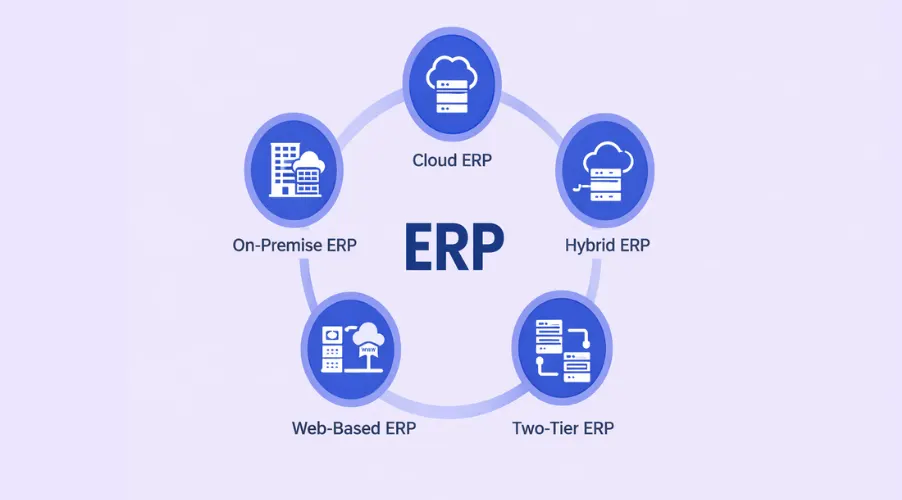
Deployment model refers to where the ERP software runs, who manages the infrastructure, and how it is accessed. This is the most commonly discussed dimension when comparing ERP types because it directly affects upfront cost, ongoing maintenance burden, data security, and scalability.
1. On-Premise ERP
On-premise ERP is installed on servers owned and operated by the company. The company purchases the software license outright, buys or leases the physical server hardware, employs IT staff to manage and maintain the system, and handles all upgrades, security patches, and backups internally. The software does not require an internet connection to function because it runs on the company’s own local infrastructure.
On-premise ERP offers the highest level of control and customization of any deployment model. Companies can modify the software at a deep level, including source code in some systems, to match very specific business processes that standard configurations cannot accommodate. Industries with strict data sovereignty requirements — such as defense, healthcare, and financial services — frequently use on-premise ERP because sensitive data never leaves company-controlled infrastructure.
The trade-off is cost and resource intensity. Initial investment in hardware, software licensing, and IT staffing is substantial. Upgrades often require planned downtime. Scaling the system to handle business growth requires purchasing additional hardware. Companies that have heavily customized their on-premise ERP over many years often face significant difficulty migrating to newer versions because those custom features must be rebuilt or abandoned during the upgrade process.[2]
Best suited for: Large enterprises in regulated industries with strict data control requirements, complex proprietary processes, or long-standing legacy system investments.
Examples: SAP ERP (on-premise version), Oracle E-Business Suite 12.2, Microsoft Dynamics NAV (now Business Central on-premise edition), JD Edwards EnterpriseOne.
2. Cloud ERP
Cloud ERP is hosted on servers managed by the software vendor and accessed through the internet. The company pays a recurring subscription fee rather than a large upfront license cost. The vendor handles all infrastructure maintenance, security updates, and software upgrades. Users access the system through a web browser from any location on any device with internet access.
Cloud ERP is currently the most widely adopted deployment model. Over 53% of companies had adopted cloud-based ERP as of 2025. Initial investment costs are 20 to 40% lower than on-premise systems. Implementation typically takes 6 to 12 months, which is faster than on-premise deployments of equivalent scope. Automatic updates mean companies always have access to the latest features without a separate upgrade project.
Cloud ERP comes in two sub-models. Public cloud ERP, such as SAP S/4HANA Cloud Public Edition and Oracle NetSuite, runs on shared infrastructure managed entirely by the vendor. Private cloud ERP runs on dedicated infrastructure either at the vendor’s data center or a third-party provider, giving more control than public cloud while retaining managed service benefits. The main limitation of cloud ERP is that deep customization is restricted in most public cloud products, as changes cannot break the shared environment that other customers rely on.[3]
Best suited for: Small to medium businesses, startups, companies with remote or distributed teams, and organizations that prioritize rapid deployment and lower upfront investment.
Examples: Oracle NetSuite, SAP S/4HANA Cloud, Microsoft Dynamics 365 Business Central (cloud), Workday, Acumatica.
3. Hybrid ERP
Hybrid ERP combines on-premise and cloud components within a single ERP environment. A company might host its most sensitive financial or compliance data on on-premise servers while running HR, CRM, or project management modules on a cloud platform. The two components are integrated so data flows between them without manual intervention.
Industry experts predict that by 2025, most large enterprises will operate hybrid ERP environments. This model is gaining traction because it allows organizations to balance the control and security of on-premise deployment with the scalability and accessibility of cloud. It also provides a gradual migration path for companies that have significant existing on-premise ERP investments and cannot or do not want to execute a full cloud migration at once.
The main challenge with hybrid ERP is complexity. Integrating on-premise and cloud systems requires careful planning around data flow, synchronization timing, and security boundaries. Hybrid deployments generally have higher long-term management costs than a pure cloud setup because both environments must be maintained. Companies in regulated industries including financial services and healthcare most commonly use this model.[4]
Best suited for: Medium to large enterprises transitioning from legacy on-premise systems, companies with mixed security requirements, and organizations with existing on-premise investments they are not ready to retire.
Examples: SAP S/4HANA (hybrid deployment), Microsoft Dynamics 365 with on-premise components, Oracle hybrid cloud configurations.
4. Web-Based ERP
Web-based ERP runs entirely through a web browser without requiring software installation on local devices beyond the browser itself. It is a subset of cloud ERP but specifically emphasizes browser-first access with minimal client-side software requirements. Web-based ERP is lightweight to deploy, requires no device-specific installation management, and can be accessed from any operating system.
This deployment type is particularly suitable for small and medium businesses or teams that need quick, accessible ERP solutions without heavy IT infrastructure. Web-based ERP typically has lower IT overhead than on-premise or even some private cloud deployments because the entire system runs server-side.
Best suited for: Small to mid-sized businesses that need quick deployment, multi-device access, and low IT maintenance overhead.
Examples: Odoo (web-based mode), Zoho ERP, ERPNext (cloud-hosted version).
5. Two-Tier ERP
Two-tier ERP is a model used by large organizations with multiple subsidiaries, divisions, or regional offices. The parent company runs a Tier-1 ERP system, typically a large enterprise platform like SAP or Oracle, for core corporate functions such as consolidated financial reporting. Individual subsidiaries run lighter, more affordable Tier-2 ERP systems suited to their specific size and operational needs. Data from Tier-2 systems flows up to the Tier-1 system for consolidated reporting.
This model avoids forcing small subsidiaries to use a complex and expensive enterprise ERP that exceeds their operational needs, while still maintaining data consistency at the corporate level. It is commonly used by multinationals, private equity portfolio companies, and conglomerates managing businesses across different industries or geographies.
Best suited for: Multinationals, holding companies, and large organizations managing subsidiaries with different operational profiles.
ERP Deployment Models: Side-by-Side Comparison
| Deployment Type | Hosted By | Upfront Cost | Customization | Best For |
|---|---|---|---|---|
| On-Premise | Company’s own servers | High | Highest | Large regulated enterprises |
| Cloud (Public) | Vendor-managed servers | Low to moderate | Limited | SMBs, startups, remote teams |
| Cloud (Private) | Vendor or third party | Moderate to high | Moderate | Mid to large businesses |
| Hybrid | Both company and vendor | High | High | Enterprises transitioning to cloud |
| Web-Based | Vendor servers | Low | Limited | Small businesses, quick deploy |
| Two-Tier | Both, split by entity | Varies | Varies by tier | Multinationals, holding companies |
Types of ERP by Functional Scope
Beyond deployment, ERP systems are also classified by what they cover and who they are designed for. These categories describe the functional scope of the software rather than where it runs.
Generalist ERP
Generalist ERP platforms are designed to serve businesses across multiple industries by covering a broad range of functions including finance, HR, supply chain, inventory, and CRM in a single configurable system. They are not pre-built for any specific industry but can be customized to fit many different types of businesses. SAP S/4HANA, Oracle Fusion Cloud ERP, and Microsoft Dynamics 365 are all generalist platforms. Their strength is breadth. Their challenge is that fitting them to a highly specialized industry often requires significant configuration effort and cost.[5]
Industry-Specific ERP
Industry-specific ERP, also called vertical ERP, is built for a single industry with workflows, compliance modules, reports, and terminology pre-configured for that sector. A manufacturer does not need to configure a production planning module from scratch because it already follows standard manufacturing workflows. A healthcare provider gets built-in HIPAA compliance tools. A construction company gets project cost tracking and contract billing built in.
Understanding the specific ERP adoption triggers in your industry helps clarify which vertical ERP features will have immediate impact on your operations versus which are general-purpose additions you may never use.
The trade-off with vertical ERP is reduced flexibility outside the target industry and potential vendor lock-in if the provider is small or niche. Examples include Epicor (manufacturing and distribution), Infor CloudSuite (manufacturing, healthcare, retail), Veeva (life sciences), and Procore (construction).
Open-Source ERP
Open-source ERP provides full access to the software’s source code. This means businesses can modify and extend the system without restriction and without paying a licensing fee. There are no per-user or per-module subscription costs for the software itself. Businesses pay only for hosting, implementation services, and ongoing support.
Open-source ERP is widely used among Indian SMEs, startups, and tech-capable businesses that have internal development resources and want to avoid vendor lock-in. ERPNext (now called Frappe) and Odoo are the most widely adopted open-source ERP systems globally. Dolibarr is another option for simpler business needs.
The limitation is implementation complexity. Most businesses without internal technical teams will need an external implementation partner to deploy and customize open-source ERP. Ongoing maintenance and upgrades also require technical knowledge that many smaller businesses lack in-house.[6]
Small Business ERP
Small business ERP is a scaled-down version of enterprise ERP designed for organizations with fewer than 100 employees and simpler operational structures. These platforms typically include accounting, basic inventory, invoicing, and HR without the full complexity of enterprise-grade systems. They are designed to be deployed quickly, require minimal IT support, and cost significantly less than enterprise platforms.
Examples include Tally Solutions for accounting-focused SMEs, Zoho Books for service businesses, and QuickBooks Enterprise for small product companies. These tools are not designed to scale to hundreds of users or complex multi-location operations, but they solve the immediate problem of replacing manual processes with structured digital management.
Enterprise ERP
Enterprise ERP is designed for large organizations with complex operations, multiple business units, global supply chains, and sophisticated financial structures. These platforms support thousands of concurrent users, handle multi-currency and multi-entity operations, and provide advanced analytics and compliance tools for operating in multiple regulatory jurisdictions simultaneously.
SAP S/4HANA, Oracle Fusion Cloud ERP, and Microsoft Dynamics 365 Finance are the most widely recognized enterprise ERP platforms. Implementation timelines for these systems in large organizations can run from 18 months to several years, and total cost of ownership including implementation, customization, and ongoing licensing frequently runs into millions of dollars. Enterprise ERP delivers value at scale but is not appropriate for businesses that have not yet reached a level of operational complexity that justifies that investment.
Modern ERP: AI and What Has Changed in 2025 and 2026
The functional boundaries between ERP types have blurred significantly as modern ERP platforms have incorporated artificial intelligence, machine learning, and advanced analytics into their core offerings. What was once a distinguishing feature of only the largest enterprise platforms is now available across cloud and mid-market ERP systems as well.
Leading ERP platforms including SAP S/4HANA, Oracle Fusion Cloud, and Microsoft Dynamics 365 have embedded AI for demand forecasting, anomaly detection in financial transactions, intelligent cash flow management, and natural language data queries that eliminate the need for manual report writing. Infor’s CloudSuite products include predictive analytics built directly into industry-specific dashboards. Even mid-market platforms like Acumatica and ERPNext are incorporating machine learning capabilities through API integrations and built-in automation tools.
The practical result is that the gap between what cloud ERP and on-premise ERP can deliver has grown. New AI-powered features are almost exclusively released through cloud delivery models first, with on-premise versions receiving them later or not at all. This is one of the primary drivers pushing enterprises toward hybrid models rather than pure on-premise: they want to retain control of sensitive data while accessing the AI capabilities that are only available in the cloud tier of their ERP vendor’s product line.[7]
How to Choose the Right Type of ERP for Your Business
The right ERP type depends on four factors: business size, industry, data control requirements, and available internal IT capacity. Here is a straightforward decision framework.
Match Deployment to IT Capacity
If the business does not have a dedicated IT team capable of managing servers, upgrades, and security, on-premise ERP is not a practical choice regardless of its other advantages. Cloud or web-based ERP, where the vendor handles infrastructure, is the realistic option. If the business has a capable IT team and strict data sovereignty needs, on-premise or private cloud becomes viable.
Match Functional Scope to Industry Needs
Manufacturers need BOM, MRP, production scheduling, and quality control. Service businesses need project management and time tracking. Distributors need warehouse management and multi-location inventory. If a platform does not have these as core built-in features, the cost and time required to build them through customization will exceed the cost of selecting the right industry-specific system from the start.
Consider Total Cost of Ownership
The listed software price is never the full cost. On-premise ERP includes hardware, IT staff, maintenance, and upgrade projects. Cloud ERP has lower upfront costs but accumulates subscription fees over time. Customization always adds cost regardless of deployment type. Businesses should calculate total cost over a five-year horizon, not just the first year, before comparing options.
Working with a professional ERP Software Development Company helps businesses that need a custom-built ERP rather than an off-the-shelf product avoid the cost of adapting generic platforms to workflows that require purpose-built solutions from the ground up.
Need Help Choosing or Building the Right ERP?
Nadcab Labs develops custom ERP software tailored to your industry, deployment preference, and workflow requirements — covering finance, inventory, HR, manufacturing, procurement, and compliance modules built for how your business actually operates.
Frequently Asked Questions
Q1.What are the main types of ERP systems?
ERP systems are classified by deployment model and functional scope. By deployment, the main types are on-premise, cloud (public and private), hybrid, web-based, and two-tier. By functional scope, they are classified as generalist, industry-specific (vertical), open-source, small business, and enterprise ERP. Most businesses need to evaluate both dimensions before selecting a platform.
Q2.What is the difference between cloud and on-premise ERP?
On-premise ERP is installed on the company’s own servers, giving full control and deep customization but requiring significant upfront investment in hardware and IT staff. Cloud ERP is hosted by the vendor and accessed via the internet on a subscription basis, with lower upfront costs, automatic updates, and faster implementation, but limited deep customization in public cloud versions.
Q3.What is hybrid ERP and who uses it?
Hybrid ERP combines on-premise and cloud components in the same ERP environment. Sensitive or regulated data is kept on company-managed infrastructure while other modules run on the cloud. Most large enterprises are expected to use hybrid ERP by 2025, particularly those in financial services, healthcare, and defense, where data cannot move entirely to shared cloud infrastructure.
Q4.What is open-source ERP software?
Open-source ERP software provides full access to the source code at no licensing cost. Businesses pay only for hosting, implementation, and support services. ERPNext and Odoo are the most widely used open-source ERP systems globally. Open-source ERP is popular among Indian SMEs and tech-capable businesses that want flexibility and cost control without per-user licensing fees.
Q5.What is industry-specific ERP software?
Industry-specific ERP, also called vertical ERP, is built for a single sector with workflows, compliance modules, and terminology pre-configured for that industry. A manufacturing ERP includes BOM, MRP, and production scheduling by default. A healthcare ERP includes HIPAA compliance tools. Choosing vertical ERP reduces customization time and cost compared to adapting a generic platform to specialized needs.
Q6.Which ERP type is best for small businesses?
Cloud-based or web-based ERP is best for small businesses because it requires no hardware investment, uses subscription pricing, and deploys faster than on-premise systems. Open-source options like ERPNext eliminate licensing costs entirely. Small business ERP platforms such as Tally, Zoho Books, and QuickBooks Enterprise cover the core needs of accounting, invoicing, and basic inventory without enterprise-level complexity.
Q7.What is two-tier ERP and how does it work?
Two-tier ERP is a model where a large parent company runs a Tier-1 enterprise ERP (such as SAP or Oracle) for corporate-level functions, while subsidiaries or business units run lighter Tier-2 systems suited to their size. Data from the Tier-2 systems flows up to the Tier-1 platform for consolidated reporting. This avoids forcing small subsidiaries to use systems that exceed their operational needs.
Explore Services
Related Services
Reviewed by

Aman Vaths
Founder of Nadcab Labs
Aman Vaths is the Founder & CTO of Nadcab Labs, a global digital engineering company delivering enterprise-grade solutions across AI, Web3, Blockchain, Big Data, Cloud, Cybersecurity, and Modern Application Development. With deep technical leadership and product innovation experience, Aman has positioned Nadcab Labs as one of the most advanced engineering companies driving the next era of intelligent, secure, and scalable software systems. Under his leadership, Nadcab Labs has built 2,000+ global projects across sectors including fintech, banking, healthcare, real estate, logistics, gaming, manufacturing, and next-generation DePIN networks. Aman’s strength lies in architecting high-performance systems, end-to-end platform engineering, and designing enterprise solutions that operate at global scale.