Ai Overview
Every time you unlock your phone, send a message, play a game, or edit a photo, you are using software. Software is the invisible system that powers every digital device around you. But the real question is this: how many types of software are there, and what makes them different from each other? If you search online, you will often find confusing answers.
Every time you unlock your phone, send a message, play a game, or edit a photo, you are using software. Software is the invisible system that powers every digital device around you. But the real question is this: how many types of software are there, and what makes them different from each other?
If you search online, you will often find confusing answers. Some sources mention two types. Some say three. Others list many categories with no clear structure. This guide will explain the three main types of software based on modern standards in 2026. It will also break down all 18 subtypes in a simple and easy way.
Key Takeaways
- Software is a set of instructions that tells a computer what to do. It is the non-physical part of a device that controls how programs and hardware work.
- There are three main types of software: System Software, Application Software, and Programming Software.
- These three categories form the complete software ecosystem used in all digital devices.
- System software manages hardware and runs in the background. Common examples include Windows, macOS, and Linux.
- Application software helps users perform specific tasks such as writing, browsing, designing, and communicating. Popular examples include web browsers, multimedia tools, and communication apps.
- Programming software is used by developers to build new apps. It includes code editors, compilers, debuggers, and version control systems.
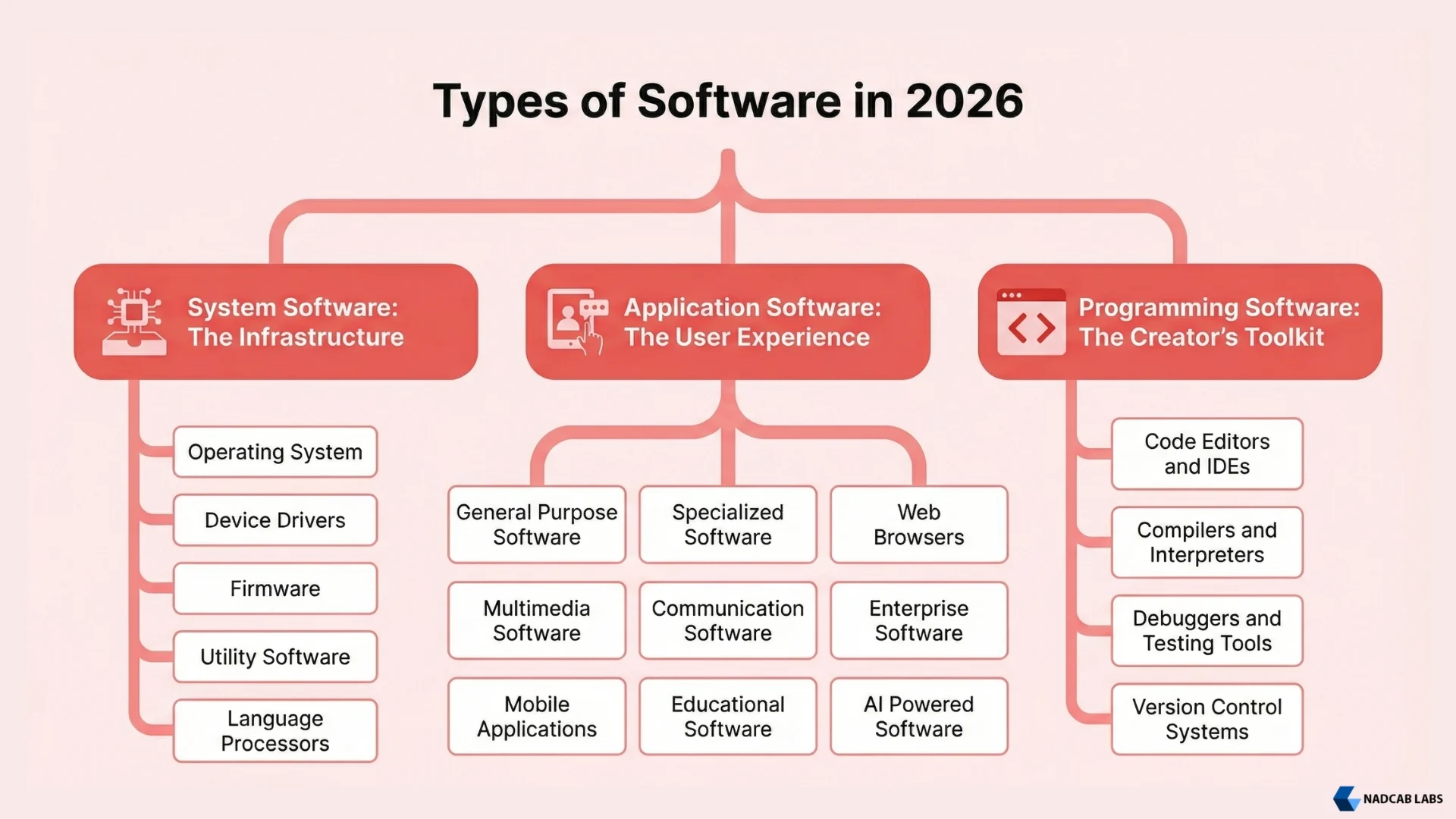
- System Software has five subcategories: Operating Systems, Device Drivers, Firmware, Utility Software, and Language Processors.
- Application Software has nine subcategories: General Purpose Software, Specialized Software, Web Browsers, Multimedia Software, Communication Tools, Enterprise Software, Mobile Apps, Educational Software, and AI-Powered Software.
- Programming Software has four subtypes: Code Editors and IDEs, Compilers and Interpreters, Debugging and Testing Tools, and Version Control Systems.
- In total, there are 18 subtypes across the three main types of software.
That is exactly why we created this guide. In this article, we will clearly define what software is, explain how many types of software actually exist according to 2026 standards, and break down every sub-type with simple, real-world software examples in computer systems. By the end, you will have a crystal-clear picture of software and its types.
What Is Software?
Software is a set of instructions that tell a computer what to do. Unlike hardware (the physical parts you can touch like a keyboard or monitor), software is something you cannot touch. It lives inside your device and controls how everything works. In simple terms, software is the brain behind every action your device performs, and understanding it can be easier with proper assignment help when studying technical concepts.
Definition
Software is a set of instructions that tells a computer what to do. It controls the hardware and allows users to work, study, communicate, and be entertained. Software acts as the brain of a computer system.
Think of it this way. Hardware is the body of your computer. Software is the mind. Without software, your computer is just a box of metal and circuits. The moment you install an operating system like Windows or macOS, your computer comes to life. That operating system is a type of software.
Here are some everyday software examples:
Examples: Windows, macOS, Linux (Ubuntu, Fedora), Android, iOS, and ChromeOS.
Every app, every tool, and every program you use on any digital device is a form of software.
Also read: Types of Computers: Complete Guide With Examples
How Many Types of Software Are There?
According to modern computer science, there are three major types of software: System Software, Application Software, and Programming Software. Together, these three categories form the full software ecosystem used in all computer systems and digital devices.
| # | Main Type of Software | What It Does (In Short) |
|---|---|---|
| 1 | System Software | Runs and manages your computer’s hardware and provides a platform for other software to work. |
| 2 | Application Software | Helps users perform specific tasks like writing, designing, browsing, or gaming. |
| 3 | Programming Software | Helps developers write, test, and debug new software programs. |
Each of these three types has several subtypes. Let us now explore each one in detail.
System Software
System software forms the foundation of a computer. It loads when the device starts. It manages core parts such as the processor, memory, storage, and input and output devices. Without system software, application programs cannot work.
In simple words, system software connects the user and the computer hardware. When you click a mouse or press a key, it turns your action into instructions the hardware understands. It works in the background. Most users never interact with it directly.
Sub Types of System Software
1. Operating System OS
The operating system is the most important system software on any device. It starts as soon as you turn on your computer. It manages files, memory, the processor, and all installed programs.
Without an operating system, a computer cannot work. It gives you the interface you see every day such as the desktop, icons, and menus.
Examples: Windows 11, macOS Sequoia, Linux Ubuntu, Linux Fedora, Android, iOS, ChromeOS.
Also read: What Are Software NOOBS?
2. Device Drivers
A device driver is a small but important piece of software. It helps the operating system communicate with hardware. Every hardware device such as a printer, mouse, keyboard, graphics card, or Wi-Fi adapter needs its own driver.
Think of a driver as a translator. The operating system and hardware speak different languages. The driver helps them understand each other.
Examples: NVIDIA Graphics Driver, Realtek Audio Driver, HP Printer Driver, Intel Wi-Fi Driver.
3. Firmware
Firmware is software built directly into a hardware device. Unlike regular software, it is not installed often. It is added during manufacturing and controls the basic functions of the device.
Devices like routers, smart TVs, washing machines, and keyboards all use firmware. It helps the device start and perform its basic tasks.
Examples: BIOS or UEFI, router firmware, smart TV firmware, printer firmware, smartwatch firmware.
4. Utility Software
Utility software helps maintain and protect your computer. It cleans junk files, scans for viruses, backs up data, compresses files, and manages disk space.
It does not help you create documents or designs. Instead, it keeps your system safe and running well.
Examples: Windows Defender, CCleaner, WinRAR, Windows Disk Cleanup, Malwarebytes.
5. Language Processors
Computers understand only machine language made of zeros and ones. Programmers write code in languages like Python, Java, or C++. Language processors convert this code into machine language.
There are three main types. Compilers translate the whole program at once. Interpreters translate code line by line. Assemblers convert low-level assembly code into machine code.
Examples: GCC Compiler, Python Interpreter, Java Compiler (javac), .NET CLR.
Also Read: What is Software Development Life Cycle (SDLC)?
Application Software
Application software, also called apps, is the software you use every day. It helps you write, browse the internet, edit videos, or manage business work. In many cases, it works alongside base software, which provides the core system and structure needed for these applications to run smoothly.
Unlike system software, application software is made for users. It always needs an operating system to run. For example, Microsoft Word needs Windows or macOS to work.
Sub Types of Application Software
1. General Purpose Software
This software is used by many people for many different tasks. It is not built for one specific industry.
Examples: Microsoft Word, Microsoft Excel, Google Docs, Google Sheets, LibreOffice, Notion, Microsoft PowerPoint.
2. Specialized Software
Specialized software is built for a specific industry or purpose. It solves particular problems for certain fields. Many businesses use custom versions of this software.
Examples: Tally, AutoCAD, hospital management systems, airline reservation systems, banking software, inventory systems, Salesforce CRM.
3. Web Browsers
Web browsers let you access and use the internet. They read website code and display it as web pages on your screen. In 2026, browsers can also run powerful web apps and AI tools.
Examples: Google Chrome, Mozilla Firefox, Microsoft Edge, Apple Safari, Brave, Arc Browser.
4. Multimedia Software
Multimedia software helps you create, edit, or play audio, video, and images. Content creators and regular users both use it.
Examples: Adobe Photoshop, Adobe Premiere Pro, VLC Media Player, Audacity, Canva, CapCut.
5. Communication Software
Communication software helps people chat, call, and work together online. It is essential for remote work and online learning. Additionally, many modern platforms now integrate AI note takers to automatically capture, summarize, and organize conversations for improved productivity.
Examples: WhatsApp, Zoom, Microsoft Teams, Slack, Google Meet, Discord, Telegram, and modern call center software solutions used for customer support and sales operations. Businesses also use QR code software such as Scanova to simplify information sharing, customer engagement, document access, and offline-to-online interactions across marketing and support channels.
6. Enterprise Software
Enterprise software is built for organization’s. It manages business operations like HR, supply chain, and AI customer Experience. Platforms like Monsterops help teams automate and streamline operations at scale.
Examples: SAP ERP, Oracle NetSuite, Salesforce CRM, Zoho One, Microsoft Dynamics 365, HubSpot Homebase.
7. Mobile Applications
Mobile apps are designed for smartphones and tablets. They are downloaded from app stores and built for touch screens.
Examples: Instagram, Uber, Swiggy, Google Maps, Duolingo, ChatGPT app, PhonePe, Spotify.
8. Educational Software
Educational software supports learning and teaching. It includes online courses, quiz tools, and classroom management systems.
Examples: Duolingo, Khan Academy, Coursera, Google Classroom, Byju’s, Moodle, Unacademy.
9. AI-Powered Software
AI-powered software uses artificial intelligence to perform smart tasks. In 2026, this is one of the fastest growing categories, driven by every forward-thinking AI software development company building intelligent, scalable solutions. These tools can generate content, create images, analyse large datasets, automate workflows, and help businesses make better decisions.
Examples: ChatGPT, Midjourney, GitHub Copilot, Grammarly, Jasper AI, Google Gemini.
Programming Software
Programming software is used by developers to create other software. Without it, no new apps or systems could be built. It is mainly used by programmers and not everyday users. But it is an important part of the full software picture.
Sub Types of Programming Software
1. Code Editors and IDEs
Code editors are tools where developers write code. IDEs (Integrated Development Environments) are advanced tools that include debugging and other features all in one place. They make development faster and easier.
Examples: Visual Studio Code, IntelliJ IDEA, PyCharm, Sublime Text, Eclipse, Xcode, Android Studio, and Cursor AI agent.
2. Compilers and Interpreters
These tools convert human-written code into machine code. Compilers translate the whole program before running it. Interpreters translate code while it runs.
Examples: GCC, Python Interpreter, Node.js, Java Development Kit.
3. Debuggers and Testing Tools
Debuggers help developers find and fix errors in code. Testing tools check whether software works correctly in different situations.
Examples: Chrome DevTools, GDB, Selenium, Postman, Jest.
4. Version Control Systems
Version control systems track changes in code when multiple developers work on the same project. They help teams work together and restore earlier versions when needed. Indoor Tracking Software enhances operational visibility by enabling real-time tracking of assets and personnel within indoor environments. It helps organizations improve workflow efficiency, ensure safety, and make data-driven decisions through accurate location insights.
Examples: Git, GitHub, GitLab, Bitbucket, Apache Subversion.
Complete Summary: All Types of Software at a Glance
Here is a full summary table showing all three main types of software and their subtypes with examples.
| Main Type | Sub-Type | Examples |
|---|---|---|
| System Software | Operating System | Windows, macOS, Linux, Android |
| Device Drivers | NVIDIA Driver, Realtek Audio Driver | |
| Firmware | BIOS/UEFI, Router Firmware | |
| Utility Software | Antivirus, CCleaner, WinRAR | |
| Language Processors | GCC Compiler, Python Interpreter | |
| Application Software | General Purpose Software | MS Word, Google Docs, Excel |
| Specialized Software | Tally, AutoCAD, Salesforce CRM | |
| Web Browsers | Chrome, Firefox, Edge, Safari | |
| Multimedia Software | Photoshop, VLC, Premiere Pro | |
| Communication Software | WhatsApp, Zoom, Slack, Teams | |
| Enterprise Software | SAP ERP, Oracle, Zoho One | |
| Mobile Applications | Instagram, Uber, Google Maps | |
| Educational Software | Duolingo, Coursera, Khan Academy | |
| AI-Powered Software | ChatGPT, Copilot, Midjourney | |
| Programming Software | Code Editors & IDEs | VS Code, IntelliJ, PyCharm |
| Compilers & Interpreters | GCC, Python Interpreter, JDK | |
| Debuggers & Testing Tools | Chrome DevTools, Selenium, Jest | |
| Version Control Systems | Git, GitHub, GitLab |
Key Differences Between the 3 Types of Software
| Feature | System Software | Application Software | Programming Software |
|---|---|---|---|
| Purpose | Manages hardware and provides a platform | Helps users do specific tasks | Helps developers build software |
| User | Runs in the background for all users | Used directly by end users | Used by programmers and developers |
| Can run without others? | Yes, it runs independently | No, needs system software | No, needs system software |
| Installed when? | Usually pre-installed | Installed by the user | Installed by developers |
| Examples | Windows, Linux, macOS | Chrome, WhatsApp, Photoshop | VS Code, Git, GCC Compiler |
How to Choose the Right Type of Software for Your Business
Choosing the right software depends on your goals, business size, and daily needs. Not every business needs complex enterprise tools. Many small businesses can start with simple application software and upgrade later as they grow.
Start by identifying your main problem – Do you need software to manage accounts, handle customers, track inventory, or automate tasks? If your focus is daily operations, application software such as Webgility for accounting or CRM tools may be enough. If you are building a digital product, you will need programming tools and development support.
Think about scalability – The software you pick should grow with your business. It should handle more users, more data, and more features in the future without slowing things down.For B2B teams choosing between browser-based and mobile-first solutions, understanding web app vs native app can help decide the right approach for scalability, performance, user experience, and long-term maintenance.
Check integration and compatibility – Your software must work well with your existing systems. For example, your CRM should connect with your email platform, payment gateway, or marketing tools.
Consider security and support – Choose software that gets regular updates, has strong data protection, and offers reliable customer support. In 2026, data security and compliance are critical for every business.
If you are unsure which type of software fits your business, professional consultation and custom software solutions can help you find the right path.
Final Thoughts
There are three main types of software: System Software, Application Software, and Programming Software. Understanding these categories helps individuals and businesses make better technology decisions. In 2026, software is not just a tool. It is the backbone of modern digital life. Choosing the right type of software can improve efficiency, cut costs, and support long-term growth.
Frequently Asked Questions (FAQs)
Q1.What is software in simple words?
Software is a set of instructions or programs that tell a computer or device what to do. You cannot touch software it is the non-physical part of your computer that makes everything work. Every app and program you use is software.
Q2.How many types of software are there?
There are 3 major types of software: System Software, Application Software, and Programming Software. Each of these has multiple sub-types. System software has 5 sub-types, application software has 9 sub-types, and programming software has 4 sub-types.
Q3.What is the difference between system software and application software?
System software manages your computer’s hardware and runs in the background (example: Windows). Application software is what you directly use to perform tasks (example: Microsoft Word). Application software cannot run without system software.
Q4.What are some common software examples in computer?
Common software examples in computer systems include: Windows 11 (operating system), Google Chrome (web browser), Microsoft Word (word processing), Adobe Photoshop (image editing), VLC (media player), and Visual Studio Code (code editor).
Q5.What are the types of application software?
The types of application software include: General Purpose Software, Specialized Software, Web Browsers, Multimedia Software, Communication Software, Enterprise Software, Mobile Applications, Educational Software, and AI-Powered Software.
Explore Services
Related Services
Reviewed by

Aman Vaths
Founder of Nadcab Labs
Aman Vaths is the Founder & CTO of Nadcab Labs, a global digital engineering company delivering enterprise-grade solutions across AI, Web3, Blockchain, Big Data, Cloud, Cybersecurity, and Modern Application Development. With deep technical leadership and product innovation experience, Aman has positioned Nadcab Labs as one of the most advanced engineering companies driving the next era of intelligent, secure, and scalable software systems. Under his leadership, Nadcab Labs has built 2,000+ global projects across sectors including fintech, banking, healthcare, real estate, logistics, gaming, manufacturing, and next-generation DePIN networks. Aman’s strength lies in architecting high-performance systems, end-to-end platform engineering, and designing enterprise solutions that operate at global scale.