Ai Overview
Software testing is a key part of any software project. Research shows that failing to plan can be devastating, as nearly 31% of software projects fail or are cancelled due to a lack of structured testing strategies and clear requirements. Without a proper test plan, testing becomes scattered and ineffective, often leading to “bug leakage” where fixing an error in production can cost over 600% more than catching it during the planning phase.
Software testing is a key part of any software project. It helps teams find bugs, ensure quality, and deliver a product that works as expected. But good testing does not just happen on its own; it needs careful planning that starts with a formal test plan. Research shows that failing to plan can be devastating, as nearly 31% of software projects fail or are cancelled due to a lack of structured testing strategies and clear requirements.
A test plan in software testing is a document that guides the entire testing process. It tells the team what to test, how to test it, who is responsible, and when the testing will happen. Without a proper test plan, testing becomes scattered and ineffective, often leading to “bug leakage” where fixing an error in production can cost over 600% more than catching it during the planning phase.
In this guide, you will learn what a test plan is, why it matters, what its key components are, how to create one, and what a good test plan document looks like. By the end, you will have a clear picture of how to build a test plan that supports strong, reliable software testing.
What is a Test Plan in Software Testing?
A test plan in software testing is a formal document that outlines all the testing activities planned for a software project. It describes what will be tested, the testing approach to be used, the resources needed, the schedule, and the expected results.
In simple terms, a test plan is a blueprint for testing. Just like a construction blueprint guides builders, a test plan guides the testing team. It helps everyone stay on the same page and work toward the same goal.
The test plan is usually written by the Test Manager or Test Lead before testing begins. It is shared with business analysts, project managers, developers, and other stakeholders so everyone understands the testing scope and approach.
Key roles in test planning:
| Role | Responsibility |
|---|---|
| Test Manager / Test Lead | Writes and approves the test plan |
| Test Engineers | Review and execute testing based on the plan |
| Business Analysts | Provide input on requirements and scope |
| Project Managers | Align testing with project timelines |
| Developers | Support by clarifying system behavior |
| Clients / Customers | Review and approve the final plan |
Why is a Test Plan Important in Software Testing?
A test plan plays a very important role in any software project. It keeps the testing process organized, focused, and efficient. Here are the main reasons why every project needs a test plan:
Why a test plan matters — the data
Industry research on the cost of poor testing and the impact of structured test planning
Key numbers at a glance
Cost of a bug — by the stage it is found
What does a structured test plan improve?
Defect detection rate rises by up to 40% when testing follows a documented plan versus ad-hoc testing.
Source: Capers Jones, Applied Software Measurement
Teams with a test plan complete testing 25 to 30% faster on average because scope and priorities are pre-defined.
Source: World Quality Report, 2023
Organizations with formal test plans report 60% fewer post-release critical incidents compared to those without one.
Source: CISQ / Gartner Research
Over 45% of QA teams say resource misallocation is the biggest waste in testing — a problem a test plan directly prevents.
Source: State of Testing Report, 2023
Data sourced from CISQ, IBM, NIST, Standish Group, World Quality Report, and PMI research. For reference use.
- It defines clear objectives so the team knows what they are working toward.
- It prevents scope creep by setting boundaries on what will and will not be tested.
- It helps allocate resources wisely, including people, tools, and time.
- It identifies risks early so the team can prepare solutions in advance.
- It improves communication between testers, developers, and business teams.
- It serves as a reference document throughout the project lifecycle.
- It ensures all critical areas of the software are covered during testing.
To understand the broader context of software testing and how a test plan fits into the quality process, visit our guide on software testing basics. It covers foundational concepts that support effective test planning.
Types of Test Plans in Software Testing
Not all test plans are the same. Different projects and testing needs require different types of test plans. Here are the three main types:
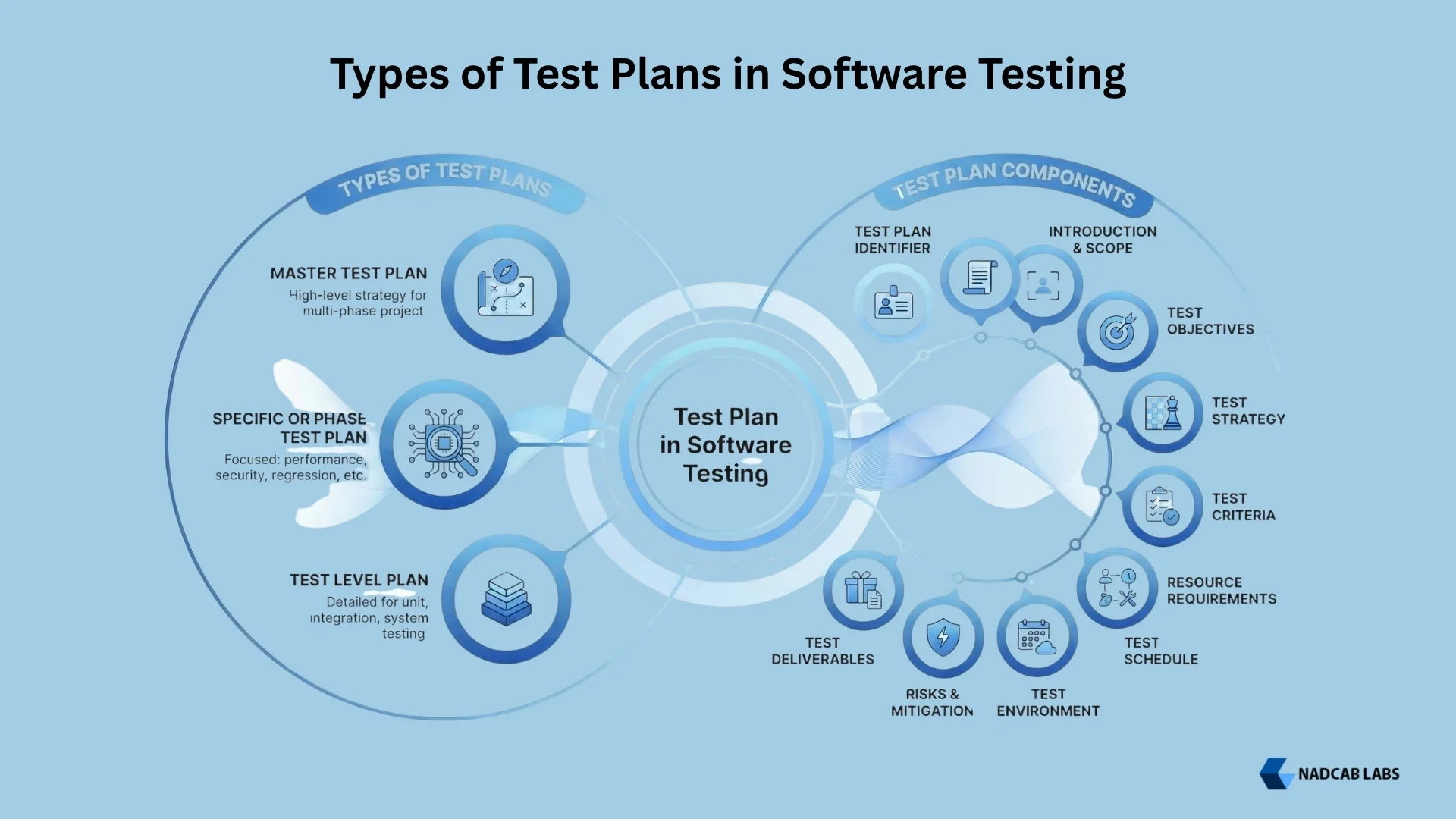
1. Master Test Plan
A master test plan is a high-level document that outlines the overall testing strategy for an entire project. It covers all testing phases and shows how different types of testing connect with each other. Large projects with multiple teams or testing phases typically use a master test plan as the central guide.
2. Specific or Phase Test Plan
A specific test plan focuses on a particular phase or type of testing. For example, there may be separate test plans for performance testing, security testing, or regression testing. Each plan provides detailed instructions for carrying out that specific type of testing.
3. Test Level Plan
A test level plan applies to a specific level of testing, such as unit testing, integration testing, or system testing. It provides the exact details needed for testers working at that particular level of the software.
Test Plan Components in Software Testing
A well-written test plan document contains several key sections. Each section covers a different aspect of the testing process. Below are the main components of a test plan in software testing:
1. Test Plan Identifier
This is a unique ID assigned to the test plan. It helps teams track and manage the document across different versions.
2. Introduction and Scope
This section gives a brief overview of the project and explains what the test plan covers. It also defines the scope of testing, meaning which features or modules will be tested and which will not be included.
3. Test Objectives
This section lists the goals of the testing effort. For example, the objective may be to verify that all user-facing features work correctly, or to check that the application performs well under high load.
4. Test Strategy
The test strategy describes the approach the team will use. It covers the types of testing to be performed, the tools to be used, and the methods for tracking and reporting defects.
5. Test Criteria
Test criteria include two types:
- Suspension Criteria: Conditions under which testing will be paused. For example, if a critical bug blocks further testing.
- Exit Criteria: Conditions that must be met before testing is considered complete. For example, all high-priority test cases must pass.
6. Resource Requirements
This section lists all the people, hardware, software, and tools needed for testing. It ensures the team has everything in place before testing begins.
7. Test Schedule
The test schedule shows the timeline for all testing activities. It breaks the testing effort into smaller tasks and assigns deadlines to each.
8. Test Environment
This section describes the environment in which testing will take place. It includes details about operating systems, browsers, devices, databases, and any other infrastructure needed.
9. Risks and Mitigation
Every project has risks. This section lists the possible risks that could affect testing and describes what steps will be taken to handle them.
10. Test Deliverables
Test deliverables are the documents and reports that will be produced during and after testing. These include test cases, test execution reports, defect logs, and final test summary reports. It is important that documents generated from Excel or Word are converted to PDF to maintain version control and a professional presentation before being distributed for formal review by clients and project managers.
How to Make a Test Plan in Software Testing
Creating a test plan requires careful thought and a structured approach. The following eight steps explain how to build a solid test plan from start to finish:
Step 1: Analyze the Product
Before writing a single word, understand the product you are going to test. Speak with clients, designers, and developers. Do a walkthrough of the software. Answer these questions:
- What does the product do?
- Who are the users?
- What are the hardware and software requirements?
- Which features are most critical to users?
Step 2: Design the Test Strategy
The test strategy is the core of your test plan. It defines:
- The scope of testing, meaning what will and will not be tested.
- The types of testing to be performed, such as functional, performance, or regression testing.
- The tools and techniques to be used.
- The testing approach, whether manual, automated, or a mix of both.
Step 3: Define Test Objectives
Write down what you want to achieve through testing. Make your objectives specific and measurable. For example, instead of saying you want to find bugs, say you want to verify that all login and registration features work without errors.
Step 4: Define Test Criteria
Set clear benchmarks for when to pause testing and when to declare it complete. Suspension criteria tell the team when to stop. Exit criteria tell the team when the job is done.
Step 5: Plan Resources
Make a list of everything you need. This includes team members and their roles, testing tools, hardware, software licenses, and any external services. Planning resources early prevents delays later.
Step 6: Set Up the Test Environment
Define the environment where testing will take place. Specify the devices, operating systems, browsers, and network conditions. Where possible, the test environment should match the real conditions in which users will access the software.
Step 7: Schedule and Estimate
Break the testing work into smaller tasks. Estimate how long each task will take. Create a schedule that accounts for possible delays. Set milestones to track progress.
Step 8: List Test Deliverables
Specify what documents and reports will be produced. Common test deliverables include the test plan itself, test cases, execution logs, defect reports, and a final summary report.
For a broader look at how software projects are structured and managed, including how testing fits in, read our article on the software development life cycle. It explains the different development models and where testing takes place in each.
Test Plan Document in Software Testing
A test plan document captures all the details discussed in the steps above. It is a formal record that can be shared with all project stakeholders. Below is a standard structure for a test plan document:
| Section | What It Covers |
|---|---|
| 1. Document Identifier | Unique ID, version number, and date of the document |
| 2. Introduction | Brief project overview and purpose of the test plan |
| 3. Scope of Testing | What will be tested and what will not be tested |
| 4. Test Objectives | Goals of the testing effort |
| 5. Test Strategy | Approach, test types, tools, and techniques |
| 6. Test Criteria | Suspension and exit criteria |
| 7. Resource Plan | Team roles, hardware, software, and tools needed |
| 8. Test Environment | Devices, OS, browsers, network, and data setup |
| 9. Test Schedule | Task breakdown, timelines, and milestones |
| 10. Risk and Mitigation | Identified risks and plans to handle them |
| 11. Test Deliverables | Documents and reports to be produced |
Test Plan Template in Software Testing
A test plan template gives teams a ready-made structure to follow and export as a PDF file. Instead of starting from scratch every time, a template saves time and ensures no important section is missed. Here is a simple template outline you can adapt for your project:
- Test Plan ID: [Unique identifier]
- Project Name: [Name of the software project]
- Version: [Document version number]
- Date: [Date of creation or last update]
- Prepared By: [Name of the Test Manager or Test Lead]
- Approved By: [Name of the approver]
- Introduction: [Brief overview of the project and testing purpose]
- Scope: [List of features to be tested and features excluded from testing]
- Objectives: [Testing goals and what success looks like]
- Test Strategy: [Types of tests, tools, and approach]
- Test Criteria: [Suspension and exit conditions]
- Resources: [People, tools, hardware, and software]
- Test Environment: [Operating systems, browsers, devices, data requirements]
- Schedule: [Timeline for each testing phase]
- Risks and Mitigation: [Identified risks and how to handle them]
- Deliverables: [List of all documents and reports to be produced]
Free Download
Get the Test Plan Template
Download your free ready-to-use test plan template in the format that works best for your team. No sign-up required.
Free to use. No sign-up required. Works with Microsoft Office and Google Docs.
Common Challenges in Test Planning
Writing a good test plan is not always easy. Teams often face several challenges during the planning stage:
Unclear Requirements
If the software requirements are not well-defined, it becomes difficult to write a complete test plan. The scope and objectives will be vague, and important areas may be missed.
Changing Requirements
Requirements often change during a project. When this happens, the test plan must be updated. If updates are not made in time, the plan becomes outdated and leads to poor coverage.
Limited Resources
Teams may not always have enough people, time, or tools to carry out the plan they have written. Resource constraints can force teams to cut corners in testing.
Setting Up the Test Environment
Configuring a test environment that accurately reflects real-world conditions can be difficult. A poor test environment leads to unreliable test results.
Estimating Time and Effort
It is hard to predict exactly how long testing will take. Poor estimates lead to missed deadlines or rushed testing at the end of a project. The best way to handle these challenges is to review the plan regularly, keep it flexible, and communicate with all stakeholders throughout the project.
Test Plan vs. Test Strategy: What is the Difference?
Many people confuse a test plan with a test strategy. They are related but not the same thing. Here is a simple comparison:
| Aspect | Test Strategy | Test Plan |
|---|---|---|
| Definition | A high level document describing the overall testing approach | A detailed document describing specific testing activities for a project |
| Scope | Covers multiple projects or the entire organization | Covers one specific project or release |
| Level of Detail | General and broad | Specific and detailed |
| Who Creates It | Senior management or test manager | Test manager or test lead |
| Flexibility | Less likely to change | Updated as the project progresses |
| Purpose | Sets testing standards and guidelines | Guides the execution of testing for a specific project |
Best Practices for Writing a Test Plan
A test plan is only useful if it is well-written and actually followed. Here are some best practices to keep in mind:
- Keep the language simple and clear so all stakeholders can understand it.
- Review the plan with your team before finalizing it to catch any gaps.
- Update the plan whenever requirements, scope, or timelines change.
- Include enough detail to guide the testing team but avoid unnecessary complexity.
- Make sure all risks are documented along with clear mitigation steps.
- Set realistic schedules and resource estimates based on actual project constraints.
- Share the plan with all stakeholders and get their feedback early.
The type of software being built also affects how a test plan is structured. For a look at different software categories and how they shape testing requirements, check out our guide on types of software with examples.
Final Thoughts
A test plan in software testing is one of the most important documents a testing team can produce. It brings structure, direction, and clarity to the entire testing process. When done right, it helps teams avoid confusion, manage resources wisely, and deliver software that meets quality standards.
Whether you are working on a small application or a large enterprise system, a clear and detailed test plan gives your team the confidence to test thoroughly and the roadmap to do it well.
For more details on how software projects are structured and how to apply testing at every stage, visit our blog on the software development life cycle. You can also explore how testing applies to specialized tools in our article on tournament software and its key features.
Explore Services
Related Services
Reviewed by

Aman Vaths
Founder of Nadcab Labs
Aman Vaths is the Founder & CTO of Nadcab Labs, a global digital engineering company delivering enterprise-grade solutions across AI, Web3, Blockchain, Big Data, Cloud, Cybersecurity, and Modern Application Development. With deep technical leadership and product innovation experience, Aman has positioned Nadcab Labs as one of the most advanced engineering companies driving the next era of intelligent, secure, and scalable software systems. Under his leadership, Nadcab Labs has built 2,000+ global projects across sectors including fintech, banking, healthcare, real estate, logistics, gaming, manufacturing, and next-generation DePIN networks. Aman’s strength lies in architecting high-performance systems, end-to-end platform engineering, and designing enterprise solutions that operate at global scale.