Ai Overview
Every day, millions of people use apps to transfer money, book flights, shop online, and communicate with others. But have you ever wondered what would happen if these apps suddenly stopped working or started giving wrong results? Behind every reliable application is a process that checks whether the software actually works as expected. Understanding software testing basics helps explain how companies prevent crashes, security issues, and costly mistakes before users ever see them.
Every day, millions of people use apps to transfer money, book flights, shop online, and communicate with others. But have you ever wondered what would happen if these apps suddenly stopped working or started giving wrong results?
Behind every reliable application is a process that checks whether the software actually works as expected. This process is called testing. Understanding software testing basics helps explain how companies prevent crashes, security issues, and costly mistakes before users ever see them.
Key Takeaways
• Software testing is the process of checking whether an application works correctly and meets user requirements before release.
• Understanding software testing basics helps companies detect bugs, security issues, and performance problems early in development.
• Testing improves product quality, reduces the cost of fixing bugs, and increases user trust in software applications.
• Verification checks whether the software is built correctly, while validation confirms that it solves the user’s real problem.
• The seven principles of software testing explain important concepts such as early testing, defect clustering, and why exhaustive testing is not possible.
• Different testing types, such as functional testing, non-functional testing, regression testing, and security testing focus on different aspects of software quality.
In this beginner’s guide, you will learn what software testing is, why it matters, the different types of testing, and how the testing lifecycle works in real-world software development, including insights commonly discussed in AI Launch Reviews when evaluating new software products.
What Is Software Testing?
Software testing is the process of checking whether a software application works correctly. It finds bugs, errors, and missing features before users interact with the product.
Think of it like a quality check. Before a car leaves the factory, engineers test the brakes, the engine, and the lights. Software testing does the same for digital products.
In simple terms, software testing answers two questions:
- Does the software do what it is supposed to do?
- Does it do it without breaking or failing?
Without testing, even a well-designed application can crash, expose user data, or deliver wrong results. Testing catches these problems early, when they are cheaper and faster to fix.
Why Software Testing Matters
You might wonder: if developers write good code, why do we still need testing?
The answer is simple. Humans make mistakes. No matter how skilled a developer is, bugs can appear in complex code. Testing is the safety net that catches those bugs before they reach real users.
Here are real-world examples of what happens when testing is skipped or done poorly:
- In 1985, a radiation therapy machine called Therac-25 gave patients deadly doses of radiation due to a software bug. Three people died and three were seriously injured.
- In 1996, a bug in a US bank system accidentally credited customer accounts with over 920 million dollars.
- In 1999, a software error caused a military satellite worth 1.2 billion dollars to be destroyed during launch.
- In 2015, Bloomberg terminals in London crashed due to a software bug. Over 300,000 traders were affected, and the UK government had to cancel a major bond sale.
- In 2016, Yahoo suffered a major data breach that exposed the accounts of 500 million users.
These are not rare edge cases. They show how critical software testing is across industries like healthcare, finance, aviation, and e-commerce. Software testing is also becoming an important career path in the technology industry. Many students interested in QA and software development choose to study software engineering or IT programs internationally to gain practical exposure and global career opportunities. Students planning to pursue technology education overseas can explore professional study abroad consultancy services at Jagvima Consultants for expert guidance to find suitable universities and programs.
Benefits of Software Testing
Software testing solutions provides several key benefits:
Better product quality. Testing finds bugs before users do. This leads to a smoother and more reliable experience.
Lower cost of fixing bugs. A bug found during testing costs much less to fix than a bug found after release. Studies show that fixing a bug in production can cost 10 to 100 times more than fixing it early.
Improved security. Security testing finds vulnerabilities before hackers can exploit them. This protects both users and businesses.
Higher user satisfaction. Users trust software that works reliably. Testing helps build that trust.
Compliance with regulations. In industries like healthcare and banking, testing helps meet legal and regulatory requirements.
Verification vs Validation
Before diving into testing types, it helps to understand two core concepts: verification and validation. Most beginners confuse them.
Verification asks: “Are we building the product the right way?”
It checks that the development process follows the correct steps and standards. Verification is usually done through reviews, walkthroughs, and inspections. It does not involve running the software.
Validation asks: “Are we building the right product?”
It checks that the final software meets the actual needs of the user. Validation involves running and testing the software. It confirms that the product solves the real problem.
Here is a simple example. Imagine you are building a calculator app.
- Verification checks that the code follows coding standards and logic.
- Validation checks that when a user enters 5 plus 3, the app shows 8.
Both are important. Verification catches process errors early. Validation confirms the end result is correct.
The 7 Principles of Software Testing
The International Software Testing Qualifications Board (ISTQB) defines seven key principles that guide professional software testing. These principles help testers work more effectively.
1. Testing Shows the Presence of Bugs
Testing can find bugs, but it cannot prove that software is completely bug-free. Even after testing, some bugs may still exist. The goal is to reduce the number of bugs, not to claim perfection.
2. Exhaustive Testing Is Not Possible
It is impossible to test every possible input, scenario, and combination. Instead, testers use risk analysis and priority to focus on the most important areas.
3. Early Testing Saves Time and Money
Testing should begin as early as possible in the development process. Finding a bug during requirements gathering is much cheaper than finding it after launch.
4. Defects Cluster Together
Most bugs are found in a small number of modules or features. If one part of the software has many bugs, there are likely more bugs hiding nearby. Testers focus more attention on these high-risk areas.
5. Pesticide Paradox
If you run the same tests over and over, the same bugs will pass without being caught. New bugs will go undetected. Testers must regularly update and add new test cases to stay effective.
6. Testing Is Context-Dependent
There is no single approach that works for every project. Testing a banking app is different from testing a mobile game. The right approach depends on the product, the users, and the risks involved.
7. Absence of Errors Fallacy
Just because software has no bugs does not mean it is good. If the software does not meet user needs, it fails regardless of how clean the code is. Quality means meeting user expectations, not just passing tests.
Types of Software Testing
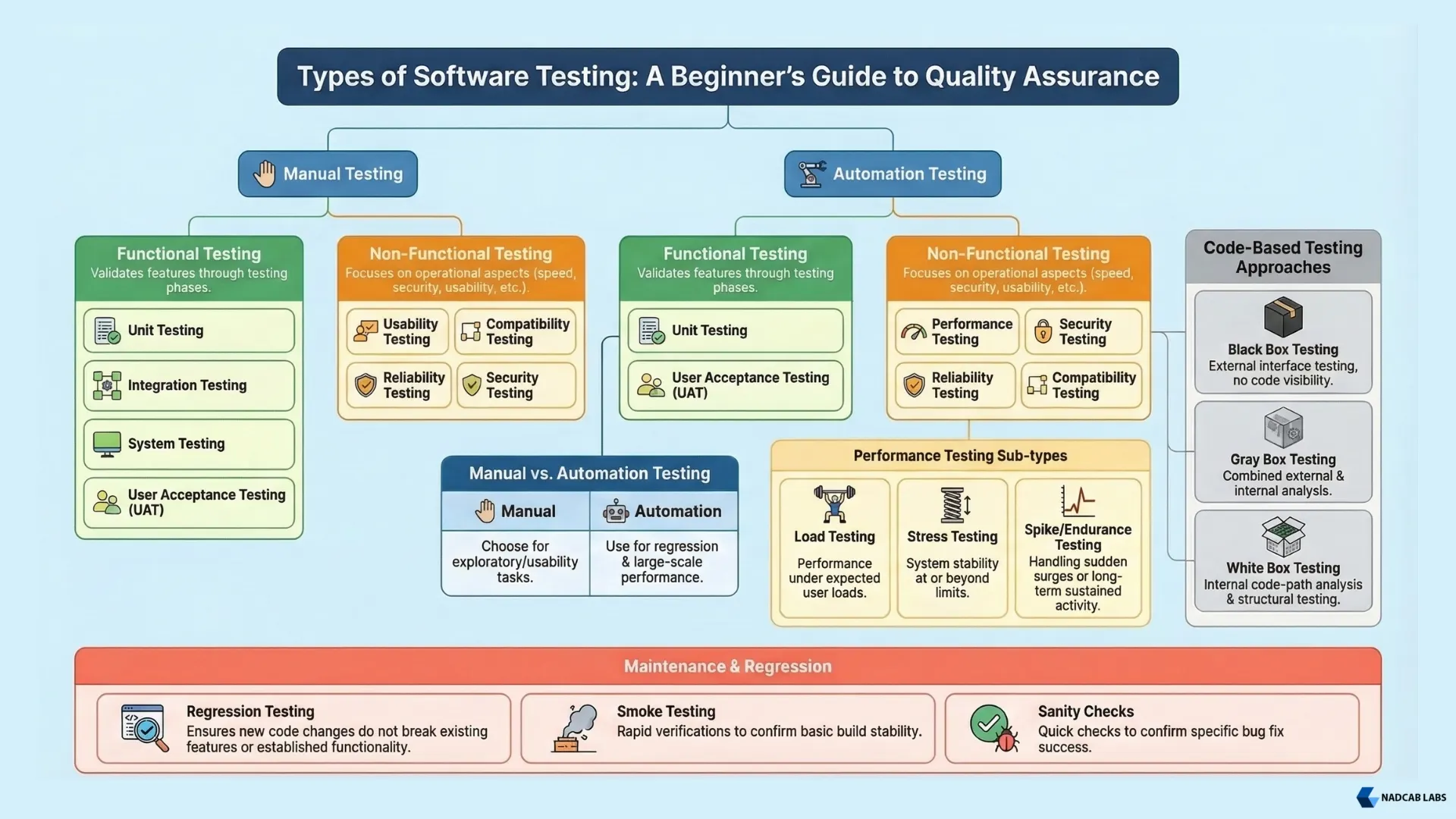
Software testing includes many different methods used to check whether an application works correctly. Each type focuses on a specific part of the software, such as functionality, performance, or security.
For beginners learning the basics of software testing, the field includes many methods for verifying that an application works correctly. Since different applications exist across industries, understanding the types of software can also help explain why different testing approaches are needed.
1. Manual Testing vs Automation Testing
Testing can be performed in two main ways.
Manual Testing
Manual testing is done by a human tester who interacts with the software and checks whether it behaves correctly.
Commonly used for:
-
Exploratory testing
-
Usability testing
-
Testing new features for the first time
Automation Testing
Automation testing uses tools and scripts to run tests automatically. It is useful when the same tests need to be executed many times.
Commonly used for:
-
Regression testing
-
Performance testing
-
Large projects with frequent releases
Most real-world projects use a combination of manual and automated testing.
2. Functional Testing
Functional testing checks whether the software works according to the defined requirements. It focuses on what the system should do.
Common types of functional testing include:
-
Unit Testing – Tests individual functions or components
-
Integration Testing – Tests how different modules work together
-
System Testing – Tests the complete application as a whole
-
User Acceptance Testing (UAT) – Final testing done by end users or stakeholders
Each of these testing levels plays an important role in verifying that the software works correctly.
3. Non-Functional Testing
Non-functional testing focuses on how the system performs rather than what it does. It evaluates quality attributes such as speed, security, and usability.
Common types include:
-
Performance Testing
-
Load testing
-
Stress testing
-
Spike testing
-
Endurance testing
-
-
Security Testing
-
Usability Testing
-
Compatibility Testing
-
Reliability Testing
These tests ensure the software is stable, secure, and easy for users to interact with.
4. Code-Based Testing Approaches
Another way to classify testing is based on how much knowledge the tester has about the internal code.
-
Black Box Testing – Tester checks inputs and outputs without seeing the code
-
White Box Testing – Tester has full access to the source code
-
Gray Box Testing – Tester has partial knowledge of the system
These approaches help testers design better test cases depending on the situation.
5. Regression Testing
Regression testing ensures that new code changes do not break existing features. Whenever developers add new features or fix bugs, testers run previous test cases again to confirm everything still works correctly.
This type of testing is very common in continuous development environments and is often automated.
6. Smoke Testing and Sanity Testing
These are quick checks used during development builds.
-
Smoke Testing – A basic check to confirm that the main functions of the software work and the build is stable enough for further testing.
-
Sanity Testing – A focused check to confirm that specific bug fixes or small changes are working correctly.
Understanding these categories is an important part of learning software testing basics. Each type plays a different role in ensuring software quality, and documenting these processes in a knowledge base software helps teams maintain consistency and easily access testing guidelines. In upcoming guides, we will explore these testing types in more detail with real examples and practical use cases.
The Software Testing Process (Step by Step)
Here is how a typical software testing process works in practice:
- Step 1: Understand the requirements. Read the product requirements or user stories carefully. Understand what the software is supposed to do.
- Step 2: Write a test plan. Define the scope, goals, resources, timeline, and tools for testing.
- Step 3: Design test cases. Write specific test cases for each feature. Each test case should have clear steps, input data, and expected results.
- Step 4: Set up the test environment. Prepare the hardware, software, and data needed to run the tests.
- Step 5: Execute the tests. Run the test cases. Compare actual results with expected results. Log any failures as defects.
- Step 6: Report and track defects. Submit defect reports to the development team. Each report should include steps to reproduce the bug, the expected result, and the actual result.
- Step 7: Retest after fixes. Once developers fix the bugs, run the relevant test cases again to confirm the fix works.
- Step 8: Perform regression testing. Run the full regression suite to ensure the fix did not break anything else.
- Step 9: Sign off on the build. When all critical defects are resolved and testing goals are met, the team gives approval for release.
Common Software Testing Mistakes to Avoid
Even experienced testers make mistakes. Here are the most common ones beginners should watch out for:
-
Starting testing too late: One common mistake is starting testing only at the end of the development process. Testing should begin as early as possible, ideally during the requirements phase. When testing starts late, bugs become harder and more expensive to fix.
-
Not writing test cases: Some testers perform informal testing without documenting proper test cases. Without written test cases, it becomes difficult to repeat tests consistently or share them with other team members.
-
Testing only the happy path: The happy path refers to scenarios where everything works perfectly. However, real users often provide unexpected inputs or use the system in unusual ways. Testers should also check edge cases, invalid inputs, and error conditions.
-
Skipping regression testing: After developers add new features or fix bugs, some teams skip regression testing to save time. This can cause previously fixed issues to reappear in the software.
-
Writing poor defect reports: A defect report that simply says “it does not work” is not helpful. A good defect report should clearly describe the steps to reproduce the issue, the expected result, and the actual result.
-
Testing without a proper test environment: Running tests directly in the production environment can be risky and may affect real users. It is always safer to perform testing in a separate and controlled test environment.
Tips for Beginners in Software Testing
If you are new to software testing, here are some practical tips to help you get started:
-
Learn the basics of SDLC and STLC: Understanding the Software Development Life Cycle (SDLC) and the Software Testing Life Cycle (STLC) will help you understand where testing fits in the overall development process.
-
Practice writing test cases: Writing clear and structured test cases is one of the most important skills for a tester. Beginners can practice by writing test cases for simple features such as login pages, search functions, or checkout processes.
-
Learn at least one testing tool: Modern software testing often involves tools that help automate tests or track bugs. Beginners can start with tools like Selenium for automation testing, Postman for API testing, or JIRA for defect tracking.
-
Understand basic SQL: Many applications store their data in databases. Knowing basic SQL queries helps testers verify whether the correct data is stored or retrieved during testing.
-
Use browser developer tools: Browser tools such as Chrome DevTools help testers inspect network requests, identify console errors, and analyze page performance while testing web applications.
-
Consider getting a testing certification: Certifications like the ISTQB Foundation Level help beginners understand industry testing standards and improve career opportunities.
-
Read real defect reports: Reviewing bug reports from open-source projects on platforms like GitHub can help beginners understand how professional testers identify and report issues.
Final Thoughts
Software testing is not just a final step before launch. It is a continuous process that runs throughout the entire software development lifecycle.
The basics of software testing include understanding what testing is, why it matters, the different types of testing, and how the testing lifecycle works. Whether you are a developer, a student, or someone exploring a career in QA, these fundamentals give you a strong foundation to build on.
Frequently Asked Questions
Q1.What is the difference between QA and software testing?
Quality Assurance (QA) is a broader process that covers the entire development lifecycle. It focuses on improving the processes used to create software. Software testing is a specific part of QA that involves executing the software and finding defects.
Q2.Can software testing be fully automated?
No. Automation handles repetitive and data-heavy tests well, but it cannot replace human judgment. Exploratory testing, usability testing, and many edge cases still require manual testers.
Q3.What skills does a software tester need?
A software tester needs analytical thinking, attention to detail, communication skills, and a basic understanding of the SDLC. Knowledge of testing tools, programming basics, and SQL is also very helpful.
Q4.What is the difference between a bug, defect, and error?
An error is a mistake made by a developer in the code. A defect (or bug) is the result of that error in the software. A failure is what happens when the defect causes the software to behave incorrectly during execution.
Q5.What is regression testing?
Regression testing re-runs existing test cases after a code change to confirm that the change did not break any previously working features.
Explore Services
Related Services
Reviewed by

Aman Vaths
Founder of Nadcab Labs
Aman Vaths is the Founder & CTO of Nadcab Labs, a global digital engineering company delivering enterprise-grade solutions across AI, Web3, Blockchain, Big Data, Cloud, Cybersecurity, and Modern Application Development. With deep technical leadership and product innovation experience, Aman has positioned Nadcab Labs as one of the most advanced engineering companies driving the next era of intelligent, secure, and scalable software systems. Under his leadership, Nadcab Labs has built 2,000+ global projects across sectors including fintech, banking, healthcare, real estate, logistics, gaming, manufacturing, and next-generation DePIN networks. Aman’s strength lies in architecting high-performance systems, end-to-end platform engineering, and designing enterprise solutions that operate at global scale.