Ai Overview
Technology is becoming a big part of our daily lives, and learning how computers work is more important than ever. But not everyone wants to start with expensive devices or complex systems. This is where Raspberry Pi makes things simple and accessible for everyone. Raspberry Pi is a small yet powerful device that helps you learn coding, build projects, and explore new technologies in an easy way.
Technology is becoming a big part of our daily lives, and learning how computers work is more important than ever. But not everyone wants to start with expensive devices or complex systems. This is where Raspberry Pi makes things simple and accessible for everyone.
Raspberry Pi is a small yet powerful device that helps you learn coding, build projects, and explore new technologies in an easy way. Whether you are a student, beginner, or developer, it offers a practical way to understand computing without spending too much money.
In this complete guide, you will learn what Raspberry Pi is, its features, different models, real-world uses, and how to install and set it up step by step. By the end, you will have a clear idea of how to start your journey with Raspberry Pi.
What is Raspberry Pi?
Raspberry Pi is a series of small, low-cost computers that fit on a single circuit board but can perform many of the same tasks as a traditional desktop. It was developed in the United Kingdom by the Raspberry Pi Foundation to make computing and programming accessible to everyone, especially students and beginners.
Unlike traditional computers, Raspberry Pi does not come fully assembled. It is just a small board with all the important parts like processor, memory, and ports built into it. You need to set it up yourself by adding a monitor, keyboard, and operating system.
In simple words, Raspberry Pi is a mini computer that helps you learn, create, and build real-world tech projects at a very low cost.
History and Evolution of Raspberry Pi
Raspberry Pi was first launched in 2012. The main purpose was to promote computer science education and help students learn programming easily.
At that time, many people found computers expensive and difficult to use. Raspberry Pi solved this problem by offering a simple and affordable solution.
Major versions over time (Pi 1 → Pi 5)
Over the years, Raspberry Pi has improved a lot. The first version, Raspberry Pi 1, was basic and designed mainly for learning.
Then came Raspberry Pi 2, 3, and 4 with better speed, more RAM, and improved performance. The latest version, Raspberry Pi 5, is much faster and supports advanced tasks like AI and edge computing.
Each new version made Raspberry Pi more powerful and useful.
Top Models of Raspberry Pi
Raspberry Pi comes in different models, each designed for specific needs and performance levels. In this section, we will explore the most popular Raspberry Pi models and understand how they differ in terms of features, power, and use cases.
Raspberry Pi 1
The journey began in 2012 with Raspberry Pi 1. It was designed mainly for learning and basic computing. Even though its performance is limited today, it played a huge role in making programming accessible to beginners.
Raspberry Pi Zero Series
First launched in 2015, the Zero series is designed to be small, lightweight, and affordable. It is ideal for compact projects such as wearable tech, embedded systems, and small IoT devices where space and cost are important.
Raspberry Pi 2 Model B
Released in 2015, this model improved performance with a faster processor and more RAM. It made Raspberry Pi more useful for real applications, allowing users to run programs more smoothly compared to the first version.
Raspberry Pi 3
In 2016, Raspberry Pi 3 introduced built-in Wi-Fi and Bluetooth. This removed the need for external adapters and made it much easier to build wireless and IoT-based projects.
Raspberry Pi 3 B+
Launched in 2018, this version focused on better connectivity and speed. It offered improved internet performance and better heat control, making it more reliable for long usage.
Raspberry Pi 4
Introduced in 2019, Raspberry Pi 4 marked a big step forward. It supports dual 4K displays and comes with multiple RAM options, making it capable of handling multitasking, media streaming, and even light desktop work.
Raspberry Pi 4B
Also released in 2019, Raspberry Pi 4B is one of the most widely used models. It offers strong performance and flexible RAM options, making it suitable for development, servers, and daily computing tasks.
Raspberry Pi 400
Launched in 2020, Raspberry Pi 400 is built into a keyboard, offering a complete computer experience. It is easy to set up and perfect for beginners, students, and educational use.
Raspberry Pi Pico
Released in 2021, Raspberry Pi Pico is not a full computer but a microcontroller. It is mainly used for controlling hardware components like sensors and motors, making it ideal for electronics and automation projects.
Raspberry Pi 5
The latest model, released in 2023, delivers a major performance boost. It is much faster, more efficient, and suitable for advanced use cases like AI, automation, and complex development tasks.
Key Features of Raspberry Pi
After understanding the models, it is important to look at the features that make Raspberry Pi unique. These features explain why this small device is so powerful, flexible, and widely used in learning, development, and various innovative technology projects.
- It has GPIO pins for connecting sensors and motors.
- It is widely used for IoT projects and automation systems.
- It includes built-in Wi-Fi, Bluetooth, USB, and HDMI connectivity.
- Raspberry Pi is highly energy efficient and consumes very little power.
- It is flexible enough to be used in education, robotics, and DIY projects.
- It is lightweight and portable, making it easy to carry and use anywhere.
- Raspberry Pi has a compact size and is roughly as small as a credit card.
- It supports Linux-based operating systems that are free and customizable.
- It supports coding and programming for learning and development purposes.
Operating Systems for Raspberry Pi
To make Raspberry Pi work, you need an operating system. Different operating systems offer different capabilities. In this section, we will explore the available options and help you understand which Raspberry Pi operating system is best for your needs.
Official OS: Raspberry Pi OS
The official Raspberry Pi operating system is Raspberry Pi OS. It is easy to use and perfect for beginners.
Other OS options (Ubuntu, LibreELEC, Kali Linux)
You can also install other operating systems like Ubuntu for general use, LibreELEC for media centers, and Kali Linux for security testing.
How to Install Raspberry Pi (Step-by-Step Guide)
Installing Raspberry Pi means setting up its operating system and getting it ready to use. Since Raspberry Pi does not come with a pre-installed system, you need to install one manually. Follow these simple steps to complete your Raspberry Pi setup easily.
Step 1: Gather Required Components
Before starting, make sure you have:
- Raspberry Pi board
- microSD card (minimum 8GB recommended)
- Power supply
- Monitor
- Keyboard and mouse
Step 2: Download Raspberry Pi Imager
Go to the official Raspberry Pi website and download the Raspberry Pi Imager tool on your computer. This software helps you install the operating system quickly and easily.
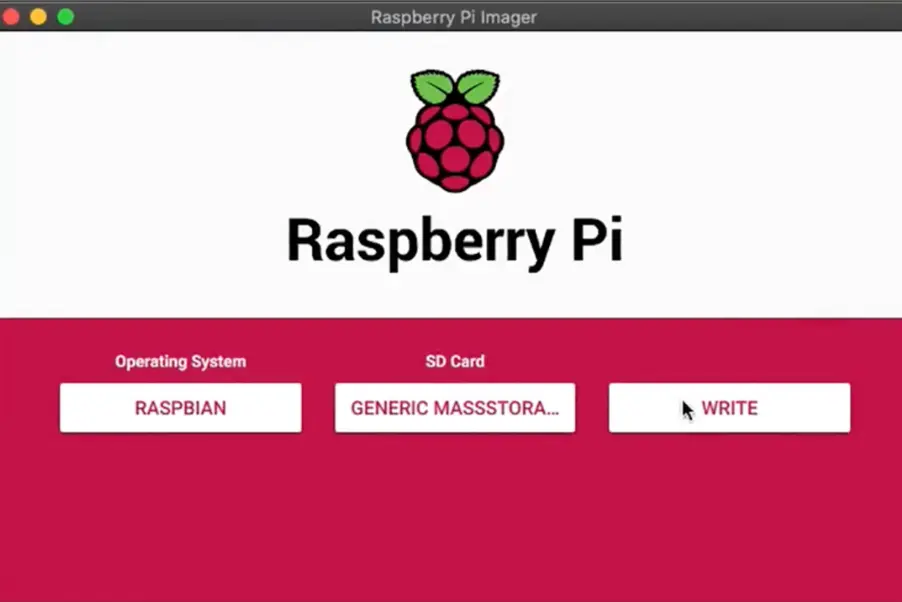
Step 3: Choose an Operating System
Open Raspberry Pi Imager and select an operating system. The recommended option for beginners is Raspberry Pi OS because it is simple and user-friendly.
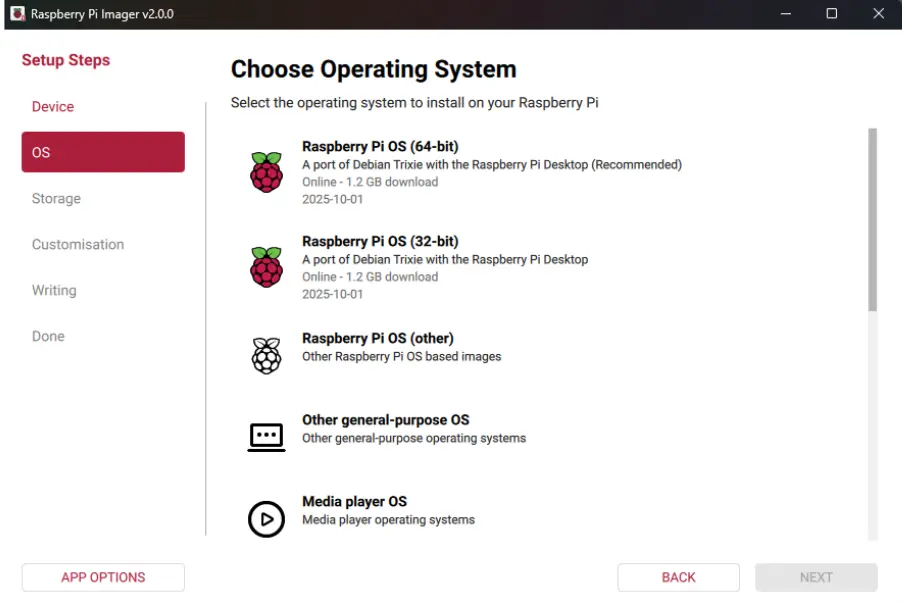
Step 4: Select Your microSD Card
Insert your microSD card into your computer and select it inside the Imager tool. This is where the operating system will be installed.
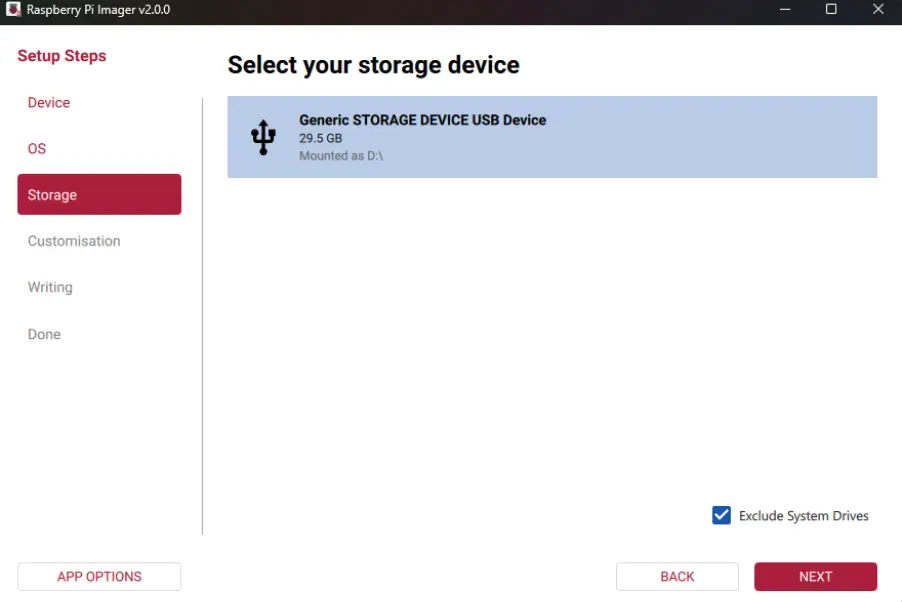
Step 5: Write the OS to the SD Card
Click on the “Write” button. The tool will download and install the operating system onto your microSD card. This process may take a few minutes.
Step 6: Insert SD Card into Raspberry Pi
Once the installation is complete, remove the microSD card and insert it into your Raspberry Pi board.
Step 7: Power On the Device
Connect the Raspberry Pi to a monitor, keyboard, and power supply. As soon as you power it on, it will start booting automatically.
Step 8: Complete Initial Setup
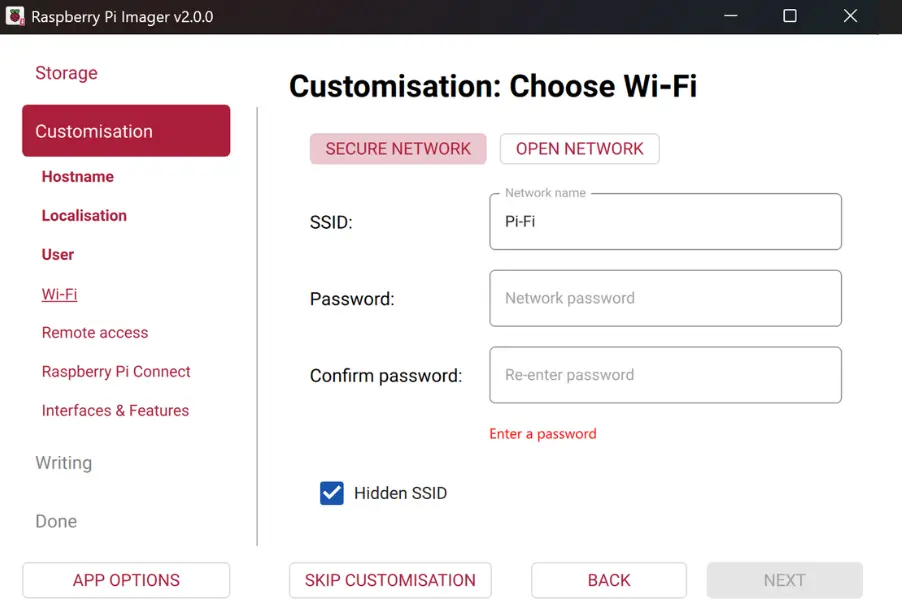
Connecting to Wi-Fi
Connect your Raspberry Pi to the internet using Wi-Fi or Ethernet.
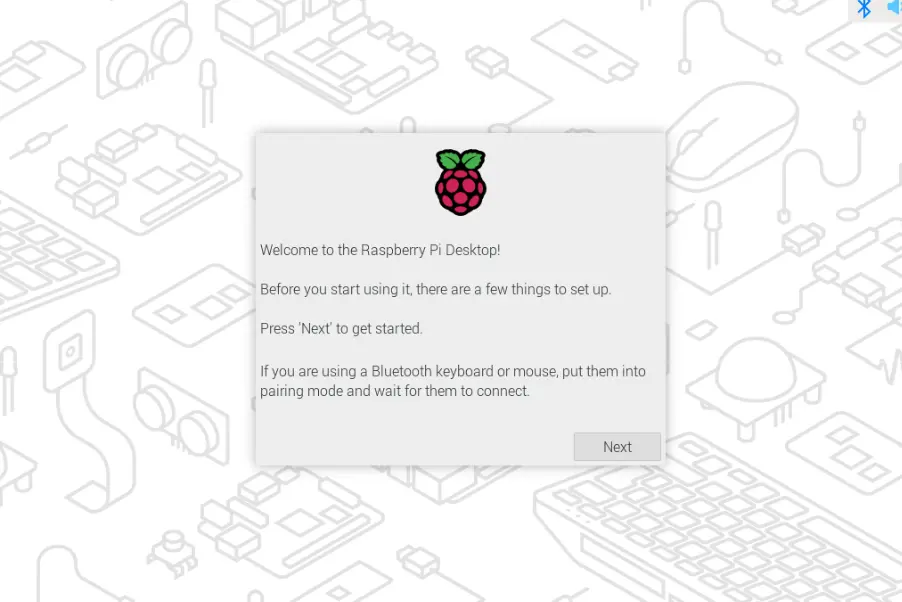
First boot experience
Once everything is set up, your Raspberry Pi is ready to use.
How to Set Up Raspberry Pi Using NOOBS
Setting up a Raspberry Pi using Software NOOBS (New Out Of Box Software) is one of the easiest ways for beginners to get started. It provides a simple interface that helps you install an operating system without any complex steps.
Step 1: Download NOOBS
Go to the official Raspberry Pi website and download NOOBS. You will get a ZIP file.
Step 2: Prepare the microSD Card
- Format your microSD card using a computer
- Extract the NOOBS ZIP file
- Copy all the extracted files to the SD card
Step 3: Insert SD Card into Raspberry Pi
Place the microSD card into your Raspberry Pi board.
Step 4: Power On the Device
Connect the Raspberry Pi to power. It will automatically boot and launch the NOOBS interface.
Step 5: Choose an Operating System
You will see a list of available operating systems. Select Raspberry Pi OS (recommended for beginners).
Step 6: Install the OS
Click on the install option. The system will start installing the selected OS on your Raspberry Pi.
Step 7: Complete Setup
Once installation is complete:
- Set your language and region
- Connect to Wi-Fi
- Create a password
Now your Raspberry Pi is ready to use.
Difference between Raspberry Pi and a traditional computer
A Raspberry Pi is different from a traditional computer in many ways.
| Feature | Raspberry Pi | Traditional Computer |
|---|---|---|
| Size | Very small, credit-card sized | Large, like desktop or laptop |
| Cost | Low-cost and affordable | More expensive |
| Performance | Limited, suitable for basic tasks | High performance for heavy tasks |
| Components | Single-board with all parts integrated | Separate components like CPU, RAM, storage |
| Setup | Requires manual setup | Ready to use |
| Storage | Uses microSD card | Uses HDD or SSD |
| Power Consumption | Very low power usage | Consumes more electricity |
| Use Cases | Learning, IoT, DIY projects | Gaming, office work, heavy software |
| Ease of Use | Slight learning curve | Easy for general users |
Top Use Cases of Raspberry Pi
Raspberry Pi is not just for learning it can be used in many real-world applications. In this section, we will explore different Raspberry Pi uses and projects that show how this small device can solve problems and create innovative solutions.
- Raspberry Pi is widely used in home automation systems to control lights, fans, cameras, and other smart devices.
- It can be turned into a media center using software like Kodi to stream movies, music, and videos.
- It is used as a web server for hosting websites, testing applications, and learning development.
- Raspberry Pi plays an important role in IoT projects by connecting sensors and collecting real-time data.
- It is commonly used in robotics and AI experiments to control machines and run basic intelligent systems.
- It can be converted into a retro gaming console to play classic games using emulators.
Limitations of Raspberry Pi
While Raspberry Pi offers many benefits, it also has some limitations. Understanding these limitations is important before using it for any project. This section highlights the areas where Raspberry Pi may not perform as well as traditional computers.
Limited processing power vs PC
Raspberry Pi is designed to be small and energy-efficient, which means it cannot match the power of a desktop or laptop. While it works well for basic tasks like coding, browsing, or small projects, it may slow down when handling multiple heavy applications at once.
Not ideal for heavy tasks
Tasks that require high performance such as video editing, high-end gaming, or running large software are not ideal for Raspberry Pi. It lacks the processing strength and graphics capability needed for such demanding workloads, which can lead to lag and poor performance.
Storage limitations
Raspberry Pi uses a microSD card for storage instead of a traditional hard drive or SSD. This means storage capacity is limited, and speed is also slower compared to modern storage devices. For large files or heavy data usage, this can become a restriction.
Learning curve for beginners
Although Raspberry Pi is beginner-friendly, it still requires some basic technical knowledge. Users need to install the operating system, connect hardware, and sometimes use command-line instructions. For someone completely new, this can feel a bit challenging in the beginning.
Final Thoughts
Raspberry Pi has completely changed the way people learn and use technology. It is not just a small computer but a powerful tool for innovation. From students learning coding to developers building advanced projects, Raspberry Pi offers endless possibilities.
Its low cost, flexibility, and wide range of uses make it one of the best tools for beginners and professionals. Whether you want to build a smart home system, create IoT projects, or simply learn programming, Raspberry Pi is the perfect starting point.
In the future, Raspberry Pi will play an even bigger role in technology, especially in areas like automation, AI, and smart systems. Learning it today can open many opportunities tomorrow.
Frequently Asked Questions
Q1.What is Single-board computer (SBC)?
A single-board computer (SBC) is a complete computer built on a single circuit board. It includes all the main components of a computer such as the processor (CPU), memory (RAM), input/output ports, and sometimes storage on one compact board.
Q2.Can Raspberry Pi replace a normal computer?
Raspberry Pi cannot fully replace a normal computer because it has limited processing power. It is suitable for learning, coding, small projects, and basic tasks, but it cannot handle heavy software like video editing, gaming, or advanced professional applications efficiently.
Q3.Which operating system does Raspberry Pi use?
Raspberry Pi mainly runs on Raspberry Pi OS, which is a Linux-based operating system. It also supports other OS options like Ubuntu and Kali Linux, allowing users to choose systems based on their project needs and technical requirements.
Q4.Is Raspberry Pi good for beginners?
Yes, Raspberry Pi is very good for beginners because it is affordable, easy to learn, and widely supported by tutorials. It helps users understand coding, electronics, and computer basics through practical hands-on projects and real-world applications.
Q5.Can Raspberry Pi run Windows?
Raspberry Pi does not officially support full Windows like a normal PC. However, it can run lightweight versions or Windows IoT editions. It mainly works best with Linux-based systems such as Raspberry Pi OS for better performance and compatibility.
Q6.What storage does Raspberry Pi use?
Raspberry Pi uses a microSD card for storage instead of a traditional hard drive. The operating system, files, and applications are stored on it. Some advanced setups also use external SSDs or USB drives for better speed and performance.
Explore Services
Related Services
Reviewed by

Aman Vaths
Founder of Nadcab Labs
Aman Vaths is the Founder & CTO of Nadcab Labs, a global digital engineering company delivering enterprise-grade solutions across AI, Web3, Blockchain, Big Data, Cloud, Cybersecurity, and Modern Application Development. With deep technical leadership and product innovation experience, Aman has positioned Nadcab Labs as one of the most advanced engineering companies driving the next era of intelligent, secure, and scalable software systems. Under his leadership, Nadcab Labs has built 2,000+ global projects across sectors including fintech, banking, healthcare, real estate, logistics, gaming, manufacturing, and next-generation DePIN networks. Aman’s strength lies in architecting high-performance systems, end-to-end platform engineering, and designing enterprise solutions that operate at global scale.