Ai Overview
CRM software stands for Customer Relationship Management software. Studies show that sales productivity increases by 20-30% after implementing CRM. Salesforce suits large enterprises but requires significant investment. Sales teams use CRM systems to manage long sales cycles, track multiple stakeholders, and forecast revenue.
Key Takeaways
- CRM software is a technology platform that helps businesses manage all interactions with customers and prospects in one centralized database.
- The main purpose of CRM systems is to improve customer relationships, increase sales, and streamline business operations.
- There are three primary types of CRM software: operational CRM, analytical CRM, and collaborative CRM, each serving different business needs.
- Key CRM features include contact management, sales pipeline tracking, customer communication history, and reporting and analytics.
- Cloud based CRM solutions offer flexibility, scalability, and accessibility from anywhere, making them ideal for modern businesses.
- Implementing CRM software can increase sales productivity, improve customer retention, and reduce customer acquisition costs.
- CRM systems work by centralizing customer data, automating workflows, and providing insights through analytics and reporting tools.
- Small businesses benefit from CRM software by improving customer communication, reducing costs, and scaling operations efficiently.
- Implementation challenges include user adoption, data migration, customization complexity, and choosing the right system for your needs.
- Future CRM trends include AI-powered insights, predictive analytics, mobile-first design, and integration with emerging technologies.
In today’s fast-paced business world, managing customer relationships effectively can make or break your success. CRM software (Customer Relationship Management) is a powerful tool designed to help businesses organize, track, and nurture their customer interactions in one centralized location. Whether you’re running a small startup or managing a large enterprise, understanding what CRM software is and how it works can transform how you do business. This guide explains everything you need to know about CRM systems, their benefits, and how they can drive growth for your organization.
What is CRM Software? A Simple Definition
Let’s start with the basics. CRM software stands for Customer Relationship Management software. It’s a digital platform that helps businesses manage relationships with customers and potential clients. Think of it as a central hub where all customer information, interactions, and communication history are stored in one accessible location.
Imagine if you kept every customer conversation, email, phone call, and transaction on separate pieces of paper scattered across your desk. It would be chaotic, inefficient, and error-prone. That’s what customer management looks like without CRM. Now imagine consolidating all that information into an organized, searchable, digital system. That’s what CRM software does.
A customer relationship management system is more than just a database. It’s a complete toolkit designed to:
- Store and organize customer information centrally
- Track all customer interactions and communications
- Manage sales pipelines and deals
- Automate repetitive business processes
- Provide insights through analytics and reporting
- Improve collaboration across teams
- Enhance customer experience and satisfaction
Why is CRM Software Important for Businesses?
In competitive markets, businesses that understand their customers better win. CRM software has become essential because:
Customer Expectations Have Changed
Today’s customers expect personalized experiences. They want to feel known and valued. When you call a company, they remember previous conversations. When you receive marketing messages, they’re relevant to your interests. This level of personalization is only possible with proper CRM implementation. Without CRM systems, you’re essentially treating every interaction as if it’s the first time.
Data is Scattered Without Centralization
In organizations without CRM software, customer information lives in multiple places: sales spreadsheets, email inboxes, support tickets, marketing databases. This fragmentation creates inefficiency, reduces visibility, and leads to duplicate work. Centralizing this information in a customer relationship management system creates a single source of truth.
Sales Teams Need Pipeline Visibility
Sales managers need to know where deals stand, what’s coming down the pipeline, and which opportunities are most likely to close. CRM software provides this visibility instantly, enabling better forecasting and resource allocation.
Business Growth Requires Scalability
As your business grows, managing customer relationships becomes exponentially more complex. Manual processes don’t scale. CRM systems grow with your business, handling 10 customers or 10 million with equal efficiency, especially all-in-one CRM and ERP platforms like Microsoft Dynamics 365 Business Central that streamline operations across sales, finance, and customer management.
How Does CRM Software Work? Step by Step
Understanding the mechanics of CRM software helps you appreciate its value. Here’s how the system works:
Step 1: Data Collection and Entry
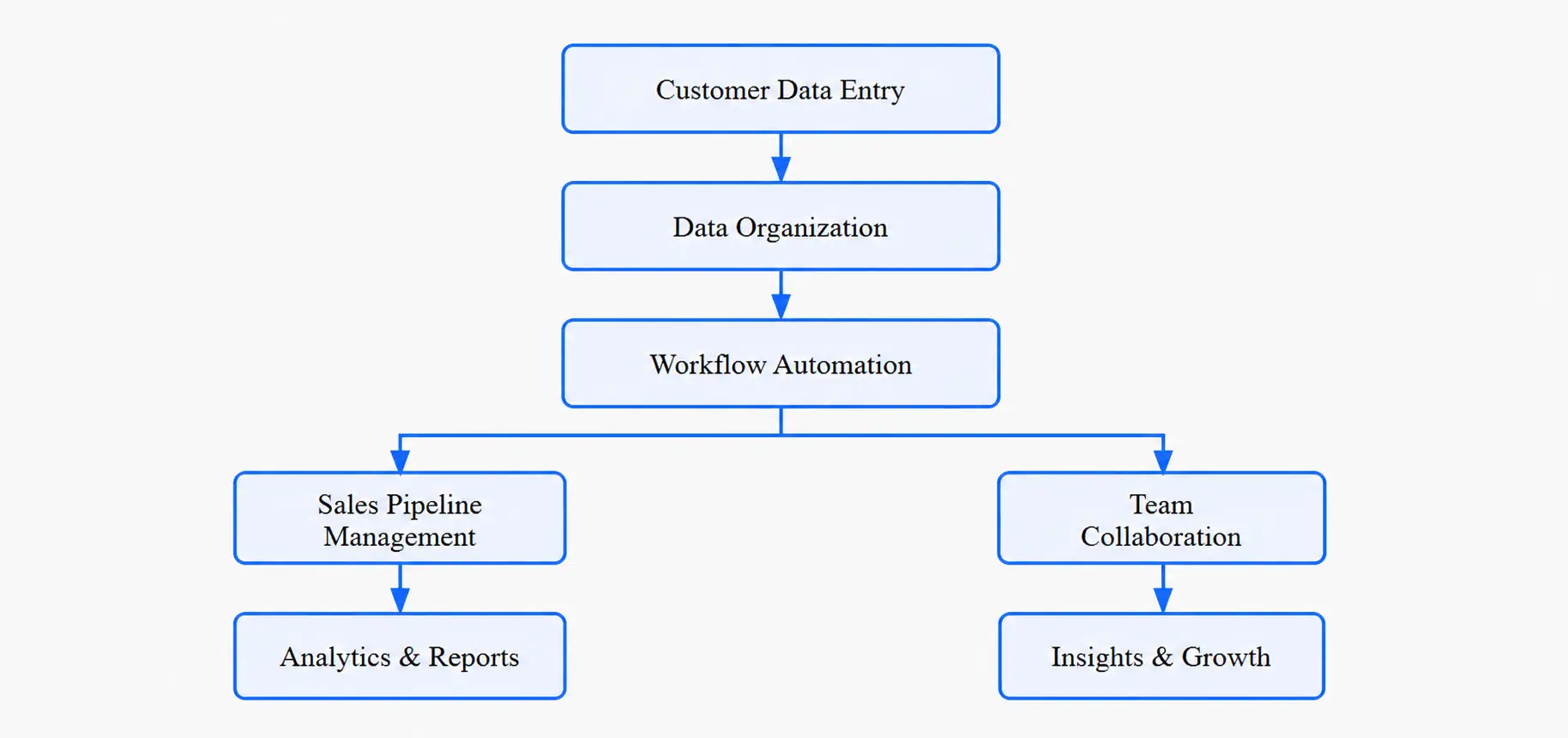
When a prospect contacts your business, information is captured. This happens through multiple channels: website forms, email, phone calls, social media, or manual entry. The CRM system collects this data and stores it in a centralized database. Think of it as the first step in building a complete customer profile.
Step 2: Organization and Segmentation
Once data enters the system, CRM software automatically organizes and categorizes it. You can segment customers by industry, company size, location, purchase history, or any custom criteria. This segmentation enables targeted communication and personalized experiences.
Step 3: Workflow Automation
Instead of manually sending follow-up emails or scheduling calls, CRM systems automate these tasks. When a prospect fills a form, the system automatically assigns the lead to a sales rep, sends a welcome email, and schedules a follow-up call. This consistency ensures no opportunity falls through the cracks.
Step 4: Pipeline Management and Tracking
Sales teams use CRM software to move deals through defined stages: prospect, qualification, proposal, negotiation, and close. Each interaction is logged, and managers can see exactly where deals stand, making forecasting and pipeline management much more accurate.
Step 5: Communication and Collaboration
When a customer calls, support agents see the entire history of previous interactions instantly. When a sales rep hands off a deal to onboarding, all information transitions seamlessly. CRM systems break down internal silos and improve cross-team collaboration.
Step 6: Analytics and Insights
The final step involves extracting value from all this data. CRM software provides dashboards, reports, and analytics showing which strategies work, where revenue comes from, and where improvements are needed. These insights drive better decision-making.
How CRM Software Works: Complete Flow
Types of CRM Systems: Understanding Your Options
Not all CRM solutions are identical. Different types serve different purposes. Let’s explore the main categories:
Operational CRM
This is the most common type of CRM software. It focuses on automating business processes related to customers. Operational CRM handles sales automation, marketing automation, and service automation. If you need to streamline how your sales and support teams work with customers, operational CRM is what you need.
Analytical CRM
Analytical customer relationship management systems focus on gathering, storing, and analyzing customer data. These systems help you understand customer behavior, identify patterns, predict future needs, and optimize business strategies. Analytical CRM is about extracting intelligence from the data you already have.
Collaborative CRM
This type emphasizes communication and collaboration across departments. It ensures that sales, marketing, and support teams share information and work toward common goals. Collaborative CRM software breaks down silos and improves organizational alignment.
Comparison Table: Types of CRM Systems
| Type | Primary Focus | Best For | Key Benefit |
|---|---|---|---|
| Operational CRM | Sales, marketing, support automation | Teams needing to streamline daily operations | Increases efficiency and productivity |
| Analytical CRM | Data analysis and customer insights | Businesses wanting data-driven decisions | Enables strategic decision-making |
| Collaborative CRM | Cross-department communication | Organizations with multiple teams | Improves alignment and reduces silos |
Key Features of CRM Software You Should Know
All quality CRM software solutions share core features. Here are the most important ones:
Contact Management
The foundation of any CRM system. Contact management stores detailed information about customers and prospects: email addresses, phone numbers, company details, interaction history, and preferences. This ensures your team has a complete view of each customer.
Sales Pipeline Management
Track deals through defined stages from first contact to close. Sales teams use CRM features like pipeline dashboards to see exactly where opportunities stand, forecast revenue accurately, and identify bottlenecks.
Marketing Automation
Create targeted campaigns, send automated emails, track engagement, and nurture leads without manual intervention. Marketing automation in CRM systems helps you reach the right people with the right message at the right time.
Customer Service and Support Tools
Manage customer support tickets, track issues from creation to resolution, and ensure customer problems are solved quickly. Support teams use these CRM features to provide excellent service and increase satisfaction.
Analytics and Reporting
Generate reports on sales performance, customer metrics, marketing effectiveness, and more. Dashboards provide real-time insights so you understand what’s working and where to focus your efforts.
Integration Capabilities
Modern CRM software integrates with other business tools: email platforms, accounting software, project management tools, and communication systems. This integration prevents data silos and creates a unified technology ecosystem.
Mobile Accessibility
Teams need access to customer information whether they’re in the office or in the field. Mobile-friendly CRM systems ensure your team can access data, update records, and manage deals from anywhere.
Benefits of CRM Software for Your Business
Implementing CRM software delivers measurable benefits that impact your bottom line. Here are the most significant advantages:
Increased Sales Productivity
Sales teams waste time searching for information, duplicating work, and managing manual processes. CRM systems eliminate these inefficiencies, freeing up time for actual selling. Studies show that sales productivity increases by 20-30% after implementing CRM.
Improved Customer Retention
Customers feel valued when you remember their preferences, follow up on their needs, and provide personalized service. CRM software enables this level of personalization at scale, leading to higher retention rates and increased customer lifetime value.
Better Decision-Making
With real-time analytics and comprehensive reporting, leaders make decisions based on data rather than intuition. You can identify opportunities, address problems, and allocate resources more effectively.
Reduced Customer Acquisition Costs
CRM software helps you identify which marketing channels and sales strategies are most cost-effective. You can optimize spending and focus resources on high-return activities.
Enhanced Team Collaboration
When all customer information is centralized, teams collaborate more effectively. Sales hands off to support seamlessly. Marketing works with sales to qualify leads. Information flows freely across departments.
Scalability Without Hiring
As your business grows, CRM systems scale with you. You can handle more customers, more deals, and more complexity without proportionally increasing headcount. This improves profitability as you scale.
Cloud CRM vs On-Premise: What’s the Difference?
When choosing CRM software, one key decision is whether to use cloud-based or on-premise solutions.
Cloud CRM (SaaS)
Cloud CRM software is hosted on the provider’s servers and accessed through the internet. Benefits include:
- Lower upfront costs (no hardware investment)
- Automatic updates and maintenance
- Accessibility from anywhere with internet
- Easy scaling as your business grows
- Built-in security and data backup
On-Premise CRM
On-premise CRM systems are installed on your company’s own servers. Benefits include:
- Complete control over data and security
- Unlimited customization possibilities
- No reliance on internet connectivity
- Potential cost savings for large organizations
For most businesses today, especially small and mid-sized companies, cloud CRM software is the better choice. It’s more affordable, easier to implement, and requires less technical expertise.
CRM Software Examples: Popular Solutions
To understand what’s available in the market, here are some popular CRM software solutions across different price points:
Enterprise Level CRM
Salesforce stands as the market leader in enterprise CRM software. It offers comprehensive features, extensive customization, and integrations with virtually any business tool. Salesforce suits large enterprises but requires significant investment.
Mid-Market CRM
Solutions like HubSpot and Zoho offer comprehensive CRM features at more accessible price points. These platforms work well for growing companies that need sophistication without enterprise complexity.
Small Business CRM
For startups and small businesses, platforms like Pipedrive, Insightly, and Monday.com provide affordable CRM software with essential features without overwhelming complexity.
Custom CRM Development
When standard solutions don’t fit your unique business needs, custom CRM software development is an option. Companies like Nadcab Labs specialize in building tailored CRM software development services that align perfectly with your business processes and requirements.
Industry Use Cases: How Different Sectors Use CRM
CRM software benefits businesses across virtually every industry. Let’s look at specific examples:
Sales and B2B Companies
Sales teams use CRM systems to manage long sales cycles, track multiple stakeholders, and forecast revenue. Pipeline visibility helps managers allocate resources to high-probability deals.
Marketing and Digital Agencies
Marketing teams use CRM software to segment audiences, create targeted campaigns, track engagement, and measure ROI. Lead scoring features help prioritize prospects most likely to convert.
Customer Support and Service
Support organizations use customer relationship management systems to track tickets, manage SLAs, and measure customer satisfaction. Knowledge bases within CRM help representatives solve issues faster.
Real Estate and Professional Services
Real estate agents, consultants, and service providers rely on CRM software to manage client relationships, track interactions, and maintain contact information. This ensures consistent, professional client service.
E-Commerce and Retail
Retailers use CRM systems to understand customer behavior, personalize shopping experiences, run loyalty programs, and improve customer retention through targeted marketing.
CRM Implementation Journey
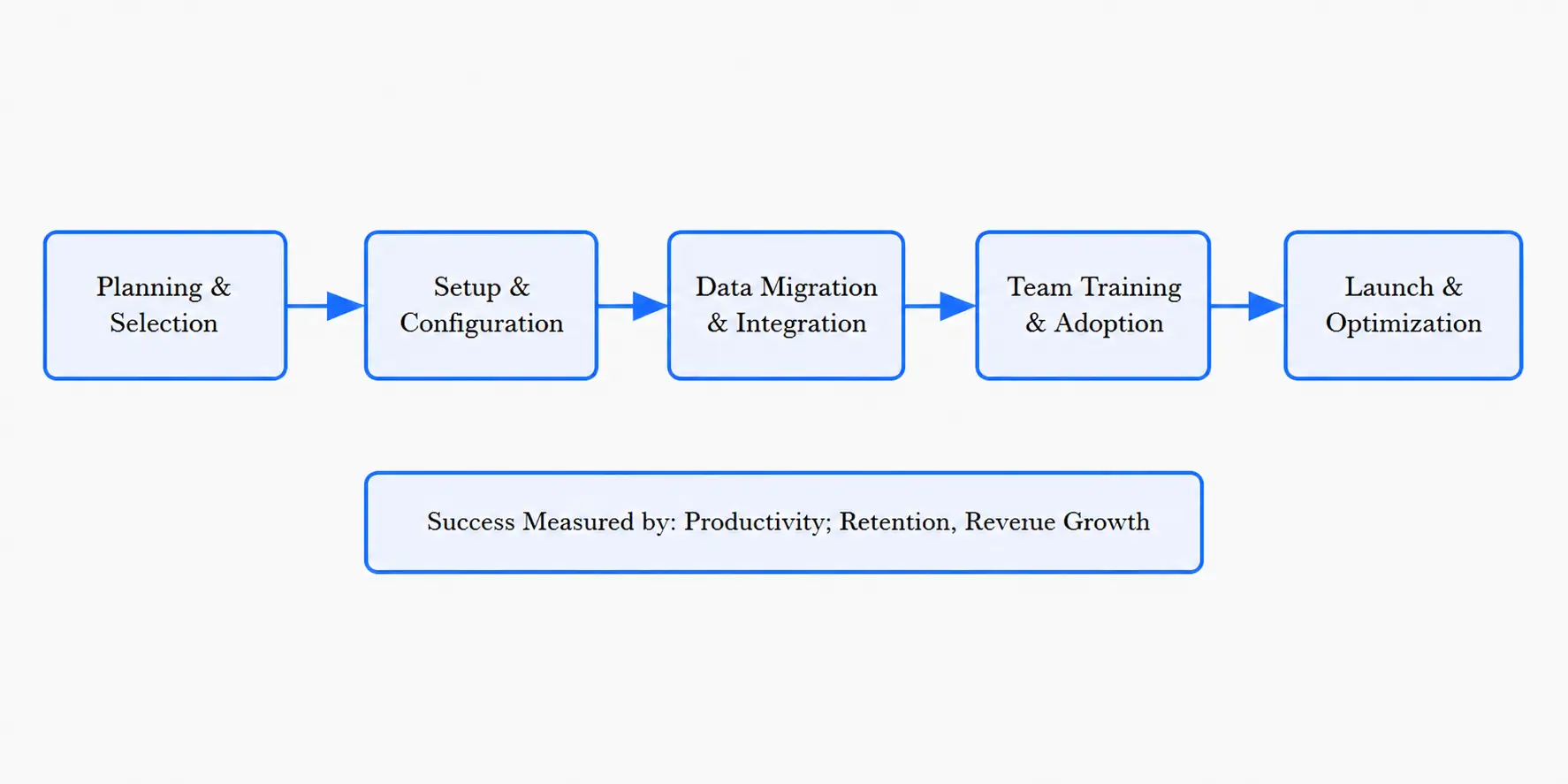
Common CRM Implementation Challenges
While CRM software delivers tremendous value, implementation isn’t always smooth. Here are challenges organizations often face:
User Adoption and Resistance
The biggest challenge isn’t the technology itself. It’s getting team members to actually use it. Employees accustomed to old processes resist change. Without proper training and change management, even the best CRM software sits unused. Success requires clear communication, hands-on training, and leadership commitment.
Data Quality and Migration Issues
Migrating from legacy systems often reveals dirty data: duplicates, incomplete records, incorrect information. Getting data clean before transferring to your new customer relationship management system is tedious but crucial. Bad data creates bad insights.
Complexity and Over-Customization
CRM systems are powerful, but power brings complexity. Organizations sometimes over-customize, creating systems so complex that adoption suffers and maintenance becomes expensive. Start simple and add features gradually.
Integration Difficulties
CRM software doesn’t work in isolation. It needs to connect with email, accounting software, and other business tools. Integration challenges can cause delays and headaches.
Ongoing Maintenance and Support
Implementation is just the beginning. CRM systems require ongoing maintenance, updates, training as business processes change, and support when issues arise. Budget for these continuous costs.
Future Trends in CRM Software
The CRM software landscape continues evolving. Here are trends shaping the future:
Artificial Intelligence and Machine Learning
AI is transforming CRM capabilities. Machine learning algorithms predict customer churn, recommend next best actions, automatically categorize leads, and detect upsell opportunities. The next generation of CRM systems will be intelligent, not just informative.
Predictive Analytics
Instead of analyzing what happened, CRM software will increasingly predict what will happen. Which customers will leave? Which deals will close? Which products will sell best? These predictions empower proactive decision-making.
Mobile-First Design
Teams work increasingly on the go. Modern CRM software prioritizes mobile experiences. Field teams need full CRM functionality on phones and tablets, not just basic access.
Social CRM Integration
Customers interact through social media. CRM systems integrate social channels, allowing teams to manage relationships across Facebook, Twitter, LinkedIn, and other platforms from within the CRM.
Voice of the Customer Programs
Advanced CRM software incorporates customer feedback from all channels: surveys, support tickets, social media, reviews. This unified customer voice guides product development and business strategy.
Ready to Transform Your Customer Relationships?
Understanding CRM software is the first step. Taking action is the next. Whether you’re implementing a standard solution or need a custom customer relationship management system tailored to your unique business, the right CRM partner makes all the difference.
Nadcab Labs specializes in helping businesses select, implement, and optimize CRM solutions. Our team has extensive experience building custom CRM software that aligns perfectly with your business processes, integrates seamlessly with your existing tools, and drives measurable results.
Why CRM Software Matters for Your Success
CRM software is no longer a luxury for large enterprises. It’s become essential for any business serious about growth. In a world where customer experience differentiates winners from losers, customer relationship management systems provide the foundation for superior customer interactions.
The question isn’t whether to implement CRM software. It’s which solution best fits your business needs and how quickly you can deploy it. The longer you wait, the more opportunities you miss to understand your customers better, operate more efficiently, and grow faster.
Whether you choose an off-the-shelf solution or custom CRM software development, the investment pays dividends through increased sales, improved customer retention, better decision-making, and operational efficiency. Start your CRM journey today and watch your business transform.
Frequently Asked Questions
Q1.What is the average cost of implementing a CRM system?
CRM costs vary dramatically based on company size and system complexity. Cloud-based CRM typically ranges from $20-300 per user monthly. Small businesses might spend $500-5,000 annually while enterprises invest $100,000-500,000+. Implementation costs often exceed software costs. Budget for proper planning, data migration, integration, training, and change management. Most organizations see ROI within 12-24 months through efficiency gains and increased revenue.
Q2.How long does it take to implement CRM software?
Small businesses with simple requirements might go live in 1-3 months. Mid-sized companies typically need 3-6 months. Large enterprises with complex customization requirements can take 6-12 months or longer. Timeline depends on system complexity, data migration scope, integration requirements, and organizational change management. Starting simple and scaling gradually often results in faster successful implementations than trying to do everything at once.
Q3.Will CRM software really increase our sales?
CRM software itself doesn’t guarantee sales increases. It enables sales increases. The platform provides tools for better customer management, pipeline visibility, and process automation. But results depend on adoption, proper use, good data quality, and sound sales processes. Companies that commit to using CRM effectively typically see 10-30% productivity improvements and corresponding revenue increases within the first year.
Q4.How do we ensure our team actually uses the new CRM software?
User adoption requires multi-pronged effort. Start with clear communication about why the change is happening and benefits for each team member. Provide comprehensive training tailored to different user roles. Designate CRM champions in each department to answer questions and model best practices. Make CRM adoption part of job responsibilities and performance metrics. Provide ongoing support during the transition. Celebrate early wins and successes. Most importantly, get executive sponsorship and demonstrate visible leadership commitment.
Q5.What data needs to be migrated to the new CRM?
Typical data includes customer contact information, company details, interaction history, sales opportunities, completed deals, communication preferences, and any custom data relevant to your business. Before migration, audit data quality and eliminate duplicates, outdated records, and incomplete information. This data cleaning phase is tedious but critical. Bad data in your CRM creates bad insights and poor user adoption. Many organizations find that migration forces necessary data governance improvements.
Q6.Can CRM software integrate with our existing business tools?
Most modern CRM platforms integrate with common business applications including email systems (Gmail, Outlook), accounting software (QuickBooks, Xero), project management tools (Asana, Monday), communication platforms (Slack, Microsoft Teams), and e-commerce systems. Integration methods include pre-built connectors, APIs, and middleware platforms. However, integration complexity varies. Older systems or niche tools may require custom development. Budget for integration testing and potential custom work during implementation.
Q7.Is our customer data secure in cloud-based CRM software?
Reputable cloud CRM providers implement enterprise-grade security: data encryption in transit and at rest, regular security audits, multi-factor authentication, role-based access controls, and compliance with standards like SOC 2, GDPR, and HIPAA. Cloud providers often have stronger security than on-premise systems because they dedicate significant resources to protection. However, security is shared responsibility. Your organization must enforce strong passwords, limit user access appropriately, and monitor suspicious activity. Review the CRM provider’s security certifications and compliance details before selecting a solution.
Q8.Can we customize CRM software to match our specific business processes?
Most CRM platforms offer customization through configuration: custom fields, workflows, dashboards, and automation rules. Enterprise systems like Salesforce allow extensive development to create highly customized solutions. However, excessive customization increases complexity, costs, and maintenance challenges. Best practice is adapting your business processes to fit the CRM rather than over-customizing the CRM. Start with standard functionality and add customization only where business value clearly justifies the cost. Custom CRM development is an option when standard solutions fundamentally don’t fit your unique requirements.
Q9.How do we measure CRM success and ROI?
Establish baseline metrics before implementation: sales cycle length, close rates, customer acquisition cost, retention rates, team productivity metrics, and revenue per salesperson. After implementation, track the same metrics to measure improvement. Key performance indicators include: percent increase in sales productivity, customer retention improvement, revenue growth, cost reduction, user adoption rates, and customer satisfaction scores. Most organizations establish 6-month and 12-month check-ins to assess progress and identify optimization opportunities. Visible ROI strengthens executive support and user commitment.
Q10.What is the difference between CRM software and marketing automation?
CRM software manages customer relationships and sales processes across the entire customer lifecycle. Marketing automation focuses specifically on automating marketing tasks: email campaigns, lead scoring, nurture sequences, and campaign tracking. Many CRM platforms include marketing automation capabilities. However, they serve different primary purposes. CRM is primarily sales and service-focused. Marketing automation is campaign-focused. Often organizations use both tools together: marketing automation nurtures leads and CRM manages the sales process and customer relationships after purchase. Some platforms offer integrated solutions combining both functions effectively.
Explore Services
Related Services
Reviewed by

Naman Singh
Co-Founder & CEO, Nadcab Labs
Naman Singh is the Co-Founder and CEO of Nadcab Labs, where he drives the company’s vision, global growth, and strategic expansion in blockchain, fintech, and digital transformation. A serial entrepreneur, Naman brings deep hands-on experience in building, scaling, and commercializing technology-driven businesses. At Nadcab Labs, Naman works closely with enterprises, governments, and startups to design and implement secure, scalable, and business-ready Web3 and blockchain solutions. He specializes in transforming complex ideas into high-impact digital products aligned with real business objectives. Naman has led the development of end-to-end blockchain ecosystems, including token creation, smart contracts, DeFi and NFT platforms, payment infrastructures, and decentralized applications. His expertise extends to tokenomics design, regulatory alignment, compliance strategy, and go-to-market planning—helping projects become investor-ready and built for long-term sustainability. With a strong focus on real-world adoption, Naman believes in building blockchain solutions that deliver measurable value, solve practical problems, and unlock new growth opportunities for organizations worldwide.