Ai Overview
IoT Non-Linear Delivery: IoT projects run parallel tracks—hardware procurement, firmware development, and cloud setup—because sequential delivery fails under real hardware constraints. Staged Rollout Mandatory: Deploy firmware updates progressively (1%, 5%, 25%, 100%) with rollback capability to avoid bricking the entire fleet at once. Project Done Definition: Engineering is complete when operations can handle 80% of incidents without escalation for 30 days—not when code first reaches production.
Key Takeaways: IoT App Development Process
- IoT Non-Linear Delivery:
IoT projects run parallel tracks—hardware procurement, firmware development, and cloud setup—because sequential delivery fails under real hardware constraints. - Business Outcome First:
Lock one measurable outcome with binary acceptance criteria before development starts to prevent feature sprawl and endless scope creep. - Field Reality Planning:
Deployment scope requires operational planning—power sources, mounting constraints, network access, and technician availability—not just architecture diagrams. - Data Contract Critical:
A focused workshop defining telemetry format, units, precision, and sampling frequency prevents months of rework after devices are deployed remotely. - Validation Before Scale:
Lab calibration and field connectivity trials catch accuracy drift, packet loss, and dead zones before thousands of devices go live. - Staged Rollout Mandatory:
Deploy firmware updates progressively (1%, 5%, 25%, 100%) with rollback capability to avoid bricking the entire fleet at once. - Operations-First Mindset:
Build tooling for operators managing devices daily—device registry, status view, and config push—not just executive dashboards. - Project Done Definition:
Engineering is complete when operations can handle 80% of incidents without escalation for 30 days—not when code first reaches production.

What “Step-by-Step” Means in IoT Projects
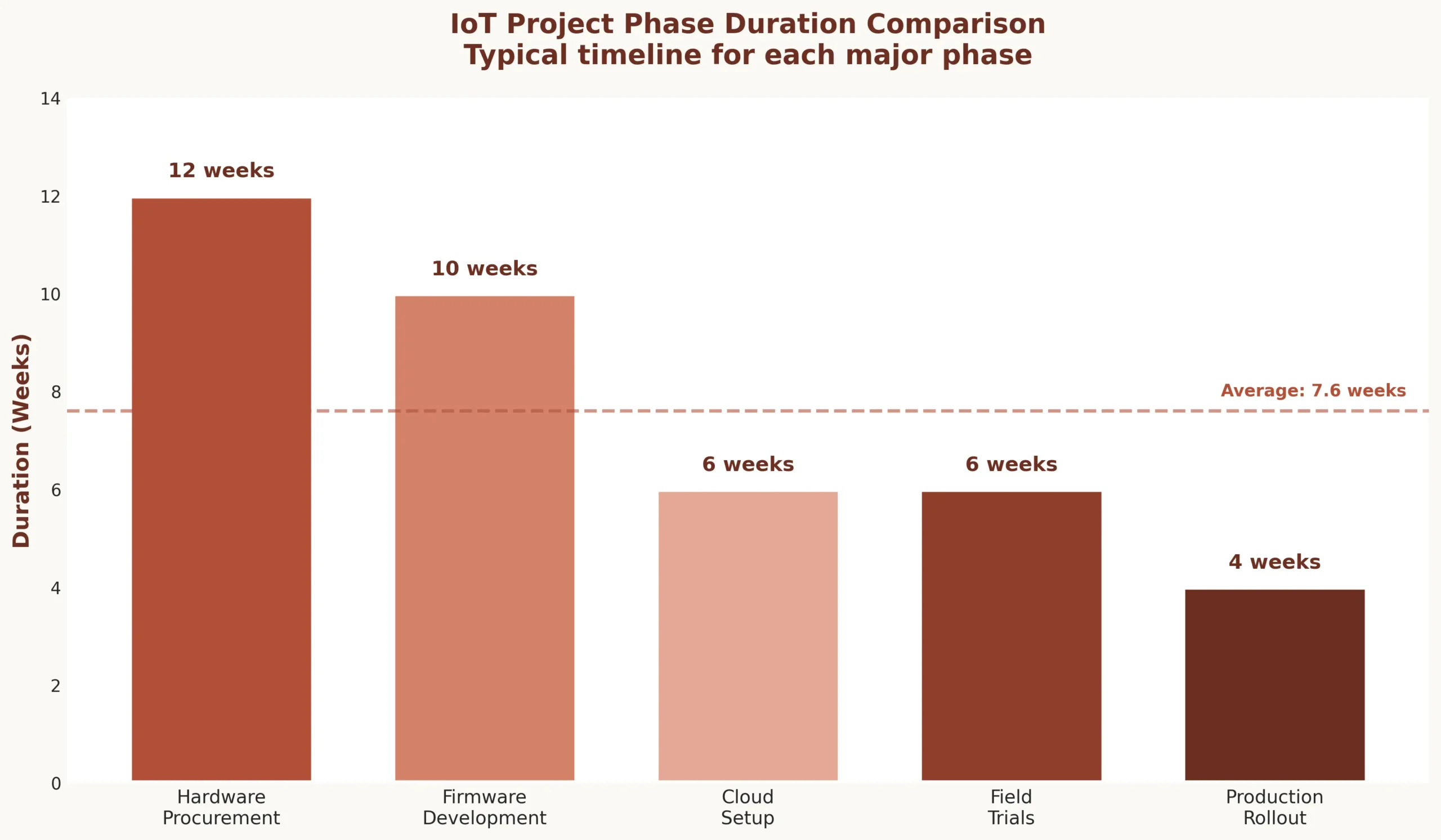
IoT development is not linear. A web app team can design, develop, test, and deploy in sequence. IoT app development teams run parallel tracks because hardware has 12-week lead times while firmware development starts immediately, and cloud infrastructure must exist before field trials begin.
Parallel tracks in IoT delivery:
| Track | Timeline | Blocking Factors |
|---|---|---|
| Hardware procurement | 8-12 weeks for custom sensors | Supplier delays, component shortages, certification |
| Firmware development | 6-10 weeks initial build | Hardware dependencies, sensor calibration |
| Cloud infrastructure | 4-6 weeks for MVP | Data contract finalization, security reviews |
| Field installation planning | 2-4 weeks logistics | Site access approvals, technician scheduling |
| Field trials | 3-6 weeks minimum | Environmental conditions, connectivity issues |
Field constraints dictate process. Devices installed in hospital operating rooms require off-hours access. Factory sensors need production downtime windows. Remote agricultural sensors face seasonal installation limits. The process must accommodate these realities, not ignore them.

Lock the One Business Outcome the System Must Prove
IoT projects drown in feature sprawl. Teams build dashboards, analytics, alerts, reports—but never define what success looks like. Successful projects start with one measurable outcome.
Good outcome definitions:
- ✓ “Reduce cold chain temperature excursions by 40% within 6 months”
- ✓ “Detect equipment failures 24 hours before breakdown with 85% accuracy”
- ✓ “Cut energy consumption by 25% without impacting production output”
Bad outcome definitions:
- ✗ “Build IoT platform for monitoring and control”
- ✗ “Implement real-time dashboards with analytics”
- ✗ “Create connected device ecosystem”
Acceptance criteria must be binary: passed or failed. “Temperature alerts trigger within 30 seconds with zero false positives over 7-day test period.” This clarity drives every downstream decision.
Define the Device Fleet Scope and Deployment Reality
Count every device. Map every location. Document power availability, mounting constraints, network access, and who physically installs them. This is not architecture—it is operational planning that determines project feasibility.
| Deployment Question | Why It Matters |
|---|---|
| How many devices total? | Determines procurement timeline, cloud costs, support burden |
| Power source at each location? | Battery life requirements, solar viability, electrical permits |
| Installation method? | Drilling, adhesive, magnetic mount—affects labor costs |
| Who maintains devices? | Internal staff vs contractors vs end-users—training needs |
| Replacement cycle? | 5-year battery life or annual replacement—TCO calculation |
Real example: Manufacturing client planned 200 vibration sensors across 3 plants. Site survey revealed 60 locations had no power access within 10 meters. Battery-powered sensors increased unit cost from $80 to $180, but eliminated $25,000 in electrical work. Deployment reality changed hardware selection before any development started.
Data Contract Workshop (Before Any Coding)
Firmware, backend, and frontend teams need a data contract defining exactly what devices send. This 2-hour workshop prevents months of rework.
Data Contract Template:
{
  "event_type": "temperature_reading",
  "device_id": "sensor-abc-123",
  "timestamp": "2025-12-31T10:30:00Z",
  "sensor_data": {
    "temperature_celsius": 72.5,
    "humidity_percent": 45.2,
    "battery_voltage": 3.7
  },
  "metadata": {
    "firmware_version": "1.2.3",
    "signal_strength_dbm": -67,
    "sampling_interval_sec": 300
  }
}
Critical decisions in data contract:
- → Units (Celsius vs Fahrenheit, meters vs feet—pick one, document it)
- → Precision (1 decimal place? 2? More decimals = more bandwidth)
- → Timestamp format (UTC only, no local time zones)
- → Sampling frequency (every 5 seconds vs 5 minutes—100x difference in data volume)
- → Required metadata (firmware version, battery level for debugging)
Lock this contract. Changes after devices deploy require firmware updates to thousands of devices—expensive and risky.
Prototype the Sensor Readings and Calibrate Early
Lab testing validates sensor accuracy. Temperature sensor spec says ±0.5°C accuracy. Lab testing over 48 hours showed ±2°C drift after thermal cycling. Sensor needed recalibration algorithm before field deployment. Caught in week 3, not month 6.
Lab validation checklist:
- → Accuracy drift over 48-hour continuous operation
- → Noise levels in electrical interference environment
- → Sampling consistency (does every 5-second reading actually happen every 5 seconds?)
- → Environmental sensitivity (temperature extremes, humidity, vibration)
- → Power consumption measurement under different operating modes
Prototype with real hardware early. Simulators hide problems. Real sensors reveal calibration drift, noise, and environmental sensitivity that specs never mention.
Connectivity Trial in Real Environment
WiFi signal excellent in office. In warehouse with metal racking, 40% packet loss. Added gateway every 50 meters instead of planned 100 meters. Infrastructure cost doubled, but discovered before installing 200 devices.
Field Connectivity Trial Checklist:
- Signal strength at furthest device location
- Packet loss during peak network usage hours
- Reconnection time after deliberate disconnection
- Behavior in dead zones (elevators, basements, metal structures)
- Roaming between access points (if applicable)
- Captive portal handling (guest networks)
- Network congestion simulation (what happens when 50 devices reconnect simultaneously?)
Field trials catch reality. Office testing catches nothing. Concrete walls, metal structures, electrical interference, neighboring WiFi networks—all invisible in lab, all critical in production.
Define Provisioning and Identity Lifecycle for Devices
How does a device go from factory to production? QR code scan during install? Certificate pre-loaded? Cloud claims device by serial number? Document every step. Missing provisioning step = device sits offline.

Device lifecycle states:
| State | Action Required | Who Performs |
|---|---|---|
| Factory → Inventory | Device registered in system, certificates loaded | Manufacturing |
| Inventory → Deployed | Installer scans QR, assigns location, activates | Field technician |
| Deployed → Failed | Device offline 72 hours, triggers replacement workflow | Automated system |
| Failed → Replaced | New device installed, old device deactivated | Field technician |
| Any → Retired | Credentials revoked, data archived, physical disposal | Operations team |
Each state transition needs a runbook. “Device stuck in inventory state” needs documented troubleshooting steps. Identity lifecycle is operational process, not technical architecture.
Decide the Release Strategy for Firmware vs App vs Backend
Different components have different risk profiles and update frequencies. Plan cadences early.
| Component | Update Cadence | Risk Level | Rollout Strategy |
|---|---|---|---|
| Firmware | Quarterly | High (can brick devices) | 1%, 5%, 25%, 100% over 2 weeks |
| Backend APIs | Weekly | Medium (impacts all devices) | Blue-green deployment |
| Mobile App | Monthly | Low (user controls update) | App store gradual rollout |
| Dashboard | Daily | Very Low (zero device impact) | Direct deploy |
Firmware updates need staged rollout with rollback capability. Backend needs backward compatibility with old firmware versions. Mobile app needs graceful degradation when backend changes. Different components, different strategies.
Build the Minimum Telemetry Pipeline (Vertical Slice 1)
One device sending one reading to cloud, stored in database, displayed on dashboard. End-to-end proof. Takes 2-3 weeks. Proves data contract works, networking works, authentication works.
Vertical slice 1 components:
- → Device: Generate reading, format per data contract, publish to cloud
- → Ingestion: Receive message, validate schema, acknowledge receipt
- → Storage: Write to time-series database with proper indexing
- → API: Query endpoint returning last 24 hours of readings
- → Dashboard: Real-time chart showing incoming data stream
This is not the full system. It is proof the fundamental pipeline works. Build this first. Everything else builds on this foundation.
Implement Command and Control (Vertical Slice 2)
Send command to device, device acknowledges, executes, reports status. Critical for actuators (valves, motors, locks). Command must be idempotent—sending twice does not cause double-action.
Command Flow Process:
- Cloud publishes command to device queue with unique command ID
- Device receives command, validates signature and parameters
- Device sends acknowledgment (received, not executed yet)
- Device executes command (open valve, lock door)
- Device sends completion status (success/failure + reason code)
- If no acknowledgment within 30 seconds, cloud retries with same command ID
- After 3 failed attempts, alert operations team
Safety limits matter. Heating system command: “set temperature to 75°F” works. “Set temperature to 500°F” should be rejected by firmware. Commands include sanity bounds validated at device level, not just cloud.
Build the Admin Console Needed for Operations
Build operator tools, not executive dashboards. Operations needs: device list with online/offline status, search by location and serial number, push configuration changes, view last 100 readings. That is it for MVP.
Admin console essentials:
- Device registry with search and filter
- Real-time status view (online/offline, last heartbeat)
- Configuration push interface (change sampling rate, alert thresholds)
- Recent readings view (debug connectivity and data quality issues)
- Firmware version inventory (which devices on which version)
Do not build analytics, reports, or business intelligence features yet. Build what operations needs to keep devices running. Analytics come after operations stabilizes.
Create Alert Rules That Do Not Spam People
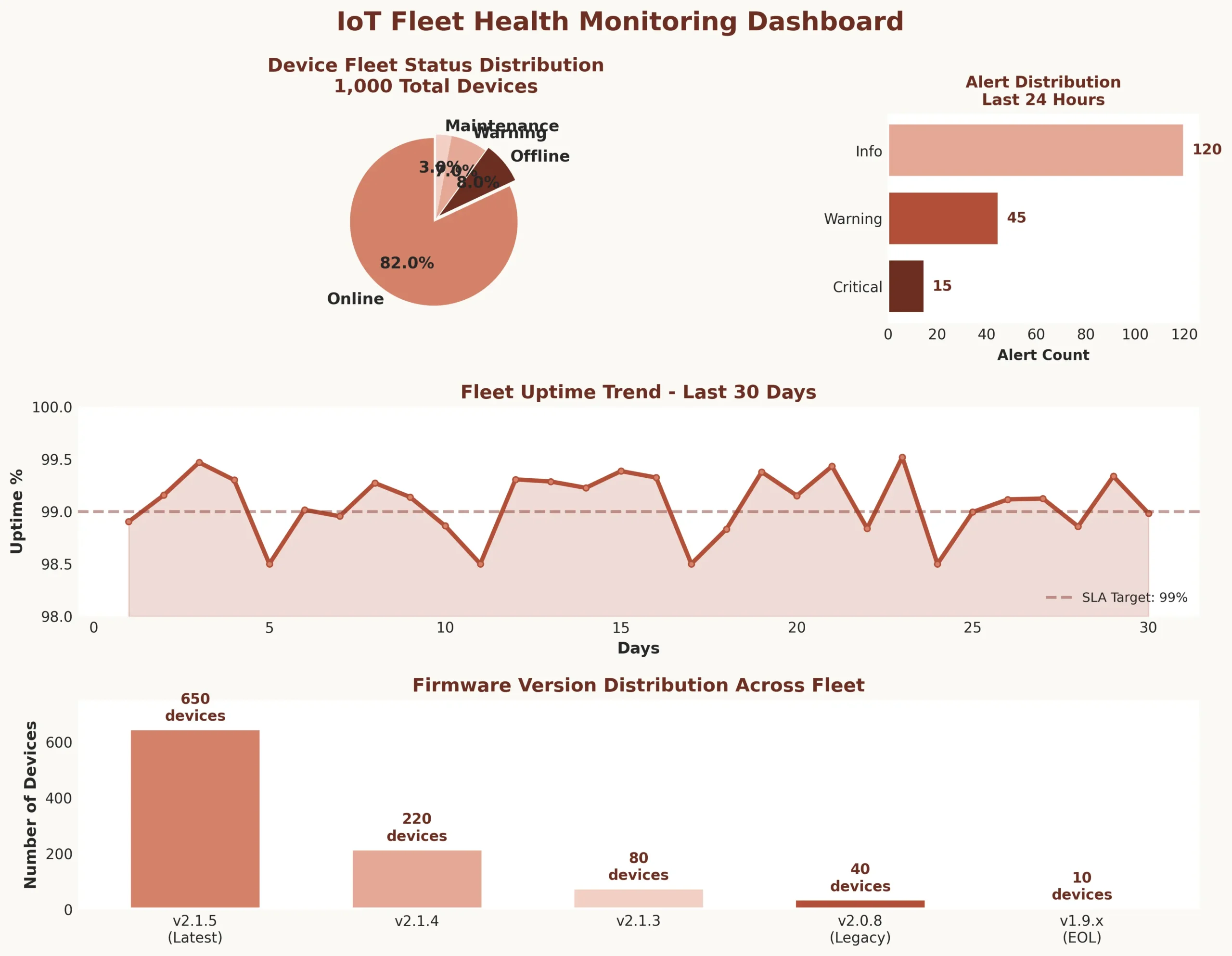
Bad alerts: 50 emails when 50 devices go offline. Good alerts: one notification “50 devices offline in Building A—likely gateway failure.”
| Severity | Threshold | Action | Deduplication |
|---|---|---|---|
| Critical | Temp exceeds 85°F for 5 minutes | Page on-call, create ticket | One alert per location per hour |
| Warning | Device offline 30 minutes | Email operations, no page | Aggregate by gateway |
| Info | Battery below 20% | Dashboard notification only | Daily digest |
Alert actionability: “Temperature high” is useless. “Check HVAC-3, likely filter clog” is actionable. Every alert needs next-step guidance. Escalation policy: if not acknowledged in 15 minutes, escalate to manager.
QA Plan That Includes Hardware, Network, and Human Workflow
IoT QA is not just software testing. Test matrix includes firmware behavior under power loss, app behavior when backend unreachable, installer workflow with poor cell signal.
Edge cases that kill IoT projects:
- → Battery dies during firmware update—does device recover or brick?
- → Network drops mid-command—does device execute or abort?
- → Installer scans QR code twice—does system create duplicate or handle gracefully?
- → Device clock drifts 2 hours—do timestamps cause data corruption?
- → WiFi password changes—does device reconnect or stay offline forever?
Test the unhappy paths. Happy path always works in demo. Production hits every edge case within first week.
Security Checklist as a Release Gate
Security cannot be retrofitted. These checks block release until passed.
| Security Gate | Verification Method |
| Device credentials unique per device | Audit shows no shared secrets, each device has unique certificate |
| TLS 1.2+ enforced | Network capture confirms no plaintext communication |
| API keys rotatable | Rotate test key, verify devices reconnect without replacement |
| Firmware updates signed | Push unsigned firmware, verify device rejects it |
| Rate limiting active | Flood test confirms API blocks excessive requests |
Pilot Deployment With “Observability First”
Pilot teaches nothing without telemetry. Instrument everything before pilot starts.
Required pilot telemetry:
- → Firmware logs uploaded every hour (not just on error)
- → Network metrics per device (signal strength, packet loss, reconnection count)
- → Command success/failure rates with reason codes
- → Battery drain rate (actual vs expected)
- → Installer feedback form (how long did install take, what problems occurred)
Pilot duration: minimum 2 weeks. Longer for battery-powered devices (need full charge cycle data). Without observability, pilot is just expensive guesswork.
Production Readiness Review
Go-live checklist before production rollout begins.
Production Readiness Checklist:
- Monitoring dashboards showing device health metrics
- Alert rules configured and tested
- On-call rotation defined with escalation policy
- Runbook for top 10 failure scenarios
- Rollback plan documented and rehearsed
- Device replacement process with spare inventory
- Support ticket system integrated
- Backup communication channel (if primary network fails)
Run production readiness review with operations team present. Engineering cannot declare themselves production-ready. Operations must agree system is supportable.
Staged Rollout Playbook
Never deploy to all devices at once. Staged rollout catches problems before they impact entire fleet.
| Phase 1 | 10 canary devices | Monitor 48 hours, manual rollback ready |
| Phase 2 | 50 devices (25% of site) | Monitor 7 days, performance metrics green |
| Phase 3 | Remaining 150 devices | Staggered over 2 weeks by building section |
| Rollback Trigger | More than 5% device offline rate OR 10%+ increase in failed readings OR any critical alert | |
Each phase needs approval gate. Operations reviews metrics, approves next phase. Automated rollback if error rates exceed threshold.
Operate the Fleet Day-to-Day
Production operations is not passive monitoring. Active fleet management prevents small issues from becoming emergencies.
Weekly operational tasks:
- → Device health audit (which devices offline more than 10% of time)
- → Battery level review (schedule replacements before devices die)
- → Connectivity quality check (signal strength trends, packet loss patterns)
- → Firmware version inventory (identify stragglers on old versions)
- → Alert effectiveness review (too many false positives? missing real issues?)
Monthly tasks: Calibration checks for sensors requiring periodic validation. Spare parts inventory review. Performance trend analysis to catch slow degradation.
OTA Updates Without Bricking the Fleet
Over-the-air firmware updates are highest-risk operation. Follow strict procedure.
OTA Update Horror Story:
Client pushed firmware update to 5,000 sensors simultaneously. Update introduced WiFi reconnection bug. All devices rebooted at once, flooding network. Gateway DHCP pool exhausted. 40% of devices failed to reconnect. Took 3 days to manually reset and reprovision 2,000 devices. Cost: $80,000 in emergency field work. Lesson: staged rollouts are not optional.
OTA update procedure:
- Package firmware with version metadata and cryptographic signature
- Preflight check per device: online, battery above 30%, not in active use
- Progressive rollout: 1% of fleet, monitor 24 hours
- If success rate above 95%, continue to 5%, then 25%, then 100% over 3 days
- Device bootloader: if new firmware crashes 3 times, auto-rollback to previous version
- Failed devices logged for manual intervention
Post-Launch Iteration Loop
Real improvements happen after launch, not before. Field feedback drives backlog.
Structured feedback collection:
- → Device ID and location
- → Issue description from operator
- → Environmental conditions when issue occurred
- → Frequency (one-time glitch vs recurring problem)
- → Impact (cosmetic vs operational vs critical)
Triage process: Weekly review with operations. High-priority fixes get regression tests before release. Medium-priority batched quarterly. Low-priority deferred or closed. Every fix deployed to 10 canary devices first, validated, then fleet-wide.
Documentation Deliverables That Actually Matter
Operations runs on documentation. These documents are not optional.
| Document | Contents | Owner |
|---|---|---|
| Device Install SOP | Step-by-step with photos, mounting heights, power requirements | Field operations |
| Troubleshooting Tree | Device offline → check power → check network → factory reset | Support team |
| Operations Runbook | Firmware update failure, mass offline event, data anomaly response | Operations manager |
| Ownership Matrix | Who handles hardware vs software vs network issues, escalation paths | Engineering manager |
Document as you build, not at the end. Runbooks written during incident response are most accurate. Install SOPs written by actual installers are most useful.
Project Closure Criteria and Handover
Engineering “done” is not when code deploys. It is when operations can run the system without engineering on-call.
| Handover Item | Acceptance Criteria |
|---|---|
| Support ownership | Operations team handles 80% of incidents without engineering escalation for 30 days |
| SLO agreement | Device uptime 99%, data delivery 99.5%, alert response within 15 minutes |
| Training completion | 3 operations staff certified on installation, troubleshooting, OTA updates |
| Escalation path | Documented: what operations handles, what escalates to engineering, response SLAs |
| Knowledge transfer | All runbooks validated by operations, architecture decisions documented with rationale |
IoT delivery is different because hardware, networking, and field constraints create dependencies web projects never face. Successful teams run parallel tracks, validate assumptions early through field trials, build operational tools before fancy features, and define “done” as when operations runs independently. The process outlined here comes from deploying systems that manage tens of thousands of devices across hospitals, factories, and smart buildings—lessons learned from both successes and expensive failures. Follow this process, adapt to your constraints, and your IoT project has a fighting chance of surviving production.
FAQ : IoT App Development Process Step by Step
Q1.Why can't IoT projects follow the same development process as web or mobile apps?
IoT projects face hardware procurement lead times (8-12 weeks), field installation constraints requiring site access, firmware that cannot be easily rolled back, network connectivity dependencies, and battery/power limitations. These physical realities demand parallel development tracks and field validation that web apps never encounter.
Q2.What is the single most important step before starting IoT development?
Lock one measurable business outcome with binary acceptance criteria. “Reduce temperature excursions by 40%” is measurable. “Build IoT monitoring platform” guarantees failure. This clarity drives every decision—device selection, data contract, deployment strategy, and defines when project succeeds versus continues indefinitely.
Q3.How do you prevent firmware updates from bricking devices in production?
Progressive rollout with automatic rollback: deploy to 1% of fleet, monitor 24 hours. If success rate exceeds 95%, continue to 5%, 25%, then 100% over days. Device bootloader detects crashes, auto-reverts to previous firmware after three failures. Never update entire fleet simultaneously—one hospital learned this costing $80,000.
Q4.What is a data contract and why does it matter?
Data contract defines exact format devices send: event type, units (Celsius vs Fahrenheit), precision (1 decimal vs 2), timestamp format (UTC only), sampling frequency. Teams agree in 2-hour workshop before coding starts. Changes after deployment require firmware updates to thousands of devices—expensive and risky.
Q5.How long should field trials run before production deployment? A: Minimum 2 weeks for connected devices, longer for battery-powered (need full charge cycle data). Field trials reveal what lab testing cannot: signal strength with metal structures, packet loss during peak hours, reconnection behavior, environmental sensitivity. Without field validation, production becomes expensive beta test.
What makes IoT QA different from software testing?
A: IoT QA tests hardware, network, and human workflows—not just code. Test matrix includes: firmware behavior during power loss, app function when backend unreachable, installer workflow with poor connectivity, battery death during updates, WiFi password changes, device clock drift. Edge cases kill IoT projects within first production week.
Q6.When is an IoT project truly production-ready?
When operations checklist passes: monitoring dashboards active, alert rules tested, on-call rotation defined, runbooks documented for top 10 failures, rollback plan rehearsed, device replacement process with spare inventory, backup communication if primary network fails. Engineering cannot self-declare readiness—operations must agree system is supportable.
Q7.How do you handle devices that go offline in production?
Automated workflow: device offline 30 minutes triggers warning. 72 hours offline marks device “failed” and creates replacement ticket. Operations dashboard shows offline devices aggregated by location (likely gateway failure) not individual spam. Replacement process documented with spare inventory ready prevents emergency procurement delays.
Q8.What documentation is actually required for IoT operations?
Four critical documents: Device installation SOP with photos and mounting specs, troubleshooting decision tree (offline → check power → check network → reset), operations runbook for firmware failures and mass outages, ownership matrix defining who handles hardware versus software issues. Written during build, not after deployment.
Q9.How do IoT projects transition from engineering to operations ownership?
Handover criteria must pass: operations handles 80% incidents without engineering escalation for 30 days, SLOs agreed (99% device uptime, 99.5% data delivery), three operations staff certified on installation and troubleshooting, escalation paths documented with response SLAs. Engineering “done” means operations runs independently.
Explore Services
Related Services
Reviewed by

Aman Vaths
Founder of Nadcab Labs
Aman Vaths is the Founder & CTO of Nadcab Labs, a global digital engineering company delivering enterprise-grade solutions across AI, Web3, Blockchain, Big Data, Cloud, Cybersecurity, and Modern Application Development. With deep technical leadership and product innovation experience, Aman has positioned Nadcab Labs as one of the most advanced engineering companies driving the next era of intelligent, secure, and scalable software systems. Under his leadership, Nadcab Labs has built 2,000+ global projects across sectors including fintech, banking, healthcare, real estate, logistics, gaming, manufacturing, and next-generation DePIN networks. Aman’s strength lies in architecting high-performance systems, end-to-end platform engineering, and designing enterprise solutions that operate at global scale.