Ai Overview
Integration Dominates Timelines: Connecting ERP, CRM, and legacy systems typically consumes 40–60% of total development time and budget. Long-Term Investment Required: Successful custom software demands 15–25% annual investment for maintenance, enhancements, security, and continuous evolution. Mitigation: assess integrations early, build POCs, budget 40% more time than estimated. Example: loan origination system automates 60% of underwriting, saves $400K/year in labor, ROI in 18 months.
Key Takeaways: Custom Software Development
- Custom Software Solves Unique Problems:
Organizations choose custom development when SaaS tools cannot support proprietary workflows, deep integrations, or true competitive differentiation. - Integration Dominates Timelines:
Connecting ERP, CRM, and legacy systems typically consumes 40–60% of total development time and budget. - Long-Term Investment Required:
Successful custom software demands 15–25% annual investment for maintenance, enhancements, security, and continuous evolution. - Organizational Failures Kill Projects:
Poor discovery, scope creep, unclear ownership, and misaligned stakeholders—not technology—are the leading causes of failure. - Architecture Must Match Team Maturity:
Monoliths fit single teams, modular systems suit growing teams, and distributed architectures support large organizations with independent deployments. - Hidden Costs Exceed Initial Development:
Infrastructure scaling, security updates, team continuity, and feature expansion often cost more than the first build over time. - Product Thinking Beats Project Thinking:
Treating software as living infrastructure creates compounding value; project-only thinking accumulates technical debt. - Build What Differentiates You:
Custom software delivers advantage only when it enables capabilities competitors cannot buy, copy, or quickly replicate.
After eight years building custom enterprise systems—from 20-user internal tools to platforms serving millions—we’ve learned this: custom software isn’t about code, it’s about risk transfer and long-term ownership. Off-the-shelf products fail when your competitive advantage depends on unique workflows. This guide reflects real project scars: $2M integrations that failed, architectures that couldn’t scale, and systems that became strategic assets worth 10x their build cost.
Why Businesses Choose Custom Software Over Off-the-Shelf Products
| Limitation | Off-the-Shelf Reality | When Custom Becomes Necessary |
|---|---|---|
| Process Fit | You adapt to software’s workflow | Your workflow is your competitive advantage |
| Integration Depth | API connectors, limited data sync, middleware costs | Need real-time bidirectional sync with legacy systems |
| Data Ownership | Vendor controls schema, export limited, compliance risk | Regulatory requirements demand full data sovereignty |
| Customization Limits | Configuration only, code changes impossible | Business logic too complex for config-driven platforms |
| Scaling Economics | Per-user pricing makes growth expensive | 10,000+ users, fixed cost model preferred |
| Vendor Dependency | Roadmap controlled by vendor, forced upgrades | Strategic asset, control upgrade timing and features |
What a Custom Software Development Company Actually Does
What We Actually Deliver:
- Discovery & Requirements: Converting “we need better reporting” into specific data models, user roles, calculation rules, and integration points
- Architecture Design: Technical decisions on databases, frameworks, APIs, security, scalability—choices that determine lifetime success
- Integration Engineering: Connecting to ERP systems from 2005, APIs with inconsistent documentation, databases without proper indexes
- Security Implementation: Authentication, authorization, encryption, audit logging, compliance frameworks (HIPAA, SOC2, GDPR)
- Knowledge Transfer: Documentation, training, code handoff so you own the system, not rent our expertise forever
- Post-Launch Partnership: Bug fixes, performance optimization, feature evolution, infrastructure scaling
Real Project Example – Manufacturing Operations Platform:
Client Request: “Build software to track production schedules”
Discovery Revealed:
• Integration with SAP ERP (on-premise, no REST API, custom tables)
• Real-time sync with factory floor sensors (MQTT protocol, intermittent connectivity)
• Multi-plant operations across 3 time zones, 5 languages
• FDA compliance requirements (21 CFR Part 11) for audit trails
• Role-based access for 12 distinct user types
• Offline operation during network outages (cellular backup)
Result: What seemed like “simple scheduling” became 9-month platform with integration middleware, offline-first architecture, compliance framework, and custom reporting engine. Initial estimate: $120K. Actual delivery: $480K over 14 months. Client ROI: $2.1M/year from reduced downtime and compliance automation.
Custom Software vs SaaS vs Low-Code Platforms
| Decision Factor | SaaS Platform | Low-Code Platform | Custom Software |
|---|---|---|---|
| Initial Cost | $50-500/user/month | $25-150/user/month + development | $100K-$2M upfront build |
| Time to Deploy | Days to weeks (configuration) | Weeks to months (building on platform) | 3-18 months (full development) |
| Process Fit | 80% fit, adapt to their workflow | 90% fit within platform constraints | 100% fit, software matches process exactly |
| Integration Depth | APIs, connectors, middleware needed | Platform connectors, limited flexibility | Direct database access, full control |
| Data Ownership | Vendor hosts, export limited | Platform-dependent schema | Full ownership, any hosting |
| Scalability | Vendor-managed, price per user | Platform limits (performance, users) | Engineer for specific load, optimize fully |
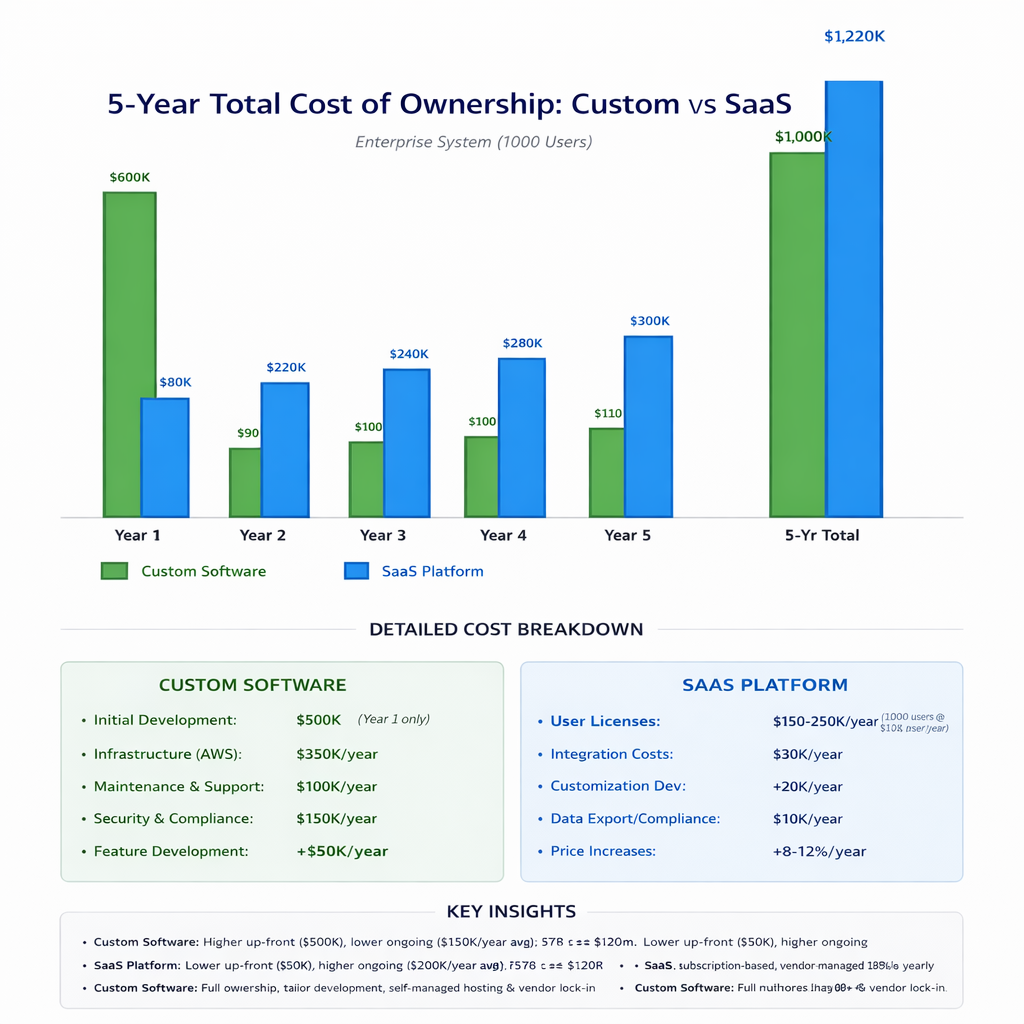
| 5-Year TCO (1000 users) | $3-6M (licensing + integrations) | $1.5-3M (platform + development) | $1.2-2.5M (build + hosting + maintenance) |
| Exit Strategy | Data export, rebuild from scratch | Locked to platform, expensive migration | Own codebase, portable, sellable asset |
Types of Custom Software Development Services
Core Service Categories:
Enterprise Web Applications:
Internal operational systems (CRM, ERP, project management), customer portals, dashboards, reporting platforms. These systems often evolve into robust accounting client management solutions when tailored to handle client data, workflows, and financial interactions efficiently. Many organizations rely on CRM software within these systems to centralize customer data and streamline operations. Typically serve 50-10,000+ users, integrate with multiple data sources, require role-based access and audit logging. Tech stack: React/Vue frontend, Node.js/Python/Java backend, PostgreSQL/MongoDB, deployed on AWS/Azure.
Mobile Applications (Native & Cross-Platform):
iOS/Android apps for field operations, sales enablement, and customer engagement. Native is preferred when performance is critical (complex UI, offline-first functionality, hardware integration), while React Native/Flutter works best when budget favors code reuse. Common requirements include offline capability, GPS tracking, camera integration, push notifications, and in some cases, integration with Web scraping services to pull real-time external data into mobile workflows.
API & Integration Platforms:
Middleware connecting disparate systems—REST APIs wrapping legacy SOAP services, data synchronization engines, webhook processors, ETL pipelines. Critical for enterprises with 5+ core systems needing real-time data consistency. Example: syncing Salesforce → NetSuite → custom warehouse system.
Internal Tools & Admin Panels:
Operations dashboards, data management interfaces, approval workflow systems, content management. Built for internal users (5-100 people), prioritize functionality over design, extensive permissions and audit trails. Fastest ROI category—automate manual processes.
Process Automation & Workflow Engines:
Replace manual spreadsheet processes, approval chains, data entry. Example: insurance claim processing, loan origination, employee onboarding. ROI measured in FTE hours saved. Integration-heavy—pull data from multiple sources, update multiple systems.
Custom Software Architecture Explained (High-Level)
| Architectural Decision | Good Choice | Bad Choice | Impact |
|---|---|---|---|
| Monolith vs Microservices | Monolith for < 50K users, simple domain | Microservices for MVP with 10 users | Premature complexity kills velocity |
| Database Choice | PostgreSQL for relational, DynamoDB for key-value | MongoDB for transactional data with complex joins | Query performance degrades, data consistency issues |
| Caching Strategy | Redis for session/frequent queries | No caching, query database for every request | System collapses at 100 concurrent users |
| API Design | RESTful with versioning (/v1/, /v2/) | Breaking changes force client upgrades | Mobile apps break, coordinated releases required |
| Authentication | OAuth 2.0 + JWT tokens | Session cookies without secure flags | Security audit failures, breach risk |
Role of Architecture in Long-Term Software Success
Custom Software Development Process Overview
End-to-End Lifecycle (No Step-by-Step Detail):
Phase 1: Discovery & Requirements (2-8 weeks): Stakeholder interviews, process mapping, integration assessment, architecture planning, cost/timeline estimation. Output: detailed specification, technical design document, fixed-price or T&M proposal.
Phase 2: Design & Architecture (2-4 weeks): Database schema design, API specifications, security model, infrastructure plan, UI/UX mockups. Output: technical blueprint, clickable prototypes, architecture diagrams.
Phase 3: Development (3-12 months): Sprint-based development, weekly demos, continuous integration, automated testing, code reviews. Iterative—adjust priorities based on feedback. Output: working software, deployed to staging environment.
Phase 4: Testing & QA (ongoing + 2-4 weeks final): Unit tests during development, integration testing, user acceptance testing, performance testing, security scanning. Output: bug-free system ready for production.
Phase 5: Deployment & Launch (1-3 weeks): Production environment setup, data migration, user training, go-live support, monitoring setup. Output: live system, trained users, documentation.
Phase 6: Maintenance & Evolution (ongoing): Bug fixes, performance optimization, feature additions, security updates, infrastructure scaling. Output: stable, evolving platform aligned with business growth.
Discovery and Requirement Engineering in Custom Projects
Discovery Failure Example – Healthcare Scheduling System:
Initial Request: “Build appointment scheduling for our clinic”
What Discovery Should Have Revealed (But Didn’t):
• HIPAA compliance requirements (encryption at rest/transit, audit logging, access controls)
• Integration with practice management system (proprietary API, rate limits)
• Insurance verification before scheduling (real-time eligibility checks)
• Multi-location scheduling with provider availability sync
• Patient reminder system (SMS, email, voice—compliance restrictions)
• Emergency override workflows (urgent appointments bypass rules)
What Happened: Developer built “simple scheduling” based on initial request. Four months in, client raised HIPAA compliance. Rebuild required—9 months delayed, 3x budget overrun. Cause: inadequate discovery, no compliance expertise, assumptions instead of questions.
What Good Discovery Uncovers:
- ✓ Hidden Stakeholders: Who else uses this data? IT security, compliance, finance—all have requirements
- ✓ Integration Landmines: Which systems must connect? What are their APIs? Do they even have APIs?
- ✓ Data Migration Complexity: How much legacy data? What condition? How to map to new schema?
- ✓ Edge Cases & Exceptions: What happens when X fails? How do refunds work? Who approves overrides?
- ✓ Compliance Landmines: GDPR, HIPAA, SOC2, industry regulations—requirements before they become blockers
Integration-First Thinking in Custom Software
| Integration Pattern | Complexity | Cost Multiplier | Common Issues |
|---|---|---|---|
| Modern REST API | Low | 1x (baseline) | Rate limits, auth token refresh, error handling |
| Legacy SOAP/XML | Medium | 1.5x | Complex schemas, inconsistent docs, WSDL parsing |
| Database Replication | Medium-High | 2x | Schema changes break sync, latency, conflict resolution |
| File-Based (CSV/FTP) | High | 2.5x | Format inconsistencies, manual intervention, delays |
| No API (Screen Scraping) | Very High | 3-4x | Breaks on UI changes, brittle, slow, unreliable |
Security and Compliance Considerations in Custom Software
Non-Negotiable Security Requirements:
- Authentication: MFA for admin users, password strength enforcement, secure session handling (HttpOnly cookies, SameSite flags), token expiration
- Authorization: Role-based access control (RBAC), least privilege principle, data-level permissions (users only see their data)
- Data Encryption: TLS 1.3 for transit, AES-256 for data at rest, key rotation policies, secure key storage (not in code)
- Input Validation: SQL injection prevention (parameterized queries), XSS protection (sanitize user input), CSRF tokens
- Audit Logging: Track all critical actions (login, data changes, exports), immutable logs, retention policies
- Vulnerability Management: Automated dependency scanning, OS patching schedule, security testing (SAST/DAST)
Cost of Custom Software Development: What Drives Budget
Cost Driver Reality:
Simple Project ($100-150K): 5-8 screens, basic CRUD, 1-2 integrations, standard security, 3-4 months
Example: Employee onboarding portal with HR system integration
Medium Project ($200-400K): 15-25 screens, moderate business logic, 3-5 integrations, compliance requirements, 6-9 months
Example: Customer portal with CRM/ERP sync, payment processing, reporting
Complex Project ($500K-1.5M): 30+ screens, complex workflows, 8+ integrations, heavy compliance, real-time features, 12-18 months
Example: Multi-tenant SaaS platform with billing, analytics, third-party marketplace
Hidden and Long-Term Costs After Launch
| Cost Category | What It Covers | Typical % of Build Cost/Year |
|---|---|---|
| Infrastructure Hosting | AWS/Azure servers, databases, storage, CDN, monitoring | 5-10% annually |
| Maintenance & Bug Fixes | Ongoing bug fixes, minor updates, dependency updates | 10-15% annually |
| Security Updates | Patching vulnerabilities, compliance audits, pen testing | 5-8% annually |
| Feature Development | New features, enhancements, user requests | 20-30% annually (if evolving) |
| Technical Debt Paydown | Refactoring, performance optimization, upgrading frameworks | 10-15% every 2-3 years |
Common Risks in Custom Software Projects
Top 7 Project Killers:
1. Scope Creep: “Just one more feature” turns 6-month project into 18 months. Mitigation: change request process, track scope changes, adjust timeline/budget accordingly.
2. Integration Underestimation: “Simple API integration” becomes 3-month debugging nightmare. Mitigation: assess integrations early, build POCs, budget 40% more time than estimated.
3. Unclear Requirements: Building wrong thing because stakeholders didn’t align. Mitigation: comprehensive discovery, requirement sign-off, prototype validation.
4. Vendor Lock-in: Proprietary frameworks make switching agencies impossible. Mitigation: use standard tech stacks, insist on code ownership, documentation.
5. Performance Failures: System works in testing, collapses in production. Mitigation: load testing before launch, performance budgets, scalability architecture.
6. Security Breaches: Inadequate security leads to compliance failures or data breaches. Mitigation: security reviews, pen testing, compliance audits before launch.
7. Technical Debt Accumulation: “Move fast” means shortcuts that become expensive to fix. Mitigation: code reviews, refactoring sprints, architecture governance.
How Enterprises Adopt Custom Software at Scale
Building custom software is 40% of the challenge—getting 500–5000 employees to actually use it is the other 60%. Enterprise adoption requires: executive sponsorship (someone with authority removes roadblocks), change management (training, communication, addressing resistance), phased rollout (pilot with 50 users, refine, then scale to thousands), data migration planning (moving from old system without disrupting operations), integration with existing workflows (don’t force parallel processes), success metrics (define what “successful adoption” means—login rates, transaction volume, user satisfaction), and ongoing support (help desk, training materials, feedback loops). Incorporating adaptive Software practices further strengthens adoption by enabling flexibility and continuous improvement based on user feedback. We’ve seen perfect software fail because companies skipped adoption planning—users kept using spreadsheets because no one trained them or migrated their data.
Use Cases Where Custom Software Delivers Maximum ROI
High-ROI Scenarios:
Operational Systems (Process Automation): Replace manual processes consuming 5+ FTEs. Example: loan origination system automates 60% of underwriting, saves $400K/year in labor, ROI in 18 months.
Competitive Differentiation: Your workflow IS your competitive advantage. Example: real estate platform with unique search algorithm, custom pricing model—cannot use off-the-shelf.
Complex Integration Hubs: Connecting 8+ systems with custom business logic. Example: order management system syncing e-commerce, warehouse, accounting, CRM—unified data view.
Compliance-Heavy Industries: Industry-specific compliance that SaaS doesn’t cover. Example: clinical trial management system with FDA 21 CFR Part 11 compliance—generic tools insufficient.
Data Monetization Platforms: Unique data + custom analytics = revenue. Example: supply chain analytics platform processing proprietary data, sold as SaaS—custom core enables business model.
When Custom Software Is the Wrong Choice
Use SaaS Instead When:
- ❌ Standard Process: Your needs match 80%+ of what Salesforce/HubSpot/Workday offers—customization not worth ownership burden
- ❌ Limited Budget: You have $50K but need CRM, project management, accounting—SaaS gives you functional systems for that budget
- ❌ No Technical Team: Custom software requires ongoing maintenance—if you can’t hire developers or retain agency, SaaS safer
- ❌ Unproven Business Model: Building custom before validating market = expensive lesson. Start with SaaS, customize if you succeed
- ❌ Commodity Functionality: Email marketing, basic analytics, document signing—mature SaaS markets, no differentiation from custom
- ❌ Fast Deployment Critical: Need system in 30 days—configuration beats custom development for speed
Scaling Custom Software From MVP to Enterprise Platform
Team Models Used by Custom Software Development Companies
| Model | Structure | Best For | Trade-offs |
|---|---|---|---|
| Project-Based | Fixed scope, timeline, budget. Team assigned for duration | Well-defined projects, stable requirements | Scope changes expensive, team dissolves after launch |
| Time & Materials | Hourly/monthly billing, flexible scope | Evolving requirements, R&D projects | Less budget predictability, requires trust |
| Dedicated Team | Reserved team works exclusively for you, long-term | Ongoing development, product companies | Higher monthly cost, but team knows your system deeply |
| Hybrid (Augmented) | Your team + agency specialists (architect, security, DevOps) | Have internal developers, need specific expertise | Coordination overhead, but flexible scaling |
How to Evaluate a Custom Software Development Company
Evaluation Framework (8 Criteria):
1. Technical Depth:
Ask about architecture decisions. A good answer explains why a specific technology was chosen in relation to business and data requirements, not just trends. For example: “We chose PostgreSQL over MongoDB because your transactional data requires strong ACID guarantees and complex relational joins.” This level of reasoning shows architectural maturity. The same principle applies at the team level especially in high-growth regions where collaborating with leading software development companies in Bangladesh enables enterprises to access mature engineering talent, proven delivery processes, and cost-efficient custom software teams capable of making and justifying such informed architectural decisions.”
2. Process Maturity: How do they handle requirements? Change requests? Code reviews? Testing? Look for documented processes, not ad-hoc development.
3. Security Mindset: Do they mention security unprompted? Ask about OWASP Top 10, encryption, audit logging. If they seem confused, walk away.
4. Reference Projects: Similar complexity to yours? Ask to speak with references—probe for missed deadlines, budget overruns, post-launch issues.
5. Communication Style: Do they ask deep questions or just say “yes we can do that”? Good agencies challenge assumptions, probe requirements.
6. Code Ownership: Confirm you own all code, documentation. Some agencies retain IP—deal breaker for strategic systems.
7. Team Stability: How long have their developers worked there? High turnover means knowledge loss, quality issues.
8. Post-Launch Support: What happens after go-live? SLA for bugs? Maintenance retainer structure? Transition plan to in-house team?
Red Flags When Hiring a Custom Software Vendor
Run Away If You See:
Unrealistic Timelines: “We can build enterprise CRM in 6 weeks”—impossible without massive compromises
No Discovery Phase: Gives estimate without understanding requirements—they’re guessing, you’ll pay for it
Weak Portfolio: Can’t show similar projects or references refuse to talk—lack experience in your domain
Proprietary Frameworks: “We use our own framework”—vendor lock-in, hard to find other developers
No Testing Plan: Doesn’t mention QA, testing strategy, or quality process—expect bugs
Offshore-Only: No onshore project manager, all communication through email—timezone/language barriers kill projects
Vague Security: Dismisses security questions or provides generic answers—will fail compliance audits
No Documentation: Doesn’t mention technical docs, API documentation, or knowledge transfer—you’re dependent on them forever
Measuring Success of Custom Software Investments
Future Trends in Custom Software Development
Emerging Trends (Next 3-5 Years):
AI-Assisted Development: AI code generation (GitHub Copilot, Amazon CodeWhisperer) accelerates routine coding 30-40%, but human architects still design systems. Don’t expect 50% cost reduction—expect better developer productivity.
Composable Architecture: Building systems from reusable components, APIs, microservices. Reduces custom code, increases assembly of proven modules. Example: auth from Auth0, payments from Stripe, search from Algolia—integrate, don’t rebuild.
Domain-Driven Design: Organizing code around business domains, not technical layers. Better alignment between business and technology, clearer ownership boundaries.
Edge Computing: Processing data closer to users for performance, offline capability. Critical for IoT, mobile-first applications.
No-Code/Low-Code Hybrid: Use low-code for 80% standard features, custom code for 20% differentiation. Best of both worlds—speed plus control.
How Custom Software Fits Into Digital Transformation
Final Perspective: Custom Software as a Long-Term Asset
The Strategic Shift:
Successful companies treat custom software like infrastructure, not projects. You don’t “buy” a factory once and never invest again—you maintain it, upgrade equipment, optimize processes. Custom software is the same: initial build is 40% of lifetime investment, 60% is evolution, optimization, scaling. Companies that get this right: budget 15-20% annually for maintenance and enhancements, retain development relationships long-term (not project-by-project), invest in documentation and knowledge transfer, measure business outcomes (not just technical metrics), and evolve architecture proactively before it becomes crisis.
The Asset Mindset: A well-built custom system becomes more valuable over time—accumulates features, optimizations, integrations. After 5 years, that $500K investment is a $2M+ asset (replacement cost). After 10 years, competitive moat—your unique workflows, data, and integrations impossible to replicate. This only works if you: choose the right problems to solve with custom software, build solid architecture that evolves, maintain and improve continuously, and measure and communicate business value.
Faq
Q1.How do I know if my business needs custom software or if off-the-shelf SaaS is sufficient?
Apply the 80/20 rule: if SaaS platforms match 80%+ of your needs and the 20% gap is non-critical, use SaaS. Custom becomes necessary when: your unique workflow is your competitive advantage (competitors can’t copy if they use same tools), you need deep integration with 5+ systems (SaaS integration costs exceed custom build), compliance requirements demand data sovereignty (cannot use cloud SaaS), or scale economics favor ownership (1000+ users means SaaS licensing costs $300K+/year while custom costs $75-100K/year to maintain). Calculate 5-year total cost of ownership for both options. If SaaS TCO is $1.5M+ and custom TCO is $1M, custom wins financially. If SaaS gives you 90% functionality for $500K over 5 years, custom at $1M doesn’t justify the gap. The decision isn’t initial cost—it’s total lifetime value, strategic control, and exit flexibility.
Q2.What's a realistic timeline and budget for custom enterprise software?
Timelines and budgets vary dramatically based on complexity. Simple internal tool (5-8 screens, basic CRUD, 1-2 integrations): $100-150K, 3-4 months. Medium complexity system (15-25 screens, moderate business logic, 3-5 integrations, reporting): $200-400K, 6-9 months. Complex enterprise platform (30+ screens, heavy integrations, compliance requirements, real-time features): $500K-$1.5M, 12-18 months. These are realistic ranges from 8+ years building enterprise systems. Agencies quoting significantly lower (50% or more) are either underestimating or planning to cut corners. Key cost drivers: number and complexity of integrations (each integration adds 2-4 weeks), compliance requirements (HIPAA/SOC2 adds 30-40% to timeline), business logic complexity (pricing algorithms, approval workflows), and data migration (moving from legacy systems). Always add 20-30% contingency buffer for scope adjustments discovered during development.
Q3.How much does it cost to maintain custom software after launch, and what does maintenance include?
Budget 15-20% of initial build cost annually for comprehensive maintenance. For a $500K system, expect $75-100K/year covering: infrastructure hosting (AWS/Azure servers, databases, CDN: $20-30K/year), bug fixes and minor updates (ongoing support retainer: $30-40K/year), security updates and compliance (vulnerability patching, dependency updates, annual security audits: $15-25K/year), and feature enhancements (new functionality, user requests: $20-30K/year if actively evolving). This excludes major feature additions or architectural refactoring—those are separate projects. Companies often underestimate post-launch costs, budgeting only for hosting ($20-30K), then panicking when security vulnerabilities need emergency patching or users demand features that take weeks to build. Mature companies establish maintenance retainers with development partners—predictable monthly cost covering agreed-upon support hours. If you cannot afford 15-20% annually, custom software may not be sustainable—consider SaaS where vendor handles all maintenance.
Q4.What happens if the development company goes out of business or we want to switch vendors?
This is why code ownership and documentation are non-negotiable. Your contract must specify: you own all source code, database schemas, and IP (no shared ownership, no licensing restrictions), comprehensive documentation (technical architecture, API docs, deployment procedures, database schema), access to all repositories and infrastructure (GitHub, AWS accounts transferred or duplicated), and transition assistance (minimum 30 days knowledge transfer, access to original developers for questions). Good agencies provide this upfront—it demonstrates confidence and reduces your risk. Red flag: agencies that resist code ownership or claim “proprietary frameworks” create vendor lock-in. If vendor disappears or relationship sours, you should be able to hire any competent development team to continue work. Standard tech stack (React, Node.js, PostgreSQL, AWS) means talent is abundant. Proprietary frameworks mean you’re stuck. Before signing, verify ownership terms explicitly—some contracts have hidden clauses retaining partial IP rights. Insist on escrow arrangements for critical systems: code deposited with third party, released to you if vendor fails.
Q5.How do I evaluate technical competence when I'm not technical myself?
Focus on process, references, and red flags rather than trying to assess code quality. Ask about their discovery process: do they push back on requirements, ask deep questions about integrations, probe edge cases? Good agencies challenge assumptions. Ask about architecture decisions: request explanation of database choices, scalability approach, security implementation. You don’t need to understand technical details—listen for clarity, logical reasoning, consideration of trade-offs. Red flag: vague answers or “we’ll figure it out later.” Speak with references from similar projects: ask specifically about missed deadlines, budget overruns, post-launch issues, how they handled problems. Request to see their testing and QA process: automated testing, code reviews, security scanning. No formal process = quality issues. Ask about team stability: high turnover (>30% annually) means knowledge loss. Bring in an independent technical advisor for contract review if dealing with $500K+ projects—$5K for expert review prevents $500K mistakes. Trust your gut on communication: agencies that communicate clearly in sales will communicate clearly during development. Agencies that overpromise or dismiss concerns will cause problems.
Explore Services
Related Services
Reviewed by

Aman Vaths
Founder of Nadcab Labs
Aman Vaths is the Founder & CTO of Nadcab Labs, a global digital engineering company delivering enterprise-grade solutions across AI, Web3, Blockchain, Big Data, Cloud, Cybersecurity, and Modern Application Development. With deep technical leadership and product innovation experience, Aman has positioned Nadcab Labs as one of the most advanced engineering companies driving the next era of intelligent, secure, and scalable software systems. Under his leadership, Nadcab Labs has built 2,000+ global projects across sectors including fintech, banking, healthcare, real estate, logistics, gaming, manufacturing, and next-generation DePIN networks. Aman’s strength lies in architecting high-performance systems, end-to-end platform engineering, and designing enterprise solutions that operate at global scale.