Ai Overview
Poor architecture → Tight coupling → Hard to test → More bugs → Fear of changes → Slower development → Bigger refactors → More risk → Technical debt → Project failure. Updates model based on user actions, updates view when model changes. In practice: View controllers become “Massive View Controllers” doing everything. Myth: “Clean Architecture is slow” Reality: Abstraction layers have zero runtime cost in release builds (optimized away).
KEY TAKEAWAYS
Architecture choice determines whether iOS app stays maintainable for years or becomes unmaintainable in months. This isn’t about perfection—it’s about choosing the least wrong pattern for specific situation, understanding trade-offs, and avoiding common mistakes that plague iOS projects regardless of architecture.
1. Why Architecture Choice Matters More Than UI in iOS Apps
The Architecture Impact Chain:
Poor architecture → Tight coupling → Hard to test → More bugs → Fear of changes → Slower development → Bigger refactors → More risk → Technical debt → Project failure
| Aspect | Impact of Poor Architecture | Impact of Good Architecture |
|---|---|---|
| Development Speed | Slows exponentially as codebase grows | Maintains consistent velocity over time |
| Bug Rate | Changes break unrelated features unpredictably | Bugs stay contained to specific layers |
| Testing | Impossible to test in isolation, brittle tests | Easy unit tests, fast test execution |
| Onboarding | New developers take weeks to contribute safely | Clear patterns enable productivity in days |
| Refactoring | High-risk, often causes regressions | Low-risk, isolated changes with confidence |
| Long-term Maintenance | Eventual rewrite becomes only option | Continuous evolution without big-bang rewrites |
2. What iOS Architecture Patterns Actually Solve
Core Problems Architecture Solves:
- Separation of Concerns: Where does network logic go? Business rules? UI updates? Architecture answers these questions consistently
- State Management: How does data flow from API → UI → User Actions → State Changes?
- Testability: Can you test business logic without UIKit? Without network calls? Without mocks everywhere?
- Change Isolation: Changing API response format shouldn’t require touching 20 view controllers
- Dependency Management: How do components get dependencies? Singletons? Initializer injection? Service locators?
3. Understanding MVC in iOS (As Apple Intended)
Apple’s Original MVC Vision:
Model: Data + business logic. Knows nothing about views or controllers. Notifies observers when data changes.
View: Pure UI rendering. Knows nothing about models. Receives data to display, sends user actions up.
Controller: Mediator between Model and View. Updates model based on user actions, updates view when model changes.
In theory: Clean separation. In practice: View controllers become “Massive View Controllers” doing everything.
4. Why MVC Turns Into Massive View Controllers
| Anti-Pattern | How It Happens | Consequence |
|---|---|---|
| Networking in ViewController | URLSession.dataTask in viewDidLoad “because it’s easy” | Can’t test without network, can’t reuse logic, can’t mock responses |
| Business Logic Leak | Validation, calculations, formatting in controller | Logic duplicated across screens, hard to test, changes risky |
| Direct View Manipulation | label.text = …, tableView.reloadData() everywhere | UI state scattered, hard to track, leads to bugs |
| Singleton Abuse | NetworkManager.shared, UserDefaults.standard direct access | Hidden dependencies, impossible to test, global state issues |
| Delegation Overload | Controller becomes delegate for 10 different protocols | Messy, unclear responsibilities, method soup |
| No Extraction Incentive | Adding more code to existing VC easier than refactoring | Technical debt accumulates, controller grows to 3000+ lines |
Real Example – E-Commerce Product Screen MVC:
Typical ProductViewController in MVC:
• viewDidLoad: Fetch product from API (networking)
• Process response: Parse JSON, validate data (business logic)
• Update UI: Set 20+ outlets, format prices, localize text (UI logic)
• Handle actions: Add to cart, calculate totals, update inventory (more business logic)
• Manage state: Track cart items, selected variants, wishlist status (state management)
• Result: 1800 lines, impossible to test, changes break randomly
5. Where MVC Still Works Well
MVC Is Actually Fine For:
- Simple Apps: 3-5 screens, minimal business logic, short lifespan (internal tools, prototypes)
- Learning Projects: SwiftUI tutorials, coding bootcamps, sample apps
- Throwaway MVPs: Validate idea in 2 weeks, may never ship to production
- Settings Screens: Static UI, minimal logic, rarely changes
- You understand all code, no team coordination needed
6. What MVVM Changes Compared to MVC
The ViewModel Layer:
MVVM introduces a new component between View and Model: the ViewModel. Its job: prepare data for the view, handle user actions, manage view state—but stay completely UIKit-agnostic. ViewModel knows nothing about UILabel, UIButton, or UIViewController. This separation enables testing business logic without instantiating views.
| Aspect | MVC | MVVM |
|---|---|---|
| View Logic Location | In UIViewController (tightly coupled) | In ViewModel (decoupled from UIKit) |
| Data Formatting | Controller formats data for labels | ViewModel exposes formatted strings |
| User Actions | @IBAction calls model directly | @IBAction calls ViewModel method |
| State Updates | Controller observes model changes manually | View binds to ViewModel properties (Combine, RxSwift) |
| Testing | Requires instantiating UIViewController | Test ViewModel in isolation, no UIKit needed |
| Reusability | Logic tied to specific view controller | ViewModel reusable across different views |
7. MVVM Strengths in Real iOS Apps
Where MVVM Excels:
1. Testability:
Test ViewModel logic without instantiating UIKit: productViewModel.addToCart() → Assert cart count increased. No view controller setup, no UI rendering, fast unit tests.
2. Declarative Data Binding:
With Combine: viewModel.$products.sink { [weak self] in self?.tableView.reloadData() } → View auto-updates when ViewModel state changes.
3. SwiftUI Natural Fit:
SwiftUI was designed around MVVM: @Published properties, ObservableObject protocol, automatic view updates. MVVM + SwiftUI = seamless.
4. Complex UI State:
Loading/Error/Success/Empty states managed in ViewModel, view just renders current state. No scattered booleans across view controller.
5. Parallel Development:
Backend team builds ViewModel, UI team builds View independently. Contract: ViewModel protocol defines interface.
Real Example – Shopping Cart MVVM:
CartViewModel:
• Properties: @Published var items: [CartItem], @Published var total: String, @Published var state: ViewState
• Methods: addItem(), removeItem(), updateQuantity(), checkout()
• Logic: Price calculations, discount application, inventory validation
• Output: Formatted strings ready for UI: “$45.99”, “3 items”
CartViewController:
• Setup bindings in viewDidLoad
• Update tableView when viewModel.$items changes
• Call viewModel.checkout() on button tap
• Total: 150 lines (was 1200 in MVC version)
Tests: 40 unit tests covering all cart logic, run in <1 second, no UI framework needed
8. MVVM Trade-offs and Common Mistakes
Common MVVM Mistakes:
- Overbinding Everything: Using @Published for every property creates unnecessary view updates, performance issues
- Massive ViewModel: Moving all controller code into ViewModel creates “Massive ViewModel” instead—still unmaintainable
- UIKit in ViewModel: Importing UIKit defeats the purpose—ViewModel should be pure Swift
- Business Logic in ViewModel: ViewModel should prepare data for view, not contain core business rules
- Tight Coupling to Framework: Directly using RxSwift types in ViewModel makes it framework-dependent
- No Separation of Concerns: Networking, persistence, business logic all in ViewModel—wrong layer
9. When MVVM Is the Right Choice
| Use Case | Why MVVM Fits | Team Size |
|---|---|---|
| SwiftUI-first apps | SwiftUI designed around @Published, ObservableObject—MVVM natural | Any |
| Medium-sized apps (10K-50K LOC) | Enough complexity to justify structure, not so much to need Clean Architecture | 2-8 developers |
| Apps with complex UI state | Loading/error/success, filters, multi-step flows managed cleanly in ViewModel | Any |
| Evolving requirements | ViewModel testable = confident changes without breaking UI | Any |
| Need for unit testing | ViewModel pure Swift = fast tests without UIKit overhead | Any |
10. What “Clean Architecture” Means in iOS Context
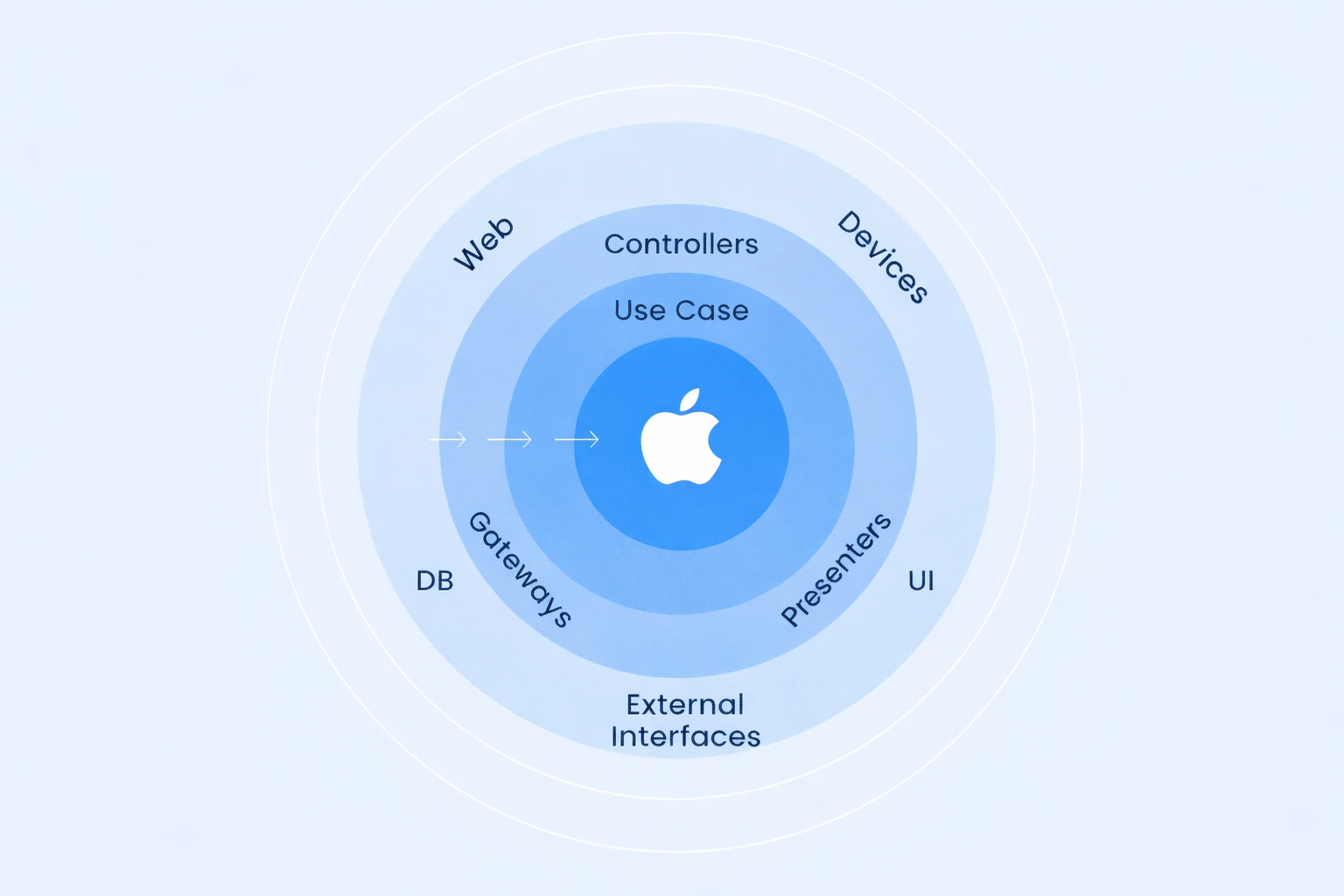
Clean Architecture Layers (iOS):
Domain Layer (Core):
• Entities: Business objects (User, Product, Order)
• Use Cases: Business logic (PlaceOrderUseCase, AuthenticateUserUseCase)
• Interfaces: Protocols for repositories, gateways (UserRepositoryProtocol)
• No dependencies on frameworks, UI, databases
Data Layer:
• Repositories: Implement domain interfaces (UserRepositoryImpl)
• API Clients: Network implementation (APIClient, Codable models)
• Persistence: CoreData, Realm, UserDefaults wrappers
• Mappers: Convert API/DB models to domain entities
Presentation Layer:
• ViewModels: Prepare data for views, call use cases
• Views: UIKit/SwiftUI, display data, send user events
• Coordinators: Navigation logic, screen flow
Infrastructure Layer:
• Dependency Injection: Container, factory patterns
• Networking: URLSession configuration, interceptors
• Third-party: Analytics, crash reporting, feature flags
11. Core Principles Behind Clean Architecture
Five Pillars of Clean Architecture:
1. Independence of Frameworks:
Business logic doesn’t depend on UIKit, SwiftUI, Combine, or any framework. Frameworks are details, not foundations.
2. Testability:
Business rules testable without UI, database, web server, or external dependencies. Pure Swift, fast execution.
3. Independence of UI:
Swap UIKit for SwiftUI without touching business logic. UI is interchangeable skin over domain core.
4. Independence of Database:
Switch CoreData to Realm, UserDefaults to Keychain—domain layer unaffected.
5. Independence of External Services:
API changes don’t propagate to business logic. Mappers translate between API models and domain entities.
12. How Clean Architecture Changes iOS Codebases
| Change | Impact | Trade-off |
|---|---|---|
| File Count Increase | Feature that was 3 files (MVC) becomes 8-12 files (Clean) | More navigation, but each file has single responsibility |
| Protocols Everywhere | Interfaces for repositories, use cases, gateways | Boilerplate, but enables dependency injection and testing |
| Explicit Dependencies | Initializer injection, no singletons or global state | More code to wire up, but dependencies visible and controllable |
| Slower Initial Dev | Setting up layers takes longer than throwing code in ViewController | Upfront time investment, but consistent speed as app grows |
| Onboarding Complexity | New developers need to understand architecture before contributing | Steeper learning curve, but fewer production bugs from new team members |
Real Example – Login Feature File Structure:
Domain Layer:
• Entities/User.swift (business object)
• UseCases/AuthenticateUserUseCase.swift (business logic)
• Interfaces/AuthRepositoryProtocol.swift (abstraction)
Data Layer:
• Repositories/AuthRepositoryImpl.swift (implements protocol)
• API/LoginAPIModel.swift (Codable for API)
• Mappers/UserMapper.swift (API model → domain entity)
Presentation Layer:
• ViewModels/LoginViewModel.swift (prepare for view)
• Views/LoginViewController.swift (UIKit) or LoginView.swift (SwiftUI)
• Coordinators/AuthCoordinator.swift (navigation)
Total: 10 files vs 1-2 in MVC, but each has clear, testable responsibility
13. Clean Architecture Trade-offs
When Clean Architecture Hurts:
- Small Apps: 5-screen app doesn’t need layers—overhead outweighs benefits
- Prototypes/MVPs: Speed to market matters more than maintainability you may never need
- Solo Short-Term: If you’re only developer and app dies in 6 months, simpler is better
- Team Not Ready: Junior team will struggle, create bad abstractions, slow down unnecessarily
- Unclear Requirements: Premature abstraction when you don’t know what will change leads to wrong layers
14. MVC vs MVVM vs Clean: Responsibility Comparison
| Responsibility | MVC | MVVM | Clean Architecture |
|---|---|---|---|
| UI Rendering | View + ViewController | View + ViewController | View (Presentation Layer) |
| Presentation Logic | ViewController (mixed with everything) | ViewModel (separated) | ViewModel (Presentation Layer) |
| Business Logic | Model (often leaks to Controller) | Model (or ends up in ViewModel) | Use Cases (Domain Layer) |
| Networking | ViewController (common) or Model | Service layer or ViewModel | Repository (Data Layer) |
| Data Persistence | Model or Singleton managers | Service layer | Repository (Data Layer) |
| Navigation | ViewController (segues, pushes) | ViewController or Coordinator | Coordinator (Presentation Layer) |
| Dependency Injection | Singletons or property passing | Initializer injection to ViewModel | DI Container (Infrastructure Layer) |
15. Testing Implications of Each Architecture
| Test Type | MVC Difficulty | MVVM Difficulty | Clean Difficulty |
|---|---|---|---|
| Unit Testing Business Logic | Very Hard (requires UIKit) | Easy (test ViewModel) | Very Easy (test Use Cases) |
| Mocking Dependencies | Hard (singletons, global state) | Medium (need mock services) | Easy (protocol mocks) |
| Test Execution Speed | Slow (UI instantiation) | Fast (no UIKit) | Very Fast (pure Swift) |
| Test Coverage Achievable | Low (20-40%) | Medium (50-70%) | High (70-90%) |
| Test Brittleness | High (UI changes break tests) | Medium (ViewModel stable) | Low (domain tests isolated) |
Testing Reality Check:
MVC: Tests require instantiating UIViewController, setting up storyboard, creating view hierarchy. Slow, brittle, developers avoid writing tests. Coverage: 20-30%.
MVVM: Test ViewModel in isolation. Mock services. Fast execution. Developers actually write tests. Coverage: 50-70%.
Clean Architecture: Test use cases with protocol mocks. Pure Swift, millisecond execution. Comprehensive test suites feasible. Coverage: 70-90%.
16. Impact on Team Collaboration and Scaling
| Team Aspect | MVC | MVVM | Clean Architecture |
|---|---|---|---|
| Onboarding Time | 1-2 days (familiar pattern) | 3-5 days (need binding framework) | 1-2 weeks (understand layers) |
| Parallel Work | Hard (merge conflicts in massive VCs) | Better (separate ViewModel/View work) | Excellent (isolated layers) |
| Code Review Difficulty | Hard (need context of entire VC) | Medium (ViewModel changes clearer) | Easy (single responsibility files) |
| Refactoring Safety | Risky (tight coupling, ripple effects) | Safer (ViewModel tests catch breaks) | Safest (comprehensive test coverage) |
| Knowledge Sharing | Tribal (code hard to understand) | Better (patterns documented) | Best (architecture diagrams clear) |
17. Performance Considerations Across Architectures
Performance Myths vs Reality:
Myth: “More layers = slower app”
Reality: Architecture overhead is negligible. App performance bottlenecks: network calls, image processing, database queries, inefficient algorithms. Adding ViewModel or Use Case layer adds microseconds. Real slowness: blocking main thread, unoptimized rendering, memory leaks.
Myth: “Clean Architecture is slow”
Reality: Abstraction layers have zero runtime cost in release builds (optimized away). Performance-critical code (rendering, scrolling) is same regardless of architecture.
Myth: “MVVM binding is expensive”
Reality: Combine/RxSwift have overhead, but only noticeable if you over-bind (hundreds of subscriptions). Reasonable binding (10-20 per screen) imperceptible.
18. Migration Paths Between Architectures
Incremental Migration Strategy:
MVC → MVVM:
1. Extract presentation logic from one ViewController into ViewModel
2. Keep existing Model layer intact
3. Migrate screen by screen over 2-3 months
4. New features always use MVVM, legacy screens migrated when touched
5. Result: Mixed codebase for 6-12 months, gradual convergence
MVVM → Clean Architecture:
1. Define Domain layer: extract business entities, create use case interfaces
2. Implement Data layer: repositories, API clients
3. Refactor existing ViewModels to call use cases instead of direct API
4. Add Coordinators for navigation
5. Migrate module by module (Login, Products, Checkout separately)
6. Timeline: 3-6 months for medium app
Real Migration Example – E-commerce App (30K LOC):
Starting Point: MVC, 50 view controllers, 1500+ lines each, no tests
Month 1-2: New checkout flow in MVVM, team learns pattern
Month 3-4: Migrate product catalog (most complex) to MVVM
Month 5-6: Convert remaining high-traffic screens
Month 7-8: Leave old settings/static screens in MVC (not worth migrating)
Month 9: Team comfortable, velocity improved 30%
Result: 70% MVVM, 30% MVC, both patterns coexist peacefully. New code always MVVM.
19. Architecture Choice by App Size and Lifetime
| App Profile | Recommended Architecture | Reasoning |
|---|---|---|
| Prototype/MVP (< 3 months lifespan) | MVC | Speed to market critical, may never scale |
| Small app (< 10K LOC, 1-2 devs, 1-2 years) | MVC or MVVM | MVC sufficient if stable, MVVM if testing needed |
| Medium app (10-50K LOC, 3-6 devs, 2-4 years) | MVVM | Sweet spot: testability + reasonable complexity |
| Large app (50-200K LOC, 6-15 devs, 5+ years) | Clean Architecture | Investment pays off, team can handle complexity |
| Enterprise (> 200K LOC, 15+ devs, indefinite) | Clean Architecture + Modularization | Necessary for coordination, clear ownership |
20. Common Anti-Patterns Across All Three
Mistakes That Break Any Architecture:
1. God Objects: Massive ViewController, massive ViewModel, massive Use Case—all violate single responsibility
2. Singleton Abuse: NetworkManager.shared, DataManager.shared everywhere = hidden dependencies, untestable
3. No Abstraction: Concrete types everywhere, no protocols = tight coupling, can’t swap implementations
4. Wrong Layer Logic: Business rules in ViewModel, networking in ViewController, UI logic in Use Case
5. Circular Dependencies: ViewModel → Service → ViewModel = impossible to test, memory leaks
6. Premature Optimization: Complex architecture before you understand requirements = wrong abstractions
7. Inconsistent Patterns: Mix of MVC, MVVM, Clean with no clear boundaries = confusion, maintenance nightmare
21. How Experienced iOS Teams Decide Architecture
Decision Framework (5 Questions):
Q1: How long will this app live?
< 6 months: MVC | 1-3 years: MVVM | 5+ years: Clean Architecture
Q2: How many developers will work on it?
1-2: MVC acceptable | 3-6: MVVM recommended | 7+: Clean Architecture necessary
Q3: How often will requirements change?
Stable: MVC fine | Evolving: MVVM safer | Constantly changing: Clean Architecture
Q4: Is testing critical (regulated industry, high stakes)?
No: MVC | Somewhat: MVVM | Yes: Clean Architecture
Q5: What’s team’s architecture experience?
Junior: Start MVC, evolve | Mid-level: MVVM | Senior: Clean Architecture
22. Final Guidance: Choosing the Least Wrong Architecture
The Pragmatic Path:
Start small: Use simplest architecture that works for current team and timeline
Listen to pain: When testing becomes hard, refactor to MVVM. When layers blur, add Clean Architecture
Migrate incrementally: Don’t rewrite—evolve module by module
Document decisions: Why you chose this pattern, what problems it solves
Stay pragmatic: Perfect architecture that ships late is worse than good-enough architecture that ships on time
FREQUENTLY ASKED QUESTIONS
Q1.Should I use MVVM for a simple 5-screen app, or is MVC sufficient?
For a 5-screen app with minimal business logic and short expected lifespan (under 1 year), MVC is perfectly adequate. The overhead of MVVM—setting up ViewModels, establishing data binding, managing reactive subscriptions—doesn’t justify the benefits when app is small and straightforward. MVVM makes sense when you have complex UI state to manage, need comprehensive unit testing (critical for regulated industries or high-stakes apps), or expect the app to grow significantly. If you’re a solo developer building an internal tool, prototyping an idea, or creating a weekend project, don’t over-engineer with MVVM. The key question: will testing and maintainability matter 6 months from now? If no, stick with MVC. If yes, invest in MVVM upfront—retrofitting architecture is harder than starting correctly.
Q2.How do I migrate a 30K line MVC codebase to MVVM without breaking production?
Incremental migration is the only safe approach—never attempt a big-bang rewrite. Start by identifying most complex or frequently changing screen (often the main feature screen). Extract its presentation logic into a new ViewModel while keeping the existing ViewController intact initially. Write tests for the ViewModel to establish safety net. Once tests pass, refactor ViewController to use ViewModel instead of direct Model access. This first migration teaches team the pattern. Next, convert new features to MVVM from the start—establish the pattern as default for greenfield work. Then migrate high-traffic or bug-prone screens next, prioritizing areas where testability matters most. Leave stable, rarely-touched screens (settings, about, static content) in MVC—migrating them wastes time for minimal benefit. Accept that codebase will be hybrid MVC/MVVM for 6-12 months. Document the migration plan, run both patterns side-by-side with clear module boundaries, and gradually converge. The goal isn’t 100% migration—it’s improving the parts that matter while maintaining production stability.
Q3.Does Clean Architecture make sense for a startup MVP that needs to ship in 6 weeks?
Absolutely not. Clean Architecture is investment in long-term maintainability at the cost of initial development speed. For a startup MVP where speed to market determines survival, you need to ship fast and validate the idea before worrying about architecture. Use simple MVC or basic MVVM—focus on proving product-market fit, not perfect code structure. Clean Architecture’s multiple layers, protocol abstractions, and dependency injection containers add 30-50% development overhead upfront. That overhead pays off after 6-12 months when the codebase grows and requirements change frequently, but for an MVP that might pivot or die in 3 months, it’s premature optimization. The correct startup approach: ship fast with simple architecture, gather user feedback, validate assumptions, then refactor toward better architecture once you have product-market fit and committed resources. Many successful apps started with “ugly” MVC code that got refactored to Clean Architecture after they proved the business model—that’s pragmatic, not wrong.
Q4.Why do my ViewModels keep growing to 1000+ lines? Am I doing MVVM wrong?
Yes, you’re experiencing “Massive ViewModel” syndrome—the MVVM equivalent of Massive View Controller. The mistake: putting too much responsibility in ViewModel. ViewModels should only handle presentation logic (formatting data for display, managing UI state like loading/error/success). Business logic belongs in separate Use Cases or Services. Networking belongs in Repository layer. Data transformation belongs in Mapper classes. If ViewModel contains API calls, complex calculations, validation rules, or multiple business flows, you’ve violated single responsibility. The fix: extract concerns into focused components. Create a ProductService for business logic, NetworkRepository for API calls, PriceCalculator for computations. ViewModel orchestrates these components but doesn’t contain their logic. Each ViewModel should manage one screen’s presentation state—if you have a ViewModel handling multiple screens or complex workflows, split it. Aim for ViewModels under 200 lines. If you exceed that, you’re probably mixing layers. MVVM without proper service layer becomes Massive ViewModel antipattern—you need architecture beyond just View-ViewModel separation.
Q5.How many files is "too many" for Clean Architecture? I have 12 files for one login feature.
12 files for login in Clean Architecture is actually reasonable, not excessive. Typical Clean Architecture login feature: Domain layer (User entity, AuthenticateUseCase, AuthRepositoryProtocol), Data layer (AuthRepositoryImpl, LoginAPIModel, UserMapper), Presentation layer (LoginViewModel, LoginViewController, AuthCoordinator), Infrastructure (DI setup). That’s 10-12 files, each with single, clear responsibility. The question isn’t “how many files” but “is each file doing one thing well and testable independently?” One 1500-line LoginViewController is worse than 12 focused 100-line files. The file count matters less than navigability and understanding. If you can find any component quickly, understand its role from the name, and test it in isolation, you have good architecture regardless of file count. Bad signs: navigating through 6 files to understand simple flow, circular dependencies between files, files that are interdependent and can’t be tested alone. Good signs: each file independently testable, clear purpose from naming, changes localized to 1-2 files. Don’t optimize for fewer files—optimize for clarity, testability, and change isolation.
Q6.Can I mix MVC, MVVM, and Clean Architecture in the same app, or must I pick one?
You can and often should mix patterns strategically within the same codebase, as long as you have clear module boundaries and consistent patterns within each module. For example: use Clean Architecture for core business features (checkout, payments, user management) where complexity and testing matter, MVVM for medium-complexity features (product catalog, search, recommendations), and simple MVC for static screens (settings, about, help). The key is consistency within modules and clear documentation of which pattern applies where. What doesn’t work: random mixing where every screen uses different pattern based on developer preference—that creates cognitive overhead and maintenance nightmares. What does work: deliberate pattern selection based on feature complexity and criticality. Document decisions: “Authentication module uses Clean Architecture because it’s business-critical and heavily tested. Content pages use MVC because they’re static and rarely change.” This pragmatic approach optimizes architecture effort where it provides most value rather than over-engineering everything or under-engineering critical parts. The architecture purists will object, but real-world projects benefit from this nuanced approach.
Explore Services
Related Services
Reviewed by

Aman Vaths
Founder of Nadcab Labs
Aman Vaths is the Founder & CTO of Nadcab Labs, a global digital engineering company delivering enterprise-grade solutions across AI, Web3, Blockchain, Big Data, Cloud, Cybersecurity, and Modern Application Development. With deep technical leadership and product innovation experience, Aman has positioned Nadcab Labs as one of the most advanced engineering companies driving the next era of intelligent, secure, and scalable software systems. Under his leadership, Nadcab Labs has built 2,000+ global projects across sectors including fintech, banking, healthcare, real estate, logistics, gaming, manufacturing, and next-generation DePIN networks. Aman’s strength lies in architecting high-performance systems, end-to-end platform engineering, and designing enterprise solutions that operate at global scale.