Ai Overview
Three-Party Architecture: Every interaction coordinates Telegram client, Mini App WebView frontend, and backend services with responsibilities. Volatile Sessions: Sessions can end anytime; design for reloads, progressive state saving, and graceful resume flows. Telegram-Controlled Runtime: WebView lifecycle, backgrounding, and memory limits are controlled by Telegram, not your logic.
Key Takeaways: Frontend–Backend Flow in Telegram Mini Apps
- Three-Party Architecture:
Every interaction coordinates Telegram client, Mini App WebView frontend, and backend services with responsibilities. - Volatile Sessions:
Sessions can end anytime; design for reloads, progressive state saving, and graceful resume flows. - Telegram-Controlled Runtime:
WebView lifecycle, backgrounding, and memory limits are controlled by Telegram, not your logic. - Security Through Signatures:
Backend must verify Telegram initData hash signature cryptographically—never trust frontend identity claims. - Backend Source of Truth:
Frontend renders data, backend owns state—treat frontend as an untrusted view layer only. - Async Operation Pattern:
Long tasks need job IDs, polling, webhooks, or bot messages—not blocking synchronous flows. - Idempotency Required:
Writes must be retry-safe using idempotency keys to prevent duplicate orders and payments. - Defensive Architecture:
Assume failures, log comprehensively, handle errors gracefully, and test mid-session reload edge cases.
Understanding data flow between Telegram client, Mini App frontend, and backend services is essential for building reliable Telegram Mini Apps. This isn’t standard web development—Telegram controls the runtime, sessions are volatile, and security assumptions differ fundamentally from traditional client-server architectures.
1. Why Frontend–Backend Flow Is Different in Telegram Mini Apps
| Aspect | Traditional Web App | Telegram Mini App |
|---|---|---|
| Session Initiation | User navigates to URL directly | Telegram launches app, injects context |
| User Identity | Requires login/authentication flow | Inherited from Telegram, pre-authenticated |
| Session Persistence | Cookies, localStorage, stable sessions | Volatile, can reload anytime, limited storage |
| Runtime Control | Browser, you control page lifecycle | Telegram WebView, platform controls lifecycle |
| Navigation | Multi-page or SPA with routing | Single session, Telegram controls back button |
| Data Trust | Frontend sends requests, backend validates | Telegram signs init data, backend verifies signature |
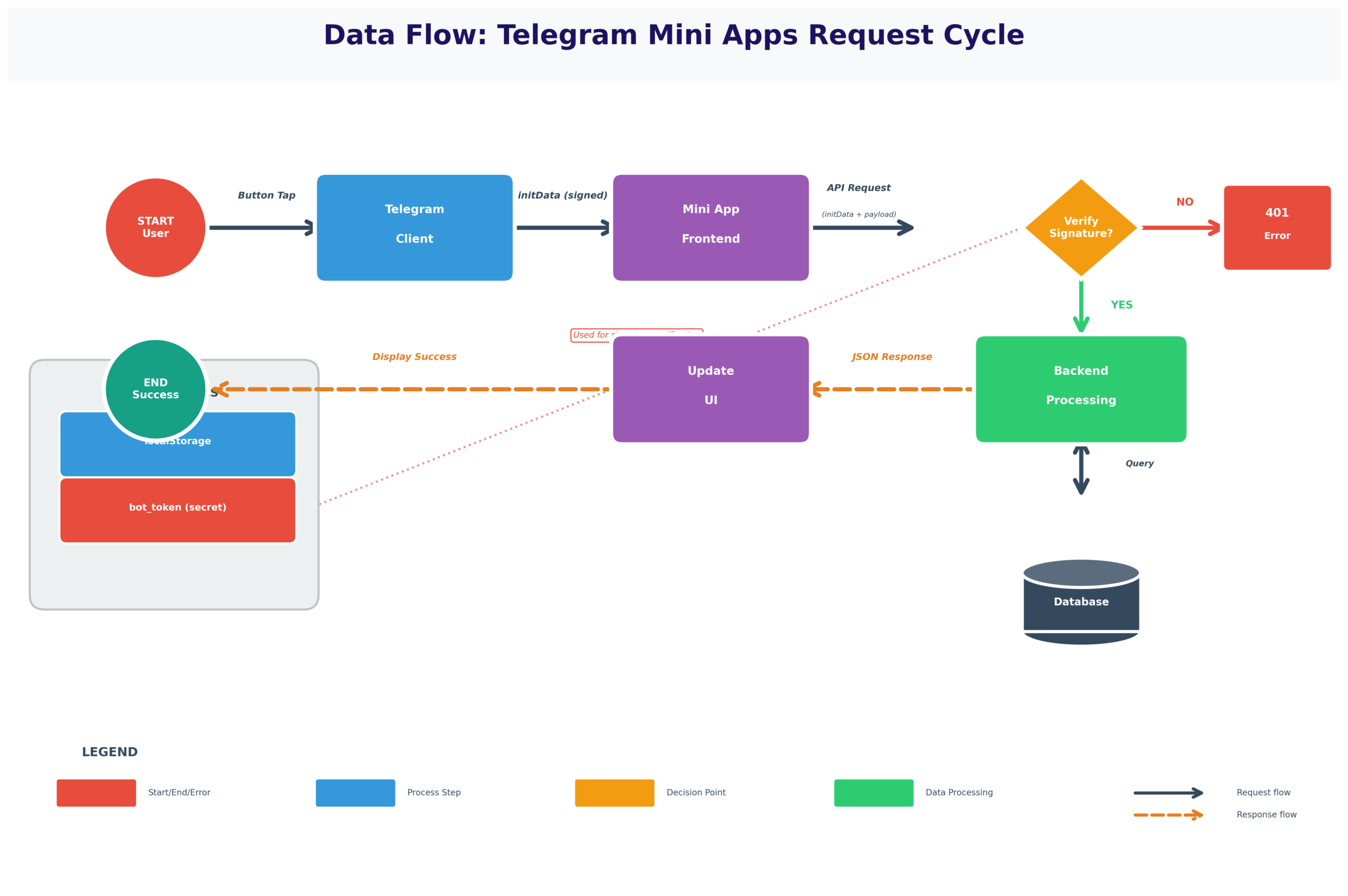
2. The Three Actors in Every Mini App Interaction
Three-Party Architecture:
- Telegram Client: Mobile/desktop app user actually interacts with, controls Mini App lifecycle
- Mini App Frontend: WebView-based interface running inside Telegram, your JavaScript/HTML
- Backend Services: Your servers providing business logic, data, authentication
| Actor | Responsibilities | What It Controls | What It Doesn’t Control |
|---|---|---|---|
| Telegram Client | Launch Mini App, inject user context, control lifecycle, handle payments | When app loads, session boundaries, user identity verification | Business logic, backend data, app functionality |
| Mini App Frontend | Display UI, handle interactions, call backend APIs, manage local state | UI rendering, user inputs, API requests, temporary state | Session lifecycle, user authentication, persistent data |
| Backend Services | Validate requests, process business logic, store data, integrate external services | Data persistence, authorization decisions, external integrations | Telegram lifecycle events, frontend display, user device |
Real Example – E-commerce Checkout:
Telegram: User taps “Buy Product” in chat → Telegram launches Mini App with user_id=12345
Frontend: Displays product catalog, user adds items to cart (stored in memory), submits order
Backend: Validates user_id from Telegram signature, checks inventory, creates order, returns confirmation
Telegram: Shows native payment sheet when backend triggers payment flow
Backend: Receives payment confirmation from Telegram, fulfills order
Frontend: Displays success screen with order number
3. How a Telegram Mini App Session Is Initiated
Mini App Launch Sequence:
User taps inline button in bot message, menu button, or shared link → Telegram captures intent
Telegram generates initData string containing: user_id, auth_date, hash signature, start_param (if launched from link), chat context
Telegram opens WebView, loads Mini App URL with initData injected via window.Telegram.WebApp.initData
JavaScript reads initData, validates presence, prepares to call backend
Frontend sends initData to backend → Backend verifies Telegram signature → Backend creates session → Returns app data
Frontend renders UI with user-specific data, session established, app functional
4. Initial Data Handshake Between Telegram and Frontend
initData Structure (Key-Value Payload):
- user: {“id”:12345,”first_name”:”John”,”username”:”john_doe”,”language_code”:”en”}
- auth_date: 1735819200 (Unix timestamp when auth was generated)
- hash: abc123def456… (HMAC-SHA256 signature proving data came from Telegram)
- start_param: “product_123” (optional, from deep link or inline button data)
- chat_type: “private” | “group” | “supergroup” | “channel”
- chat_instance: Unique identifier for this chat context
| Data Field | Source | Can Frontend Trust? | Backend Must Verify? |
|---|---|---|---|
| user.id | Telegram | For display only | Yes – verify hash signature |
| auth_date | Telegram | No – could be replayed | Yes – check not too old (e.g., < 1 hour) |
| hash | Telegram | No – frontend can’t verify | Yes – cryptographic verification required |
| start_param | bot/link | For routing only | Validate format/existence |
Real Example – Food Ordering:
User clicks “Order from Restaurant” bot button with start_param=”restaurant_456″
initData received:
user={“id”:78910,”first_name”:”Alice”}&auth_date=1735819200&start_param=restaurant_456&hash=abc123…
Frontend action: Parse user.first_name → Display “Hi Alice!” → Extract start_param → Load restaurant_456 menu
Backend verification: Verify hash proves this came from Telegram → Check auth_date is recent → Validate restaurant_456 exists → Return menu data for authorized user
5. Frontend Runtime Constraints Inside Telegram
Critical WebView Constraints:
- ❌ Backgrounding: App can be suspended when user switches chats, no guarantee of resume
- ❌ Reloads: Telegram may reload WebView anytime, losing in-memory state
- ❌ Memory Limits: Excessive memory use causes termination
- ❌ No Service Workers: Can’t use typical PWA background capabilities
- ❌ Limited Storage: localStorage available but may be cleared
- ❌ No Control Over Back: Telegram’s back button closes app, can’t intercept
| Lifecycle Event | What Happens | State Impact | Response |
|---|---|---|---|
| Launch | User opens Mini App | Clean slate, no state | Initialize from initData, fetch state from backend if needed |
| Backgrounded | User switches to another chat | May be suspended, state frozen | Save critical state to localStorage before suspension |
| Resume | User returns to Mini App | May resume or reload fresh | Check if state exists, restore from localStorage/backend |
| Reload | Telegram reloads WebView | Complete memory loss | Reinitialize, restore from persistent storage |
| Close | User closes app or taps back | Session ends, state lost | Best-effort save, can’t guarantee |
6. Frontend State Management Strategy
State Management Patterns for Volatile Sessions:
- ✓ Optimistic UI: Update UI immediately, persist to backend asynchronously
- ✓ Progressive Save: Save state incrementally as user progresses, not just on submit
- ✓ Backend as Source of Truth: Treat backend as canonical state, frontend as view layer
- ✓ Graceful Resume: On reload, check localStorage → then backend → reconstruct state
- ✓ Fail-Safe Defaults: If state can’t be restored, show safe default rather than error
| State Type | Storage Location | Persistence | Use Case |
|---|---|---|---|
| UI State (current tab, scroll position) | Memory only | Lost on reload | Ephemeral view state, OK to lose |
| Draft Data (form inputs) | localStorage + backend | Survives reloads | User shouldn’t lose work in progress |
| Shopping Cart | Backend (user session) | Permanent until checkout | Critical data, must not lose |
| User Preferences | Backend (user profile) | Permanent across sessions | Settings, language, favorites |
| Auth Token | Memory (from initData) | Per-session only | Security: don’t persist credentials |
Real Example – Multi-Step Form:
User filling out insurance application (5 steps, 40 fields)
Bad Approach: Store all data in React state → User switches chat after step 3 → Telegram reloads app → All data lost → User has to restart
Good Approach: After each step, POST data to backend /api/save-draft → On reload, GET /api/get-draft → Resume from last saved step → User never loses progress even if app reloads mid-session
7. Secure Data Transfer From Frontend to Backend
| Security Layer | Protection Against | Implementation |
|---|---|---|
| Signature Verification | Forged user IDs, tampered data | Verify HMAC-SHA256 hash using bot token |
| Timestamp Validation | Replay attacks | Reject initData older than 1 hour |
| Input Sanitization | SQL injection, XSS | Validate/escape all user inputs |
| HTTPS Only | Man-in-the-middle attacks | TLS encryption for all API calls |
| Authorization Checks | Unauthorized access | Verify user has permission for requested operation |
Typical API Request Pattern:
POST /api/create-order
Headers: { "X-Telegram-Init-Data": "user=...&auth_date=...&hash=..." }
Body: { "product_id": 123, "quantity": 2 }
Backend Processing:
1. Extract initData from header
2. Verify hash signature (proves from Telegram)
3. Extract user_id from verified data (don’t trust body)
4. Check user_id has permission to order
5. Validate product_id exists and quantity is reasonable
6. Process order for verified user
8. Backend Session Validation and User Verification
Session Validation Flow (Backend):
API endpoint receives request with initData in header or body
Extract key-value pairs: user, auth_date, hash, start_param
Recreate hash using bot token secret: HMAC-SHA256(data, bot_token)
If computed hash !== provided hash → Reject (data tampered or forged)
If auth_date > 1 hour old → Reject (replay attack or stale session)
Parse user.id from verified data → This is authoritative user identity
Check if user_id has permission for requested action
Execute business logic using verified user identity
9. API Call Flow: Mini App → Backend → Response
| Step | Actor | Action | Data Flow |
|---|---|---|---|
| 1 | Frontend | User clicks “Submit Order” button | UI event captured |
| 2 | Frontend | Prepare API request with initData + order data | Build JSON payload |
| 3 | Frontend | Make HTTP POST to /api/orders | Request sent over network |
| 4 | Backend | Receive request, verify initData signature | Security validation |
| 5 | Backend | Extract user_id, validate order data | Business logic validation |
| 6 | Backend | Check inventory, calculate total, create order record | Database writes |
| 7 | Backend | Return HTTP 200 with order_id and confirmation | Response sent |
| 8 | Frontend | Receive response, parse JSON | Data deserialized |
| 9 | Frontend | Update UI to show success screen with order_id | UI rendered |
Response Patterns:
- Success (200): { “success”: true, “order_id”: “ORD-12345”, “total”: 45.99 }
- Validation Error (400): { “error”: “Invalid product_id”, “field”: “product_id” }
- Unauthorized (401): { “error”: “Invalid initData signature” }
- Business Logic Error (422): { “error”: “Product out of stock”, “product_id”: 123 }
- Server Error (500): { “error”: “Internal server error”, “request_id”: “req_abc123” }
10. Handling Asynchronous Backend Operations
| Pattern | How It Works | Frontend UX | Use When |
|---|---|---|---|
| Polling | Backend starts job, returns job_id. Frontend polls /status/job_id every 2-5 seconds | Show progress screen, update when status changes | Operations taking 5-60 seconds |
| Webhook + Bot Message | Backend processes async, sends Telegram message when done | “We’ll notify you when ready” → User gets bot message | Long operations (minutes/hours), user can leave app |
| Optimistic UI | Show success immediately, update async in background | Instant feedback, rollback if async fails | Operations that rarely fail (likes, favorites) |
| Progress Streaming | Backend sends incremental updates via WebSocket/SSE | Real-time progress bar with status updates | Multi-step processes with intermediate results |
Real Example – Report Generation:
User requests analytics report (takes 45 seconds to generate)
Polling Approach:
1. Frontend: POST /api/generate-report → Backend: Returns { “job_id”: “job_789”, “status”: “processing” }
2. Frontend: Shows “Generating report…” with spinner
3. Frontend: GET /api/job-status/job_789 every 3 seconds
4. Backend: Returns { “status”: “processing”, “progress”: 45 } → Frontend updates progress bar
5. After 45s: Backend returns { “status”: “complete”, “download_url”: “https://…” }
6. Frontend: Shows “Report ready!” with download button
11. Error Handling Across the Frontend–Backend Boundary
Common Error Scenarios:
- ❌ Network Failure: Request never reaches backend (timeout, no connection)
- ❌ Invalid Session: initData expired or signature invalid (401 Unauthorized)
- ❌ Validation Error: User input fails backend validation (400 Bad Request)
- ❌ Business Logic Error: Operation not allowed (422 Unprocessable Entity)
- ❌ Backend Crash: Server error during processing (500 Internal Server Error)
- ❌ Timeout: Backend taking too long, frontend gives up
| Error Type | Frontend Detection | User Message | Recovery Action |
|---|---|---|---|
| Network failure | fetch() throws, timeout | “Connection problem. Check internet and retry.” | Show retry button, auto-retry with backoff |
| Invalid session (401) | HTTP 401 response | “Session expired. Please restart app.” | Force reload to get fresh initData |
| Validation error (400) | HTTP 400 with error details | “Invalid email format” (field-specific) | Highlight field, show inline error message |
| Business logic (422) | HTTP 422 with reason | “Item out of stock” or “Insufficient balance” | Show explanation, suggest alternatives |
| Server error (500) | HTTP 500 response | “Something went wrong. Try again later.” | Log error, provide request ID for support |
Error Handling Best Practices:
- ✓ Specific Messages: “Email already exists” not “Error occurred”
- ✓ Retry Logic: Auto-retry transient failures (network, 503), not permanent (401, 422)
- ✓ Exponential Backoff: Wait 1s, 2s, 4s, 8s between retries
- ✓ Error IDs: Backend logs error_id, frontend shows to user for support
- ✓ Graceful Degradation: Show cached data if fresh fetch fails
12. Real-Time Updates and Push-like Behavior
| Approach | How It Works | Pros | Cons |
|---|---|---|---|
| Short Polling | Frontend fetches /api/updates every 5-10 seconds | Simple, works everywhere, survives backgrounding | Wasteful (empty responses), delayed updates, battery drain |
| Long Polling | Request hangs until data available or timeout, then reconnects | Faster than short polling, less wasteful | Connection drops on background, complex error handling |
| WebSocket | Persistent bidirectional connection, server pushes updates | True real-time, efficient, instant updates | Disconnects on background, complex reconnection logic |
| Bot Messages | Send Telegram message when event occurs | Works when app closed, native notification, reliable | Separate from app UI, can’t update app state directly |
Real Example – Ride-Sharing App:
While user in app (active session):
• WebSocket connection to backend for driver location updates every 2 seconds
• Real-time map showing driver approaching
• If app backgrounded → WebSocket disconnects → Fallback to polling every 10 seconds
When driver arrives:
• Backend sends Telegram bot message: “Driver has arrived! ”
• User gets native notification even if app closed
• Tapping notification reopens Mini App to trip screen
13. Payment and Transaction Flow (Conceptual)
Payment Flow Sequence:
Frontend: User taps “Pay $29.99” → Frontend calls backend API
Backend: Validates order → Creates invoice with Telegram Payment API → Returns invoice_link
Frontend: Calls window.Telegram.WebApp.openInvoice(invoice_link)
Telegram: Displays payment sheet with amount, card form, provider selection
Telegram: Processes payment through provider → Telegram holds result
Telegram: POST to webhook URL with payment_id, success/failure status
Backend: Verifies payment in webhook → Marks order paid → Sends confirmation → Fulfills product
Frontend: Displays “Payment successful! Order #12345 confirmed”
14. Security Boundaries in the Flow
| Data/Action | Who Owns It | Who Trusts It | Security Implication |
|---|---|---|---|
| User Identity (user_id) | Telegram | Backend (after signature verification) | Must verify hash, never trust frontend-supplied user_id |
| initData Signature | Telegram | Backend only (frontend can’t verify) | Backend exclusive—cryptographic proof of authenticity |
| User Input (form data) | User via frontend | Nobody until validated | Sanitize, validate, never trust raw input |
| Business Data (orders, profiles) | Backend | Backend (authoritative source) | Frontend displays but doesn’t own—backend is truth |
| Payment Confirmation | Telegram | Backend (via webhook verification) | Verify webhook signature, never trust frontend payment status |
| UI State (current tab) | Frontend | Frontend only (ephemeral) | No security implication, purely presentation |
Trust No One Principle:
• Telegram: Backend verifies signatures but doesn’t let Telegram execute business logic
• Frontend: Backend treats all frontend data as potentially malicious until validated
• Backend: Frontend verifies responses but doesn’t trust without server authority
Mutual distrust creates security—each layer validates the layer below, no layer fully trusts any other.
15. Rate Limiting and Abuse Prevention
Rate Limiting Strategies:
- Per User ID: 100 requests/hour per verified user_id (prevents single user abuse)
- Per IP: 1000 requests/hour per IP (catches bot nets, but shared NATs hurt)
- Per Endpoint: 10 create-order/minute per user (expensive operations stricter)
- Global: 50K requests/hour total (circuit breaker for infrastructure)
- Burst Allowance: Allow 20 requests in 10 seconds, then throttle (handle spikes)
| Abuse Vector | Attack Pattern | Prevention |
|---|---|---|
| API Spam | Automated bot hitting endpoints thousands of times | Rate limit per user_id + IP, return 429 Too Many Requests |
| Data Scraping | Systematically fetching all products/users | Pagination limits, rate limit list endpoints, add delays |
| Fake Accounts | Creating many Telegram accounts to abuse free trials | Require phone verification (Telegram does this), behavioral checks |
| Payment Fraud | Testing stolen cards or chargebacks | Velocity checks, fraud detection, Telegram payment provider handles |
Real Example – Free Trial Abuse:
Productivity app offers 7-day free trial. Bad actor creates 50 Telegram accounts to get 350 free days.
Defense layers:
• Telegram requires phone number per account (friction)
• Backend tracks device fingerprint + IP (same device = suspicious)
• Limit 1 trial per IP per month (catches most abuse)
• Behavioral analysis: accounts created in burst pattern flagged for review
• Result: 50 accounts → 2-3 actually succeed, rest blocked
16. Logging and Observability Across the Flow
What to Log at Each Layer:
Frontend:
- User actions (button clicks, form submissions)
- API call timing (request sent, response received)
- Errors (network failures, validation errors)
- Performance metrics (page load time, render time)
Backend:
- Incoming requests with user_id, endpoint, timestamp
- initData verification results (success/failure + reason)
- Business logic decisions (order created, payment processed)
- External API calls (Telegram bot API, payment providers)
- Errors with full stack traces and context
Correlation:
- Request ID generated by frontend, passed to backend
- Allows tracing entire flow: frontend action → backend processing → response
17. Performance Bottlenecks in Mini App Flows
| Bottleneck Location | Symptom | Common Cause | Fix |
|---|---|---|---|
| Initial Load | 3-5 second blank screen | Large JavaScript bundle, unoptimized images | Code splitting, lazy loading, compress assets |
| API Response Time | 2-3 second wait after click | Slow database queries, no caching, N+1 queries | Optimize queries, add indexes, cache frequently accessed data |
| Network Latency | 500ms+ round trip time | Server geographically distant from users | CDN for static assets, regional backend servers |
| Re-render Performance | Laggy scrolling, janky animations | Inefficient React rendering, expensive calculations | Memoization, virtualized lists, move work off main thread |
| Backend Processing | 10-30 second operation | Synchronous external API calls, complex computation | Move to async queue, show progress, return job_id immediately |
Performance Budget:
- Initial Load: < 2 seconds to first paint, < 3 seconds to interactive
- API Calls: < 500ms for simple reads, < 1 second for writes
- UI Updates: < 100ms from action to visual feedback
- JavaScript Bundle: < 300KB compressed (lazy load rest)
18. Common Flow Breakpoints in Production
Production Issues That Break Flows:
- Session Expiry: User returns after 2 hours, initData expired, backend rejects with 401 → Fix: Check auth_date on frontend, refresh if old
- Unexpected Reloads: User switches chats, Telegram reloads app, state lost → Fix: Progressive save to localStorage + backend
- Duplicate Requests: User double-clicks submit, creates two orders → Fix: Idempotency keys, disable button after click
- Partial State Loss: localStorage cleared but backend has state → Fix: Always re-fetch from backend on load
- Race Conditions: Two requests in flight, responses arrive out of order → Fix: Request cancellation, sequence numbers
- Webhook Delays: Payment succeeds but webhook takes 10 seconds → Fix: Poll payment status, don’t only rely on webhook
19. Patterns That Scale Well in Mini App Flows
Proven Scalable Patterns:
✓ Idempotent APIs:
POST /api/orders with idempotency_key → Same key = same result, never duplicate
✓ Stateless Backend:
No session storage on server → Every request self-contained → Horizontal scaling easy
✓ Defensive Frontend:
Assume reload anytime → Progressive save → Reconstruct state from backend
✓ Event-Driven Architecture:
Payment success → Event → Multiple handlers (email, fulfillment, analytics) → Decoupled
✓ Async by Default:
Long operations return job_id immediately → Process in background → Notify when done
✓ Circuit Breakers:
External API failing → Stop calling → Fail fast → Retry after cooldown
20. Anti-Patterns That Break Mini Apps
Common Mistakes to Avoid:
❌ Trusting Frontend Data:
Using user_id from request body instead of verified initData → Anyone can impersonate anyone
❌ Long Synchronous Operations:
Processing payment synchronously in POST request → 30 second timeout → User sees error
❌ Fragile State Coupling:
Storing critical state only in memory → Reload destroys data → User loses work
❌ No Retry Logic:
Network fails → Show error → User stuck → No auto-retry
❌ Ignoring Idempotency:
Same payment request twice → Charge customer twice → Support nightmare
❌ Insufficient Logging:
User reports bug → No logs → Can’t reproduce → Can’t fix
21. How Mature Teams Design Mini App Flows
Operational Discipline:
- 1. Design for Volatile Sessions: Assume app can die anytime, save state defensively
- 2. Security by Default: Verify every request, sanitize all input, trust nobody
- 3. Observability First: Log comprehensively, correlate across layers, alert on anomalies
- 4. Performance Budget: Measure constantly, optimize bottlenecks, respect latency targets
- 5. Graceful Degradation: When things fail, fail gracefully with clear error messages
- 6. Test Edge Cases: Reload mid-operation, network failure, expired sessions, duplicate requests
- 7. Idempotency Everywhere: Every write operation should be safely retryable
22. When Frontend–Backend Flow Design Determines Success
Success Indicators:
- ✓ Users complete multi-step flows even with interruptions
- ✓ Error rate < 1% despite network variability
- ✓ Performance consistent under load (1K → 100K users)
- ✓ Security incidents = zero (proper verification catches attacks)
- ✓ Debugging production issues takes minutes not days (good logging)
Failure Indicators:
- ✗ Users lose progress and abandon when app reloads
- ✗ Error rate > 5%, mostly session/state issues
- ✗ Performance degrades badly under modest load
- ✗ Security breaches due to frontend trust
- ✗ Production debugging impossible (no correlation)
23. Summary: Think in Flows, Not Screens
Core Flow Principles:
1. Three-Party Coordination: Every interaction involves Telegram, frontend, and backend coordinating. Design for this reality.
2. Volatile Sessions: Mini App sessions can end without warning. Save state progressively, reconstruct gracefully.
3. Security Through Verification: Verify Telegram signatures, validate all inputs, trust nobody implicitly.
4. Backend as Truth: Frontend displays, backend decides. Never trust frontend for authorization.
5. Async by Nature: Long operations must be asynchronous with progress indication or notifications.
6. Defensive Architecture: Assume failures, handle errors gracefully, log comprehensively.
7. Performance Matters: Latency kills conversion. Optimize every layer—frontend load, API response, backend processing.
8. Idempotency Required: Every operation should be safely retryable without side effects.
FREQUENTLY ASKED QUESTIONS
Q1.Why can't I just treat a Telegram Mini App like a regular web app?
Telegram Mini Apps run in a fundamentally different environment than standard web applications. Unlike web apps where users navigate to URL directly and maintain stable browser sessions, Mini Apps are launched by Telegram which controls the entire runtime environment. Telegram injects user context (initData) that app didn’t request, manages the session lifecycle (can suspend or reload app anytime), and intermediates initial authentication. You can’t rely on traditional web assumptions: cookies may not persist reliably, localStorage can be cleared, sessions are volatile, and navigation patterns differ (Telegram’s back button closes the app, you can’t intercept it). Additionally, user identity comes pre-authenticated from Telegram rather than through own login flow, requiring cryptographic signature verification instead of session cookies. The WebView environment has constraints on background processing, memory usage, and storage that normal browsers don’t impose. Treating it like a regular web app leads to broken flows when Telegram suspends session, state gets lost on reload, or security vulnerabilities emerge from trusting frontend data without Telegram signature verification.
Q2.How does backend verify that a request actually came from Telegram and not a malicious user?
Backend verification works through HMAC-SHA256 cryptographic signatures. When Telegram launches Mini App, it generates initData containing user information (user_id, username, etc.) plus auth_date timestamp and a hash signature. The hash is computed using bot token as the secret key: HMAC-SHA256(data, bot_token). Only Telegram and you know the bot token. On the backend: (1) You receive initData from frontend in request header or body, (2) Parse out the hash value, (3) Recreate the hash yourself using the same data fields and bot token, (4) Compare computed hash with the provided hash—if they match exactly, the data is authentic and unmodified because only someone with the bot token could have generated that signature. You also validate auth_date isn’t too old (reject if > 1 hour) to prevent replay attacks. This proves the request originated from Telegram, contains accurate user information, and hasn’t been tampered with. Without this verification, anyone could send API requests claiming to be any user_id. The shared secret (bot token) is what makes this cryptographic proof work—frontend can’t forge it because frontend doesn’t know the bot token.
Q3.What happens to my Mini App's state when user switches to another chat?
When a user switches chats or backgrounds the Mini App, Telegram may suspend WebView immediately or keep it in memory briefly depending on device resources. You don’t get reliable beforeunload events, and Telegram doesn’t guarantee app will resume from the same state. Three scenarios occur: (1) App stays in memory and resumes exactly where it was (best case, not guaranteed), (2) App gets suspended and reloaded fresh when user returns, losing all in-memory JavaScript state, or (3) App gets terminated entirely and relaunches from scratch. Because you can’t predict which scenario happens, defensive state management is essential: save critical data to localStorage incrementally (not just on submit), persist important state to backend via API calls as user progresses, use optimistic UI patterns where actions save to backend asynchronously while showing success immediately. On resume/reload: check localStorage for saved state, query backend for authoritative data, reconstruct UI from whatever state you can recover, provide graceful fallbacks if state is partially lost. Never assume in-memory state survives—treat every resume as potentially requiring full reconstruction. This volatile session behavior differentiates Mini Apps from traditional web apps where browser tabs maintain state reliably.
Q4.Should I use WebSockets or polling for real-time updates in Mini Apps?
The choice depends on tolerance for complexity versus reliability. WebSockets provide true real-time bidirectional communication and are efficient when connections stay active, but they have significant challenges in Mini Apps: connections drop immediately when app is backgrounded (can’t maintain persistent connections), reconnection logic becomes complex (must handle exponential backoff, session restoration), and debugging connection issues is harder. Short polling (fetch /api/updates every 5-10 seconds) is simple, works reliably across backgrounding (you just resume polling when app comes back), survives network interruptions gracefully, but wastes bandwidth with empty responses and has update delays of several seconds. Long polling (request hangs until data available) is middle ground—more efficient than short polling, less complex than WebSockets, but still drops on backgrounding. For most Mini Apps, the recommendation: use short polling for simplicity and reliability unless you genuinely need sub-second updates. If real-time is critical while app is active (like ride tracking), use WebSockets during active session but fall back to polling or Telegram bot messages when backgrounded. For critical notifications users should receive even when app is closed, use Telegram bot messages—these deliver reliably as native notifications regardless of app state.
Q5.How do I handle payment flows securely in Mini Apps?
Payment flows in Mini Apps are unique because Telegram intermediates the entire transaction for PCI compliance. backend never sees card details—Telegram handles all payment processing. The secure flow: (1) User initiates checkout in frontend, (2) Frontend calls backend API to create an order, (3) Backend validates order data, creates invoice using Telegram Bot API with amount and description, receives invoice_link back from Telegram, (4) Backend returns invoice_link to frontend, (5) Frontend calls window.Telegram.WebApp.openInvoice(invoice_link), (6) Telegram displays native payment sheet where user enters card details directly to Telegram (not app), (7) Telegram processes payment through their provider, (8) Telegram sends webhook POST to backend URL with payment confirmation including payment_id and success status, (9) Backend verifies webhook signature (prevents spoofing), marks order as paid in database, fulfills the order. Security critical points: always verify webhook signature to ensure it came from Telegram, use idempotency on order creation so duplicate webhook calls don’t double-fulfill, never trust frontend claims about payment status (only backend webhook is authoritative), validate amounts match between invoice creation and webhook confirmation. The advantage: you’re PCI-compliant by default since you never handle card data. The constraint: you must trust Telegram’s payment confirmation webhooks and handle cases where webhook might be delayed or delivered out of order.
Q6.Why do my API calls sometimes fail with 401 Unauthorized errors seemingly randomly?
The most common cause is initData signature expiration. When Telegram launches Mini App, it includes auth_date timestamp in initData. Many backends (correctly) reject initData older than 1 hour to prevent replay attacks. If a user opens Mini App and keeps it open for 90 minutes without closing, the initData becomes stale—backend will start rejecting API requests with 401 errors because auth_date is too old, even though the signature is technically valid. This appears random to users because it’s time-based, not action-based. Solutions: (1) On frontend, check initData age before making requests—if auth_date is > 50 minutes old, prompt user to restart app to get fresh initData, (2) Implement token refresh endpoint where frontend can exchange old initData for fresh session token within system, (3) Increase backend tolerance window (e.g., 2-4 hours instead of 1 hour) if threat model allows, (4) Catch 401 errors on frontend and automatically reload app to get fresh initData transparently. The underlying issue: Telegram provides initData once at launch, doesn’t refresh it during session, so long-running sessions eventually have expired auth. Other 401 causes include: signature verification bugs (check HMAC implementation), using wrong bot token for verification, or initData corrupted during transmission (ensure proper URL encoding/decoding).
Explore Services
Related Services
Reviewed by

Aman Vaths
Founder of Nadcab Labs
Aman Vaths is the Founder & CTO of Nadcab Labs, a global digital engineering company delivering enterprise-grade solutions across AI, Web3, Blockchain, Big Data, Cloud, Cybersecurity, and Modern Application Development. With deep technical leadership and product innovation experience, Aman has positioned Nadcab Labs as one of the most advanced engineering companies driving the next era of intelligent, secure, and scalable software systems. Under his leadership, Nadcab Labs has built 2,000+ global projects across sectors including fintech, banking, healthcare, real estate, logistics, gaming, manufacturing, and next-generation DePIN networks. Aman’s strength lies in architecting high-performance systems, end-to-end platform engineering, and designing enterprise solutions that operate at global scale.