Ai Overview
Businesses today face constant pressure to do more with less. Manual, repetitive tasks slow teams down and increase the risk of errors. Robotic Process Automation (RPA) addresses this directly by using software robots to handle rule-based tasks that humans currently perform — logging into systems, copying data, filling forms, and generating reports. This guide covers everything enterprises need to know about RPA development: how it works, the tools available, how to implement it, and what results to expect.
Businesses today face constant pressure to do more with less. Manual, repetitive tasks slow teams down and increase the risk of errors. Robotic Process Automation (RPA) addresses this directly by using software robots to handle rule-based tasks that humans currently perform — logging into systems, copying data, filling forms, and generating reports.
This guide covers everything enterprises need to know about RPA development: how it works, the tools available, how to implement it, and what results to expect. There is no hype here — only practical, factual information.
Key Takeaways
- What RPA Does: Software robots automate repetitive, rule-based tasks without changing existing systems.
- Business Value: RPA reduces processing time, cuts operational costs, and lowers error rates in high-volume workflows.
- Tool Landscape: Leading platforms include UiPath, Automation Anywhere, Blue Prism, Microsoft Power Automate, and SAP Build Process Automation.
- Implementation Needs Planning: Successful RPA requires process discovery, bot design, testing, and change management — not just software installation.
- AI Integration: Intelligent automation combines RPA with AI capabilities like OCR, NLP, and machine learning to handle unstructured data.
- ROI Is Measurable: Most enterprises report positive ROI within 6–18 months of deployment when the right processes are automated.
- Scalability Matters: Enterprise automation strategy should plan for scaling bots across departments, not just individual use cases.
- Governance Is Essential: Bot maintenance, monitoring, and access control must be managed as part of ongoing operations.
What Is RPA Development?
Robotic Process Automation (RPA) refers to the use of software to mimic human actions on digital systems. RPA bots interact with applications the same way a person would — through the user interface — which means they do not require API integrations or changes to underlying systems.
RPA development is the process of building, configuring, and deploying these bots. It includes identifying which processes to automate, designing the bot logic, testing it in a controlled environment, and then running it in production.
Unlike traditional automation scripts, RPA tools provide low-code or no-code interfaces that allow business analysts and developers to build bots without deep programming knowledge. That said, complex enterprise workflows often require custom development and technical expertise.[1]
What Tasks Can RPA Automate?
RPA works best for tasks that are:
- High in volume and repetitive in nature
- Rule-based with clear decision logic
- Based on structured data (spreadsheets, forms, databases)
- Performed across multiple systems or applications
Common examples include invoice processing, employee onboarding data entry, bank reconciliation, customer data migration, compliance reporting, and IT service desk ticket management.
How RPA Works in Busines
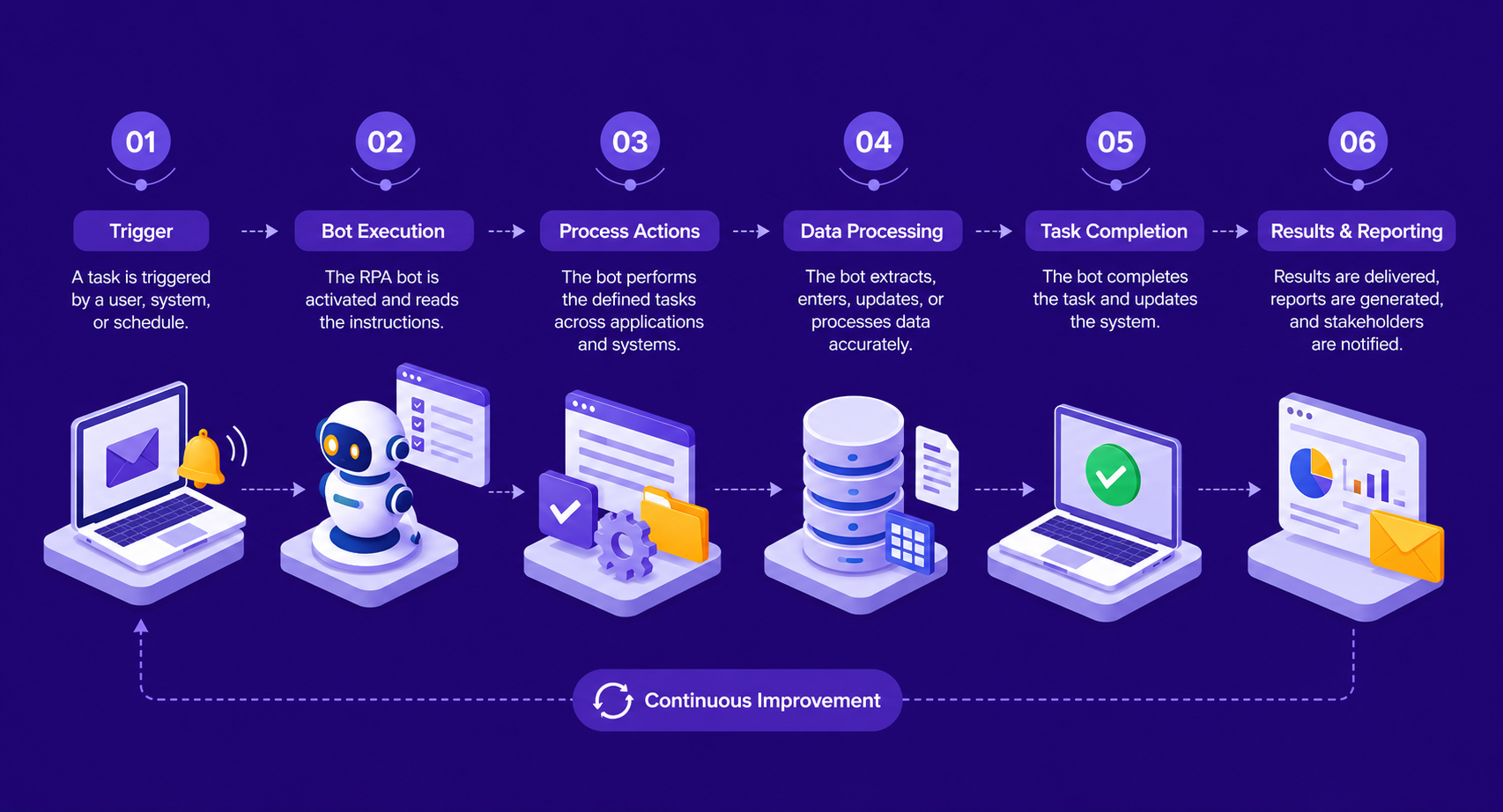
An RPA bot follows a defined workflow. When triggered — either on a schedule or by an event — it opens the required application, reads the necessary data, performs the task (copy, paste, calculate, submit), and records the outcome. All of this happens without human involvement.
Bots can run on attended or unattended modes. Attended bots work alongside employees and are triggered manually when needed. Unattended bots run fully automatically in the background, often during off-hours to process large volumes of work.[2]
Attended vs. Unattended Bots
| Feature | Attended Bot | Unattended Bot |
|---|---|---|
| Trigger | Human-initiated | Schedule or event-based |
| Use Case | Customer service, live data entry | Batch processing, reporting |
| Human Oversight | Required during execution | Minimal, post-execution review |
| Deployment | Employee workstation | Dedicated server or cloud |
Benefits of Robotic Process Automation for Enterprises
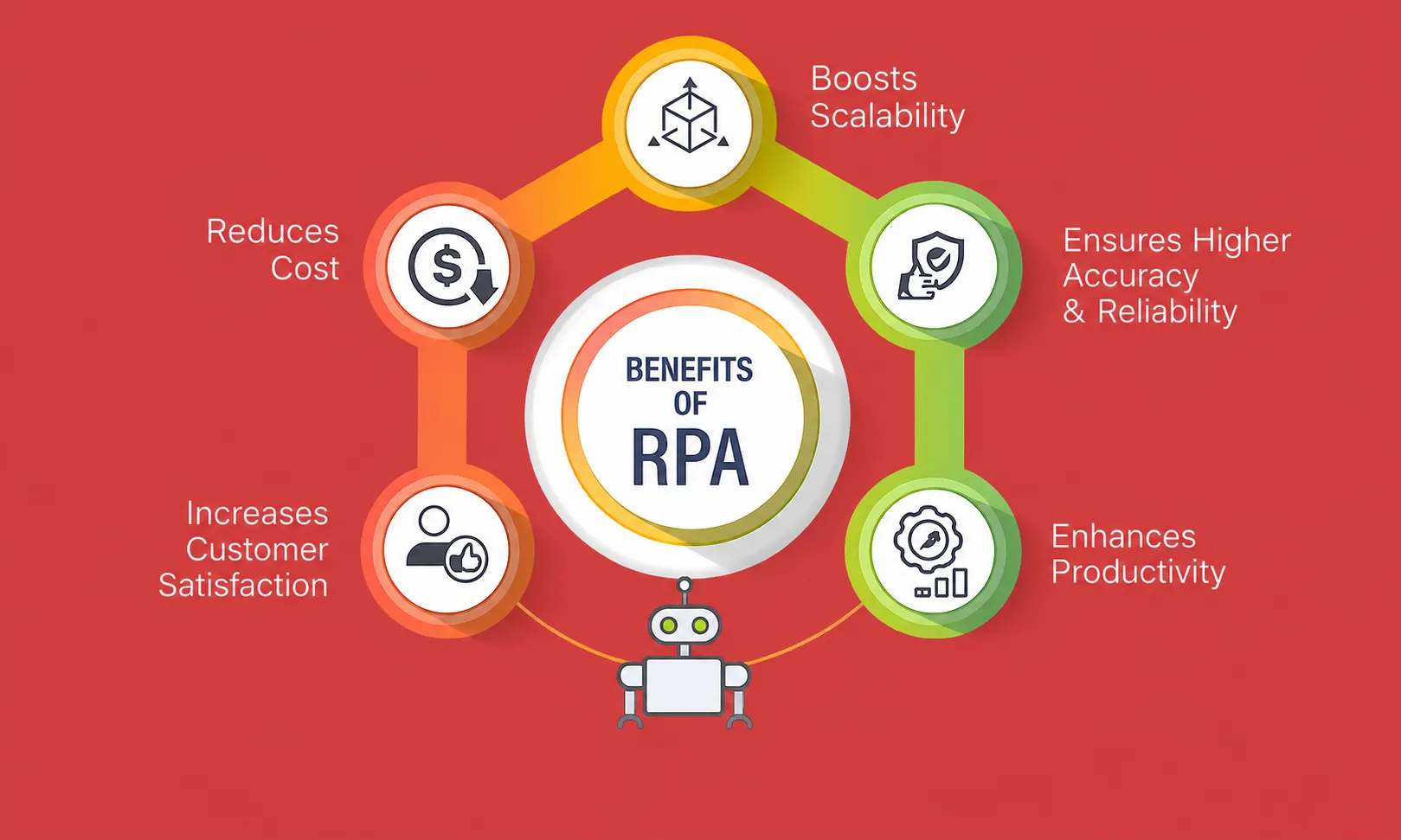
The business case for RPA is built on concrete, measurable outcomes. Here are the documented benefits enterprises consistently report:
1. Reduced Processing Time
Bots complete tasks significantly faster than humans. A reconciliation that takes an employee four hours can often be completed by a bot in under thirty minutes. This directly improves throughput.[3]
2. Lower Error Rates
Bots do not make the mistakes that occur when humans manually copy data between systems. They follow instructions precisely every time, which is critical for compliance-heavy industries like finance, healthcare, and insurance.
3. Cost Reduction
Automating high-volume tasks reduces the need for manual labor on those specific activities. Enterprises typically report cost savings of 25–80% on automated processes, depending on complexity and volume.
4. Employee Redeployment
When bots handle repetitive work, employees can focus on judgment-based tasks — analysis, problem-solving, and customer interaction — where human input adds real value.
5. 24/7 Operations
Unlike employees, bots do not have working hours. Unattended bots can process work overnight, on weekends, and during holidays without additional cost.[4]
6. Audit Trail and Compliance
Every action performed by a bot is logged. This creates a complete audit trail that satisfies regulatory requirements and simplifies compliance reporting.
RPA Tools and Technologies
Choosing the right platform is one of the most important decisions in any RPA implementation. The major platforms differ in capability, pricing model, scalability, and ease of use.
Leading RPA Platforms
| Platform | Best For | Key Strength |
|---|---|---|
| UiPath | Large enterprises | Strong AI integration, large community |
| Automation Anywhere | Cloud-native deployments | Cloud-first architecture, cognitive bots |
| Blue Prism | Regulated industries | Strong governance and security controls |
| Microsoft Power Automate | Microsoft ecosystem users | Deep Office 365 and Azure integration |
| SAP Build Process Automation | SAP environments | Native SAP workflow automation |
Platform selection should be driven by your existing technology stack, the type of processes being automated, your internal technical capability, and your long-term automation roadmap.
RPA Implementation Process
A successful RPA implementation follows a structured approach. Skipping steps — particularly process discovery and testing — is the most common reason RPA projects fail to deliver expected results.
Step 1: Process Discovery and Assessment
Identify which processes are good candidates for automation. Good candidates are high-volume, rule-based, stable (not frequently changing), and currently performed manually. Use process mining tools or manual workshops to document these workflows in detail.
Step 2: Business Case and ROI Projection
Before building anything, calculate the expected return. Estimate current labor cost for the process, projected bot development cost, licensing fees, and expected savings. Most enterprises target a payback period of 12–18 months.
Step 3: Bot Design and Development
A developer maps the process into bot logic using the chosen RPA platform. This includes handling exceptions — cases where the process does not follow the normal path — which is where most of the development effort goes. Working with an experienced RPA development company at this stage ensures bots are built with proper error handling and scalability from the start.
Step 4: Testing
Bots are tested in a non-production environment using real data scenarios. Testing covers normal cases, edge cases, and exception scenarios. A bot that fails on uncommon inputs can cause serious downstream problems in production.
Step 5: Deployment and Monitoring
After sign-off, the bot is deployed to production. Active monitoring is required in the initial weeks to catch unexpected failures or process changes that break the bot. Most RPA platforms include built-in monitoring dashboards.
Step 6: Maintenance and Optimization
RPA bots require ongoing maintenance. When the underlying applications they interact with are updated — new UI, changed field names, updated workflows — bots must be updated accordingly. Planning for this operational overhead from the start is essential.
Enterprise Automation Strategy
Individual bots deliver value, but a fragmented approach — automating random processes without a plan — creates technical debt and limits long-term ROI. Enterprise automation strategy means treating RPA as a program, not a project.
Key Elements of a Mature Automation Strategy
Automation Center of Excellence (CoE)
A dedicated team responsible for setting RPA standards, managing the bot portfolio, evaluating new automation opportunities, and governing bot performance. The CoE prevents duplication, enforces quality, and drives adoption across business units.
Process Pipeline
Rather than automating one process and stopping, enterprises should maintain a prioritized pipeline of automation candidates. This ensures continuous improvement and sustained ROI from the RPA program.
Scalability Planning
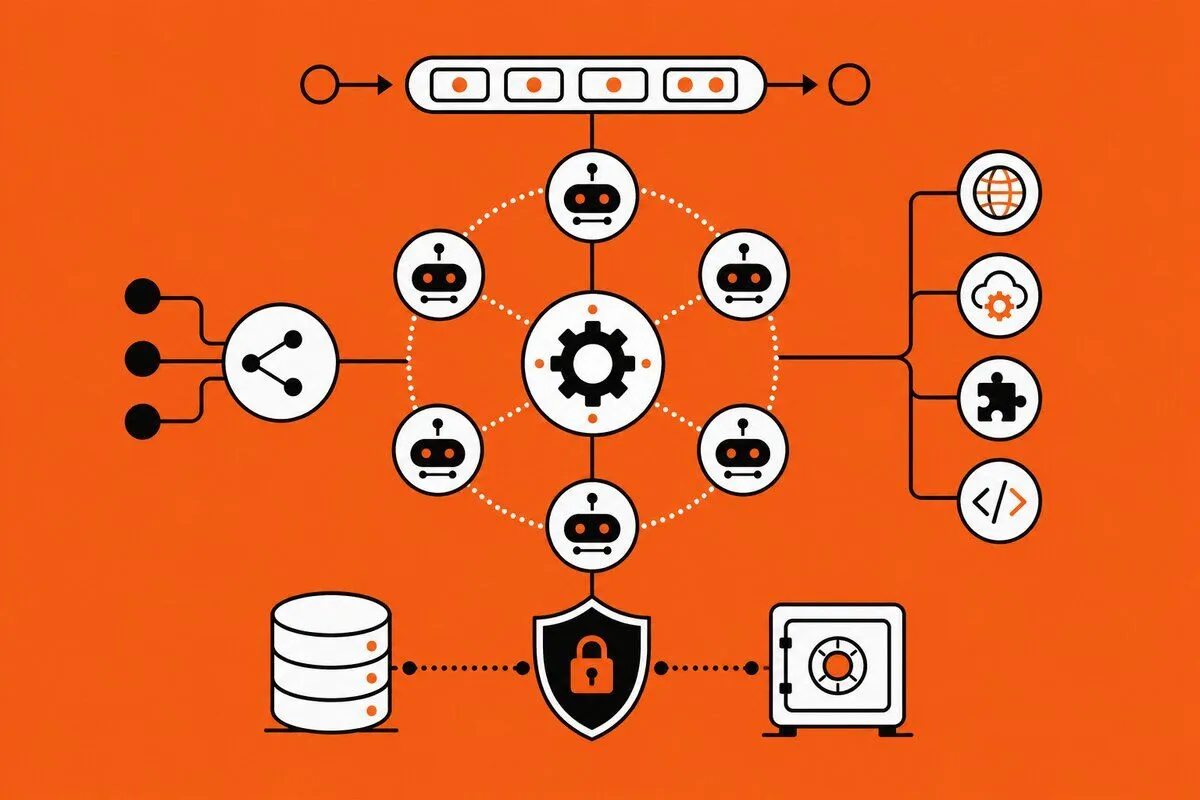
Start with two or three processes, demonstrate results, then scale. Build the bot infrastructure — orchestration platform, monitoring, bot library — to support dozens or hundreds of bots without rebuilding from scratch each time.
Change Management
Employees affected by automation need clear communication about what will change and how their roles will evolve. RPA implementations that ignore this step face internal resistance that slows rollout and reduces adoption.
AI-Powered RPA Solutions and Intelligent Automation
Standard RPA handles structured data and rule-based tasks well. But many enterprise processes involve unstructured data — emails, PDFs, scanned documents, voice inputs — that basic RPA cannot process without AI capabilities layered on top.
Intelligent automation combines RPA with:
- OCR (Optical Character Recognition): Extracts text from scanned documents and images
- NLP (Natural Language Processing): Interprets email content, chat messages, and free-text fields
- Machine Learning: Identifies patterns in data and makes predictions to guide bot decisions
- Computer Vision: Reads and interacts with UI elements that standard selectors cannot handle
This combination — often called intelligent automation or cognitive automation — expands the range of processes that can be automated beyond simple rule-following tasks. Enterprises using AI Agent Development Services alongside RPA can automate complex decision-heavy workflows that were previously too variable for automation.
Industries Where RPA Delivers the Highest Impact
RPA is used across virtually every industry, but some sectors see disproportionately high returns due to the volume of manual, rule-based work in their core operations.
-
Banking and Financial Services
Loan processing, KYC verification, fraud alert management, regulatory reporting, and account reconciliation are all high-volume tasks that RPA handles accurately and quickly. Banks have reported 70–90% reduction in processing time for automated tasks. Beyond banking, enterprises are utilizing a decisioning automation platform to instantly approve trade credit and vendor applications, applying the same high-speed efficiency to their internal finance and procurement workflows.
-
Healthcare
Patient data entry, insurance claims processing, appointment scheduling, and billing reconciliation are common RPA use cases. Reducing manual data handling also reduces compliance risk under HIPAA and similar regulations.
-
Manufacturing and Supply Chain
Purchase order processing, inventory updates, supplier invoice matching, and logistics tracking benefit from RPA, particularly in environments using multiple legacy systems that do not share data automatically.
-
Retail and E-Commerce
Order management, returns processing, price monitoring across platforms, and customer data synchronization are tasks well-suited to RPA automation.
The Future of RPA Automation
RPA itself is evolving. The current direction of development is toward hyperautomation — a term coined by Gartner that describes combining RPA with process mining, AI, analytics, and low-code platforms to automate end-to-end business processes, not just individual tasks.
Key trends shaping the future of RPA include:
- Process Mining Integration: Automatically discover automation opportunities from system logs rather than relying on manual interviews
- Generative AI in RPA: Using large language models to handle variable text inputs within automated workflows
- Cloud-Native RPA: Shifting from on-premise bot deployment to fully cloud-hosted orchestration and execution
- Low-Code Expansion: Business users building their own automations with minimal IT involvement using visual workflow tools
Enterprises that build a strong RPA foundation today — with proper governance, scalable infrastructure, and AI integration — will be better positioned to adopt these advanced capabilities as they mature.
Build Enterprise RPA Solutions with Expert Support
Nadcab Labs designs and deploys custom RPA bots, intelligent automation workflows, and enterprise automation strategy tailored to your business processes, systems, and compliance requirements.
Final Thoughts
Robotic Process Automation (RPA) is a proven technology for reducing manual work, improving accuracy, and lowering operational costs across enterprise functions. The results are not theoretical — thousands of organizations across banking, healthcare, manufacturing, and retail have demonstrated measurable ROI from RPA programs.
Success depends on selecting the right processes, choosing the appropriate platform, building with proper exception handling, and treating automation as a strategic program rather than a one-time project. Enterprises that invest in governance, scalability, and AI integration from the beginning will achieve greater long-term value from their automation programs.
Frequently Asked Questions
Q1.What is RPA development in simple terms?
RPA development is the process of building software bots that automate repetitive, manual tasks on digital systems — such as data entry, report generation, and form submission — without requiring changes to existing applications. Bots mimic human actions through the user interface.
Q2.How long does RPA implementation typically take?
A simple bot can be deployed in 4–6 weeks. Complex, multi-system workflows may take 3–6 months. Timeline depends on process complexity, number of exception scenarios, and the availability of process documentation and testing resources.
Q3.What processes are not suitable for RPA?
Processes that involve heavy judgment, unstructured data without AI support, frequent process changes, or physical actions cannot be automated with standard RPA. Cognitive automation with AI is needed for tasks involving free-text, images, or variable decision logic.
Q4.How much does enterprise RPA cost?
Licensing costs range from free (Microsoft Power Automate basic) to $10,000–$50,000+ per year for enterprise platforms like UiPath or Automation Anywhere. Development and implementation costs vary based on process complexity and the number of bots deployed.
Q5.What is the ROI of RPA for businesses?
Most enterprises report a payback period of 6–18 months. Cost savings on automated processes typically range from 25–80%, depending on the volume of work and the complexity of the task. Higher-volume, simpler processes tend to deliver the fastest ROI.
Q6.Does RPA work with legacy systems?
Yes. One of RPA’s main strengths is that it interacts with systems through the user interface, just like a human would. This means it works with legacy systems that do not have modern APIs, without requiring costly system upgrades or integrations.
Q7.What is intelligent automation vs standard RPA?
Standard RPA handles structured, rule-based tasks. Intelligent automation adds AI capabilities — OCR, NLP, machine learning — to handle unstructured data like emails, documents, and variable inputs. It extends RPA to more complex, judgment-requiring processes.
Q8.How many bots does an enterprise need?
There is no fixed number. A small automation program may start with 5–10 bots. Large enterprises often run hundreds of bots across multiple departments. The number should grow based on a prioritized pipeline of automation opportunities tied to measurable business outcomes.
Explore Services
Related Services
Reviewed by

Naman Singh
Co-Founder & CEO, Nadcab Labs
Naman Singh is the Co-Founder and CEO of Nadcab Labs, where he drives the company’s vision, global growth, and strategic expansion in blockchain, fintech, and digital transformation. A serial entrepreneur, Naman brings deep hands-on experience in building, scaling, and commercializing technology-driven businesses. At Nadcab Labs, Naman works closely with enterprises, governments, and startups to design and implement secure, scalable, and business-ready Web3 and blockchain solutions. He specializes in transforming complex ideas into high-impact digital products aligned with real business objectives. Naman has led the development of end-to-end blockchain ecosystems, including token creation, smart contracts, DeFi and NFT platforms, payment infrastructures, and decentralized applications. His expertise extends to tokenomics design, regulatory alignment, compliance strategy, and go-to-market planning—helping projects become investor-ready and built for long-term sustainability. With a strong focus on real-world adoption, Naman believes in building blockchain solutions that deliver measurable value, solve practical problems, and unlock new growth opportunities for organizations worldwide.